
Claude Code Codex Plugin (by Alvaro Cintas) · Launch Video Breakdown: Hook, Pacing & Motion Design
You can use now Codex in Claude Code OpenAI has dropped a plugin that lets you run Codex directly inside Claude Code. Code reviews, adversarial reviews, background tasks…one command to install: /pl…
Scene-by-scene timeline & spoken transcript
The Hook
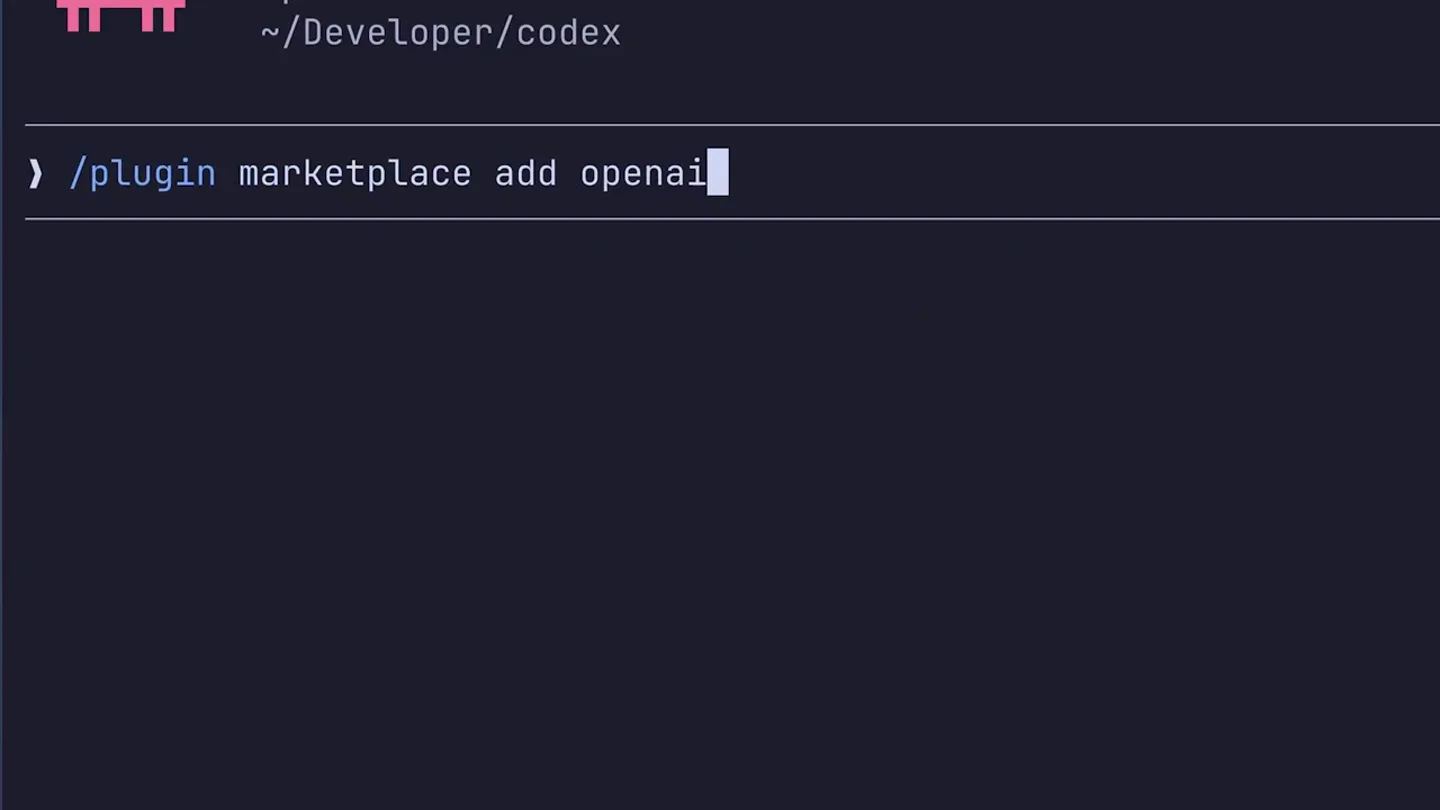
Instant Plugin Installation
“(No spoken dialogue — The track begins with a sustained, evolving synth pad creating an atmospheric soundscape. At 00:05, a subtle, high-frequency riser begins to build, culminating in a soft sub-bass impact at 00:07.)”
- On screen
- ~/Developer/codex > /plugin > /plugin marketplace add openai/c > /plugin install > /plugin install codex@openai-codex Code
- Camera
- Static, full-screen terminal view, then a quick cut to a centered text overlay, followed by a wider shot of the terminal within a desktop environment.
- Motion
- Rapid text typing animation, command line interface (CLI) auto-completion, quick cuts, and a subtle zoom out to reveal the application window.
Product Reveal
Automated Code Review
“(No spoken dialogue — A rhythmic, arpeggiated synth pattern introduces a sense of forward momentum. Another, more pronounced riser starts at 00:14, leading to a significant sub-bass drop and impact at 00:16, accompanied by a bright, percussive synth hit.)”
- On screen
- ~/Developer/codex > /codex: /codex:setup /codex:review /codex:status /codex:rescue /codex:result /codex:cancel > /codex:review * Flummoxing... esc to interrupt There are 20 untracked files across a new sdk/python-sdk/ directo Review mode The review covers 20 new files in sdk/python-sdk/. How would you li 1. Run in background (Recommended) Review runs in the background. Check /codex:status for progres 2. Wait for results Block and wait for the review to complete before continuing. 3. Type something. 4. Chat about this Enter to select ^/v to navigate Esc to cancel Background command "Codex review" completed (exit code 0) * Reticulating... Tip: Paste images into Claude Code using control+v (not cmd+v!) esc to interrupt Background command "Codex review" completed (exit code 0) The Codex review has completed. Let me fetch the results. Read 1 file (ctrl+o to expand) Here are the Codex review results: --- Codex Review Target: working tree diff esc to interrupt The SDK types don't fully match the exec event schema, which can cause parsing failures for declined tool calls and loses web search action data. Additionally, the wheel build likely omits py.typed, so installed packages won't be recognized as typed. Full review comments: - [P2] Accept declined command/patch statuses - sdk/python-sdk/src/codex_sdk/types.py:59-61 When a command or patch is rejected (for example, approval denied or policy blocks), the exec JSONL schema can emit status: "declined" for command_execution and file_change items. With CommandExecutionStatus/PatchApplyStatus restricted to completed/failed, Pydantic will raise a validation error and the stream will abort on those events. Add the missing "declined" variant to both enums so declined tool outcomes are parseable. - [P3] Expose web search action in item model - sdk/python-sdk/src/codex_sdk/types.py:151-154
- Camera
- Static, full-screen terminal view, with a subtle background blur on the desktop environment.
- Motion
- Fast-paced text typing, command execution, and scrolling through detailed code review results. The terminal window remains central.
Feature Teaser
Intelligent Issue Resolution
“(No spoken dialogue — The arpeggiated synth continues, becoming more prominent. A longer, more intense riser builds from 00:24, reaching a peak with a powerful sub-bass drop and a bright, shimmering synth chord at 00:27.)”
- On screen
- Delegate > Ask Cod > Ask Codex to fix the issues Successfully loaded skill Bash(node "/Users/dkundel/.claude/plugins/cache/openai-codex/codex/0.1.0/scrip ts/codex-companion.mjs" task-resume-candidate --json) { "available": true, "sessionId": null, } Codex thread There's an existing Codex thread from a previous session. Would you like to continue it or start fresh? 1. Start a new Codex thread (Recommended) Begin a fresh Codex rescue thread for this fix task 2. Continue current Codex thread Resume the existing thread from 2026-03-25 3. Type something. 4. Chat about this Enter to select ^/v to navigate Esc to cancel codex:codex-rescue(Fix python-sdk issues) Done (1 tool use 8.2k tokens 36s) (ctrl+o to expand) Codex fixed both issues: 1. Removed unused import sys from sdk/python-sdk/src/codex_sdk/_exec.py 2. Consolidated the duplicate sample files - replaced structured_output.py with the Pydantic version (with UNKNOWN enum value and files_checked field) and deleted structured_output_pydantic.py * Sautéed for 2m 41s
- Camera
- Static, full-screen terminal view, with a quick cut to a centered text overlay, then back to the terminal.
- Motion
- Typing animation, command execution, and rapid display of resolution steps and confirmation messages. The text overlay provides a brief, impactful summary.
Call to Action
Get Started with Codex
“(No spoken dialogue — The music then transitions to a more open, expansive feel with sustained pads and a subtle, driving rhythm. A final, rapid riser and sweep occurs at 00:38, leading into a concluding sub-bass impact and a sustained, resonant synth chord at 00:39.)”
- On screen
- Get started at git Get started at github.com/openai/codex-plugin-cc
- Camera
- Static, full-screen white background with centered text, then a subtle zoom out as the full URL appears.
- Motion
- Text reveal animation, with words appearing sequentially, followed by a smooth reveal of the full call to action URL.
Motion design primitives
Synthesizable in Remotion · key components of the cli-developer-tool-launch template.
TerminalTypewriterEffect
Text appears character by character as if being typed in a command-line interface, often with a blinking cursor at the end of the input line.
+ Code construction recipe
Use `interpolate` to reveal characters of a string over time. A `spring` animation can be applied to the cursor's opacity for a blinking effect. Ensure monospace font styling.
CommandOutputScroll
Blocks of text, representing command output or review results, scroll rapidly upwards or appear instantly, simulating a fast terminal interaction.
+ Code construction recipe
Implement with `Sequence` and `AbsoluteFill` components. Use `spring` or `tween` for vertical translation (`transform: translateY`) to simulate scrolling, or simply `delay` for instant appearance of new text blocks.
DesktopAppReveal
A full-screen terminal view subtly zooms out to reveal the application window within a blurred desktop background, adding context.
+ Code construction recipe
Apply `interpolate` to `scale` and `opacity` properties on the terminal component. Simultaneously, animate a background image's `filter: blur()` property to transition from sharp to blurred.
Style DNA & aesthetic system
Visual aesthetic
Typography
Motion
Special effects
Pacing & rhythm
Conceptual story rhythm
- 1
Installation & Setup
Purpose. Demonstrate the ease of integrating Codex into Claude Code.
Execution. Rapid typing of installation commands, showing quick setup and immediate readiness.
- 2
Automated Review
Purpose. Showcase Codex's ability to perform comprehensive code reviews.
Execution. Execution of a review command, followed by a fast scroll through detailed, actionable feedback.
- 3
Intelligent Fixes
Purpose. Highlight Codex's capability to not just identify but also resolve code issues.
Execution. Typing a command to fix issues, followed by a concise summary of the successful resolutions.
- 4
Call to Action
Purpose. Direct viewers to where they can access and start using the plugin.
Execution. Clear, bold text revealing the GitHub repository URL on a clean background.




