
Claude Code Context Timeline Hook (by Daniel San) · Launch Video Breakdown: Hook, Pacing & Motion Design
Introducing Claude Code Hook - Context Timeline (Saving this to try later) Install with: npx claude-code-templates@latest --hook monitoring/context-timeline Managing the context window and the suba…
Scene-by-scene timeline & spoken transcript
The Hook
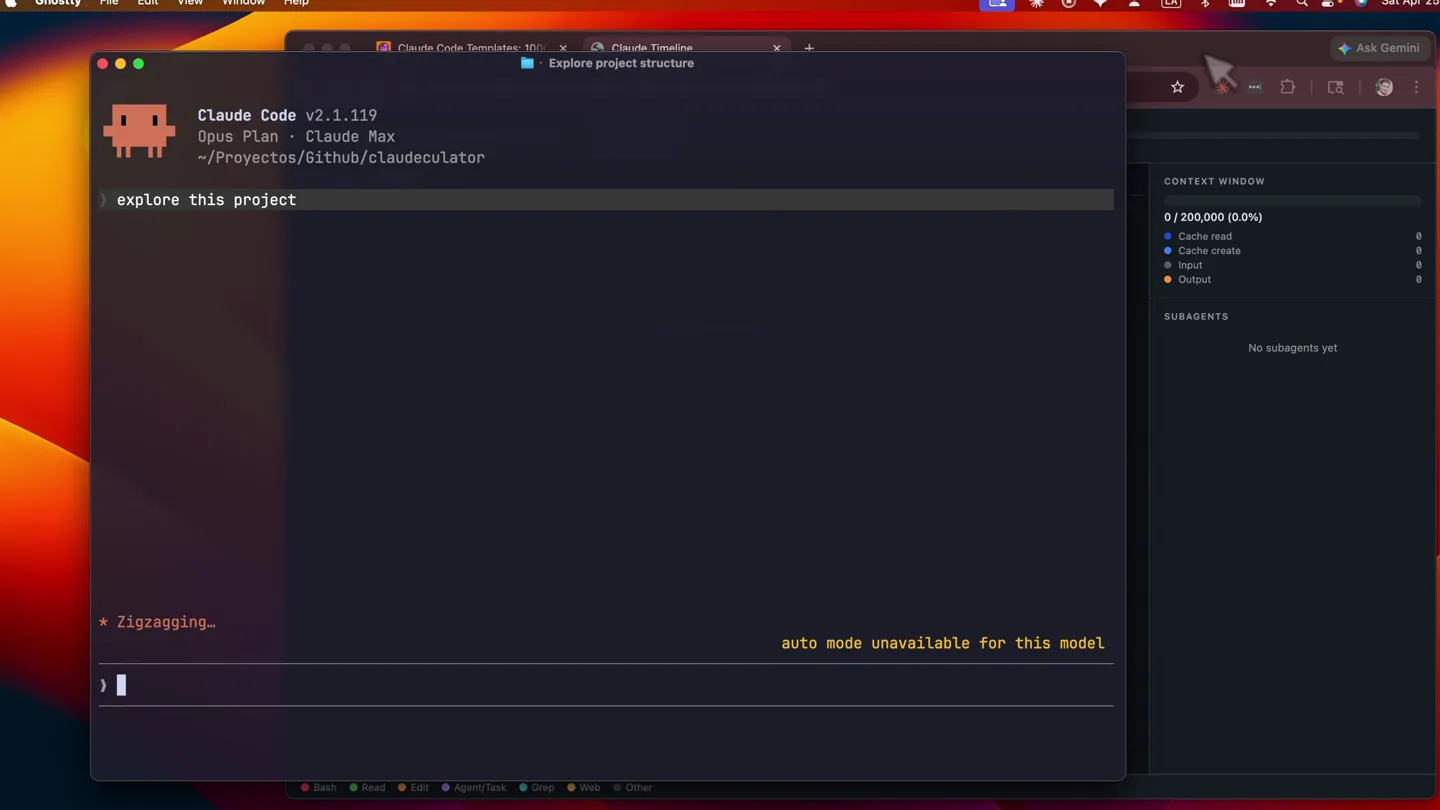
Terminal Interface & Context Window Reveal
“(No spoken dialogue — Sustained, evolving pad sound, subtle high-frequency sweep, distinct sub-bass drop/impact at 0:06.)”
- On screen
- Ghostty File Edit View Window Help Claude Code Templates: 10 X Claude Timeline X + Claude Code Claude Code v2.1.119 Opus Plan Claude Max ~/Proyectos/github/claudeculator • high /effort > explore this project CONTEXT WINDOW 0/200,000 (0.0%) Cache read Cache create Input Output SUBAGENTS No subagents yet
- Camera
- Static wide shot of a desktop environment, focusing on a terminal and a browser window. The camera subtly zooms in on the terminal content.
- Motion
- Progressive text reveal (typing effect) within the terminal, accompanied by a dynamic context window update. Elements appear and connect with animated lines.
Problem Agitation
Agent Workflow Visualization
“(No spoken dialogue — Sub-bass impact, layered synth textures, arpeggiated elements, riser builds from 0:10 to 0:12, culminating in another sub-bass impact.)”
- On screen
- Ghostty File Edit View History Bookmarks Profiles Tab Window Help Claude Code Templates: 10 X Claude Timeline X + Claude Code 127.0.0.1:7878/?session=7e56f31c-1655-46ac-a17a-ce84add42477 CONTEXT WINDOW 19,422 / 200,000 (9.7%) 100% Fit Ctrl+scroll main 1 A Agent Explore the project Bash find /Users/danipower Explore Explore claudeculator project 42,491 tokens 3 calls Cache read Cache create Input Output SUBAGENTS explore this project I'll explore the project Explore (Explore claudeculator project) Bash (find /Users/danipower -name "*.yaml") -o -name Running... + 2 tool uses (ctrl+b to run in background) Zigzagging... (12s 24s) Ask Gemini
- Camera
- Static shot, with the focus shifting to the browser window displaying a node-graph-like visualization. The camera remains steady.
- Motion
- Node-graph animation with connecting lines and expanding nodes representing agent actions (Bash, Read). Text appears and updates dynamically within the terminal and context window.
Product Reveal
Deep Dive into File Operations
“(No spoken dialogue — Layered synth textures, arpeggiated elements, sustained pads, significant riser from 0:20 to 0:22, leading to a powerful sub-bass drop.)”
- On screen
- Ghostty File Edit View History Bookmarks Profiles Tab Window Help Claude Code Templates: 10 X Claude Timeline X + Claude Code 127.0.0.1:7878/?session=7e56f31c-1655-46ac-a17a-ce84add42477 CONTEXT WINDOW 19,422 / 200,000 (9.7%) 100% Fit Ctrl+scroll main 1 Explore 11 Bash ls -la /Users/danipower Read /Users/danipower/Proy Read /Users/danipower/Proy Read /Users/danipower/Proy Read /Users/danipower/Proy Read /Users/danipower/Proy Read /Users/danipower/Proy Read /Users/danipower/Proy Read /Users/danipower/Proy Read /Users/danipower/Proy Bash find /Users/danipower Read /Users/danipower/Proy Read /Users/danipower/Proy Read /Users/danipower/Proy Read /Users/danipower/Proy Read /Users/danipower/Proy Read /Users/danipower/Proy Read /Users/danipower/Proy Read /Users/danipower/Proy Read /Users/danipower/Proy A Agent Explore the project Cache read Cache create Input Output SUBAGENTS Explore Explore claudeculator project 54,829 tokens 11 calls explore this project I'll explore the project Explore (Explore claudeculator project) Bash (ls -la /Users/danipower) Running... +8 tool uses (ctrl+b to run in background) Zigzagging... (25s 587) Ask Gemini
- Camera
- The camera remains static, maintaining the view of the terminal and browser. The focus is on the expanding and scrolling content within these windows.
- Motion
- Rapid expansion of the node graph, showing numerous 'Read' and 'Bash' operations. The terminal output scrolls quickly, simulating real-time execution. A subtle blur effect is used during transitions.
Feature Teaser
Key Features & Project Summary
“(No spoken dialogue — Powerful sub-bass drop, intensity builds with a long, sustained riser from 0:30 to 0:33, followed by a final, impactful sub-bass drop and a sustained, resonant synth chord that fades out.)”
- On screen
- Ghostty File Edit View Window Help Claude Code Templates: 10 X Claude Timeline X + Claude Code File Role src/components/Calculator.tsx Main 626-line UI component (sliders, toggles, export) src/lib/calculator.ts Scoring & monthly cost estimation logic src/lib/presets.ts 5-level preset definitions per axis src/lib/types.ts Model info, usage profiles, permission modes src/lib/defaults.ts Default config & available MCP servers Notable Features - Real-time cost estimation (tokens/month, USD, cache savings %) - JSON export - generates valid settings.json, 100% client-side/private - Pre-configured MCP servers: filesystem, github, linear, gmail, calendar, neon, vercel - Preset configs for 15 combinations (5 levels x 3 axes) The project is a clean, single-page tool with no backend - purely static generation with client-side React interactivity. * Crunched for 57s > CONTEXT WINDOW 19,422 / 200,000 (9.7%) Cache read Cache create Input Output SUBAGENTS Explore Explore claudeculator project 63,582 tokens 19 calls Ask Gemini
- Camera
- A quick, blurred transition to a new terminal view, presenting a structured summary of files and features. The camera remains static on this new view.
- Motion
- Instantaneous scene cut with a strong motion blur effect. Text appears instantly, then a 'Notable Features' section is revealed with a subtle fade-in. The context window continues to update in the background.
Motion design primitives
Synthesizable in Remotion · key components of the developer-workflow-visualizer template.
TerminalTypewriterEffect
Text appears character by character in a terminal window, simulating real-time typing. This is often accompanied by a blinking cursor.
+ Code construction recipe
Use Remotion's `Sequence` and `interpolate` to reveal characters of a string over time. A `spring` animation can be used for the blinking cursor's opacity.
NodeGraphExpansion
Nodes and connecting lines dynamically appear and expand in a graph-like structure, illustrating a workflow or process flow.
+ Code construction recipe
Implement with `AbsoluteFill` and `Path` components for lines, and custom `Node` components. Use `spring` or `interpolate` for position, scale, and opacity of nodes and lines, with delays for sequential appearance.
ContextWindowUpdate
A sidebar panel displays real-time data updates, such as token counts, call numbers, and progress bars, with smooth numerical transitions.
+ Code construction recipe
Utilize `interpolate` for numerical counters and progress bar widths. `spring` can be applied to the overall panel's entrance or subtle background shifts.
Style DNA & aesthetic system
Visual aesthetic
Typography
Motion
Special effects
Pacing & rhythm
Conceptual story rhythm
- 1
Initial Setup & Intrigue
Purpose. Introduce the core interface and hint at the product's capabilities without explicit explanation.
Execution. A static shot of the terminal, with a typing effect revealing a command, and the context window subtly updating.
- 2
Process Unfolding
Purpose. Visually demonstrate the product's internal workings and its ability to manage complex tasks.
Execution. The node graph rapidly expands, showing a cascade of agent actions (Bash, Read) and their interconnections.
- 3
Deep Dive & Detail
Purpose. Showcase the depth of analysis and the granular control the product offers.
Execution. The node graph continues to grow, with the terminal output scrolling quickly to reveal extensive file operations.
- 4
Feature Summary & Value Proposition
Purpose. Conclude by highlighting the key benefits and functionalities of the product.
Execution. A quick cut to a structured summary of files and notable features, presented clearly in a terminal-like format.




