
Cutroom · Launch Video Breakdown: Hook, Pacing & Motion Design
Cutroom Studio is an AI studio for product launch videos. It uses MiniMax M3 to turn your website or brief into a launch film.
Scene-by-scene timeline & spoken transcript
The Hook
Beyond the Screenshot
“Your product deserves more than another screenshot.”
- On screen
- cutroom Your product deserves more than another screenshot. • GIVE IT A LITTLE MOTION CUTROOM / A LITTLE MOTION 01 / 07
- Camera
- Static, centered text. The camera is fixed, allowing the text to animate in.
- Motion
- Text reveal with a subtle underline animation and color change on a key word. The word 'screenshot' animates in with a red underline.
Product Reveal
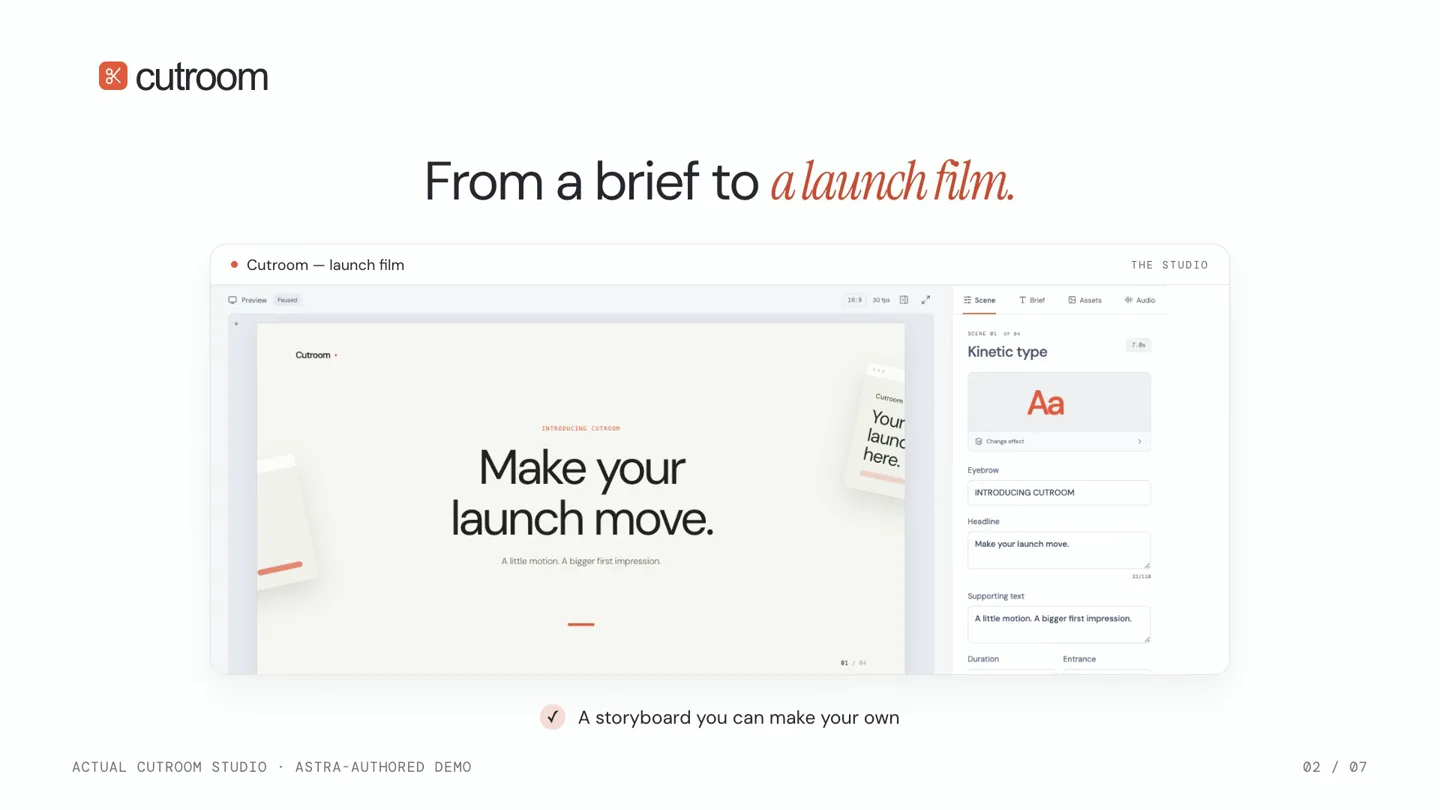
Introducing Cutroom Studio
“Introducing Cutroom Studio. An AI studio for product launch videos. It uses MiniMax M3 to turn your website or brief into a launch film. A storyboard you can make your own.”
- On screen
- cutroom INTRODUCING cutroom From a brief to a launch film. • Cutroom — launch film Preview Paused 30 s 30 fps Scene Brief Assets Audio THE STUDIO SCENE 01 / 04 Kinetic type Aa Change effect Eyebrow INTRODUCING CUTROOM Headline Make your launch move. Supporting text A little motion. A bigger first impression. Duration Entrance ✓ A storyboard you can make your own ACTUAL CUTROOM STUDIO • ASTRA-AUTHORED DEMO 02 / 07
- Camera
- Static shot, then a subtle zoom out to reveal the product UI. The camera remains fixed on the UI elements as they animate.
- Motion
- UI elements animate into view, simulating user interaction. Text fields populate, and a checkbox appears with a subtle bounce. The overall motion is clean and functional.
Feature Teaser
Customize Your Story
“Start with your idea. Your story, scene by scene. Make every scene yours. Your words, your rhythm, your brand.”
- On screen
- cutroom Start with your idea. WEBSITE OR PRODUCT cutroom-studio.vercel.app WHAT ARE WE MAKING? A light, confident launch film for fou| 30 seconds 16:9 Launch film Create storyboard DEMONSTRATION SEQUENCE • GENERATION TIME CONDENSED 03 / 07 cutroom Start with your idea. YOUR STORY, SCENE BY SCENE. DEMONSTRATION SEQUENCE • GENERATION TIME CONDENSED 03 / 07 cutroom Start with your idea. 01 / INTRODUCE Make your launch move. Kinetic type 7s 02 / EXPLAIN From idea to storyboard. Steps 8s 03 / MAKE IT YOURS Make it feel like you. Gallery 8s 04 / INVITE Ready when you are. Call to action 7s 00:00 00:30 DEMONSTRATION SEQUENCE • GENERATION TIME CONDENSED 03 / 07 cutroom Make every scene yours. • PREVIEW 16:9 Scene Brief Assets Audio SCENE 01 / 04 Kinetic type Ma Headline Ma Entrance Rise Slide Zoom Tilt Accent color #ED663C SOURCE-DERIVED UI DEMONSTRATION 04 / 07
- Camera
- Static shots of UI, with elements animating in and out. The camera focuses on specific interactive areas of the application.
- Motion
- Typing animation in input fields, button clicks, and selection highlights. A progress bar animates, and scene cards slide into view. UI elements like dropdowns and color pickers are demonstrated with subtle, responsive animations.
Call to Action
Ready to Launch
“A film. Ready to go. No account. No API key. Your first three films. On us. Give your next launch a little motion.”
- On screen
- cutroom A film. Ready to go. CUTROOM Make your launch move. A little motion. A bigger first impression. 1080p PREVIEW • UPLOAD AUDIO • EXPORT MP4 / RENDER TIME CONDENSED 05 / 07 cutroom A film. Ready to go. EXPORT FILM The final cut. Resolution 1920 x 1080 Export film VOICEOVER PREVIEW • UPLOAD AUDIO • EXPORT MP4 / RENDER TIME CONDENSED 05 / 07 cutroom No account. NO SIGNUP REQUIRED 06 / 07 cutroom No account. No API key. • FREE FILM CREDIT 1 YOURS TO CREATE • FREE FILM CREDIT 2 YOURS TO CREATE NO SIGNUP REQUIRED 06 / 07 cutroom No account. No API key. • FREE FILM CREDIT 1 YOURS TO CREATE • FREE FILM CREDIT 2 YOURS TO CREATE • FREE FILM CREDIT 3 YOURS TO CREATE Your first three films. On us. Three total video credits per device/IP. Shared processing limits apply. NO SIGNUP REQUIRED 06 / 07 cutroom Give your next launch a little motion. Create your first film cutroom-studio.vercel.app Three free films. No account needed.
- Camera
- Static shots, with elements appearing and disappearing. The camera maintains a consistent, clean framing.
- Motion
- Number count-up animation, card reveals, and a final call-to-action button with a subtle hover effect. The overall motion is direct and encouraging, leading to the CTA.
Motion design primitives
Synthesizable in Remotion · key components of the minimalist-ui-launch template.
KineticTextReveal
Text animates in with a subtle rise or slide, often accompanied by a color change or an underline effect on a specific word. This highlights key phrases and adds emphasis.
+ Code construction recipe
Use Remotion's `interpolate` function for `translateY` or `translateX` and `opacity`. Apply a `spring` animation for a smooth, slightly bouncy finish. For the underline, animate `width` and `backgroundColor` of a pseudo-element or a separate `div`.
UIDemoInteraction
Simulated user interactions within a clean UI, including typing, button clicks, and element selections. Elements appear, disappear, or change state to demonstrate functionality.
+ Code construction recipe
Utilize `Sequence` and `AbsoluteFill` for scene management. Animate `opacity`, `scale`, and `translate` properties for UI elements using `spring` or `ease-in-out` `interpolate` curves. Implement `delay` for sequential actions like typing or button presses. SVG paths can be used for cursor animations.
CardStackReveal
Information cards or numerical counters appear sequentially, often sliding in from the side or fading up, creating a sense of progression or accumulation.
+ Code construction recipe
Employ `map` over an array of data to render multiple `Card` components. Animate each card's `translateX` or `translateY` and `opacity` with a staggered `delay` using `spring` or `cubic-bezier` for a smooth, cascading effect. For number counting, use `interpolate` on a numerical value.
Style DNA & aesthetic system
Visual aesthetic
Typography
Motion
Special effects
Pacing & rhythm
Conceptual story rhythm
- 1
The Pain Point
Purpose. Establish the problem of static product representation and introduce the need for motion.
Execution. Bold, static text highlighting 'screenshot' with a red underline, creating immediate visual contrast and emphasis.
- 2
The Solution Unveiled
Purpose. Introduce Cutroom Studio as the answer, demonstrating its core functionality.
Execution. Clean UI animations showing the process of turning a brief into a launch film, with text fields populating and elements sliding into place.
- 3
Customization & Control
Purpose. Showcase the ease of personalizing the generated launch films.
Execution. Interactive UI elements demonstrating scene editing, text customization, and motion effect selection, emphasizing user agency.
- 4
Effortless Export & Offer
Purpose. Conclude with the simplicity of the export process and a compelling free trial offer.
Execution. A clear export interface, followed by a sequential reveal of 'free film credits' cards, leading to a direct call to action.