Dawning · Launch Video Breakdown: Hook, Pacing & Motion Design
A Framer marketplace template built for AI products, SaaS tools, and data intelligence platforms.
Scene-by-scene timeline & spoken transcript
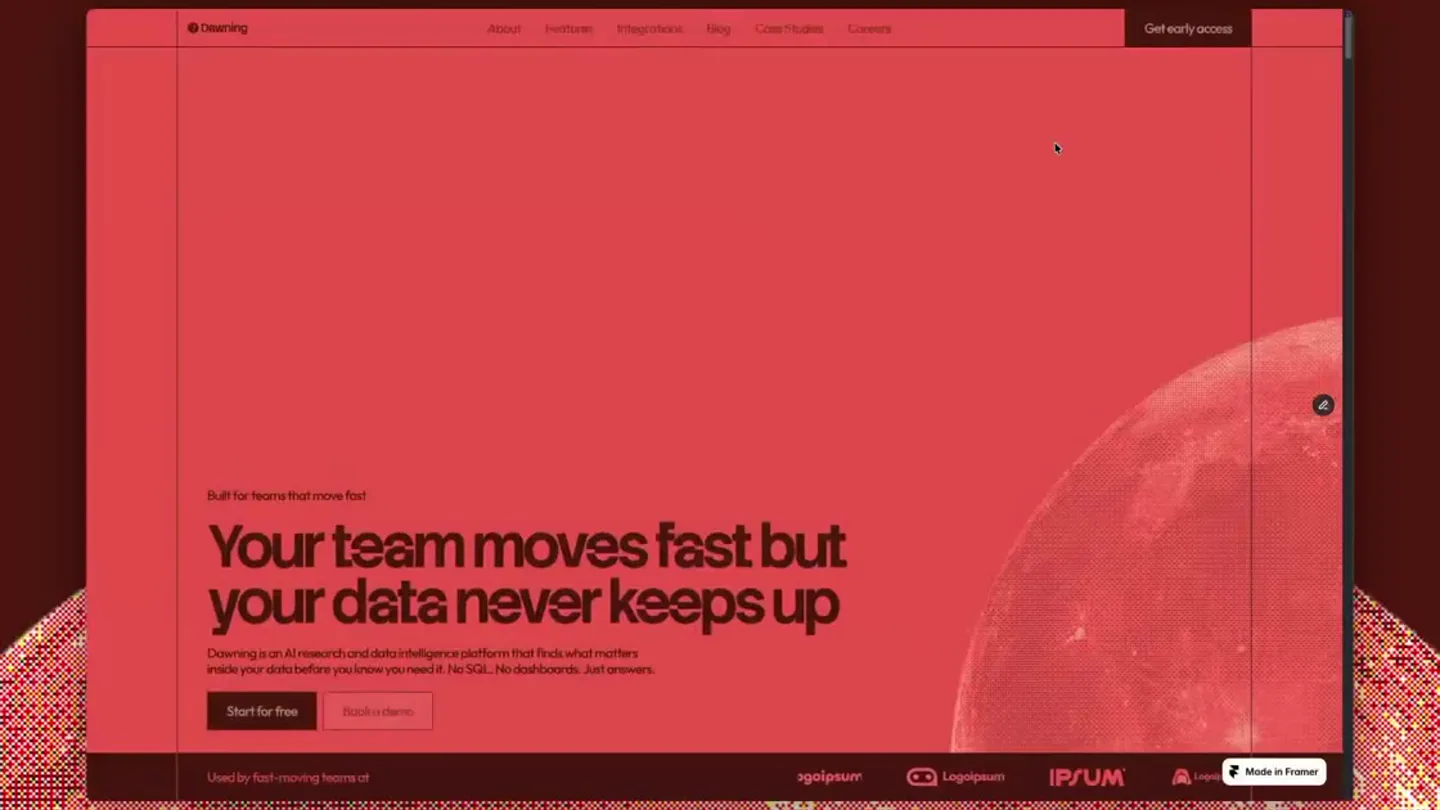
The Hook
Problem Agitation & Solution Tease
“(No spoken dialogue — Pizzicato synths, sub-bass, 808 percussion, driving electronic rhythm)”
- On screen
- Dawning Get early access About Features Integrations Blog Case Studies Careers Built for teams that move fast Your team moves fast but your data never keeps up Dawning is an AI research and data intelligence platform that finds what matters inside your data before you know you need it. No SQL. No dashboards. Just answers. Start for free Book a demo Used by fast-moving teams at .ogolpsuM IPSUM A Logo Made in Framer Every fast-moving team hits the same wall. Too much data, not enough clarity, and no time to close the gap. 001 Data Overload Too much noise Your team spends hours searching through dashboards, reports, and spreadsheets just to find one number that matters. 002 Delayed Insights Too slow By the time the analysis is done the decision has already been made. Research that arrives late is research that does not help. 003 SQL Dependency Too technical Asking a question about your own data requires a data engineer, a ticket, and three days of waiting. Ready to fix this? How it works Connect once and never search 01 Connect your stack Connect your data sources in minutes. CRM, analytics tools, databases, and documents. Dawning works with the tools your team already uses and starts analyzing immediately. 02 Ask in plain language Type any question about your data the way you would ask a colleague. No SQL, no dashboards, no ticket to the data team. Dawning understands what you mean and gets to work. 03 Discover what matters Dawning analyzes your data continuously and surfaces insights, anomalies, and opportunities automatically — even the ones you did not know to look for. No more making important calls on incomplete information. 04 Get answers that move you forward Research-grade insights, automated reports, and smart alerts delivered in plain language. The clarity your team needs to make fast, confident decisions. Your team gets answers the moment they need them — not two days later when the window has already closed. Ask a question in plain language and Dawning finds the answer across all your connected data. No digging. No switching between tools. Stop missing Dawning watches your data continuously and tells you when something worth knowing happens. Before it becomes a problem. Stop guessing Every person on your team has access to the same research-grade intelligence. Not just the ones with SQL access. See features What sets Dawning apart Continuous monitoring Dawning watches your data around the clock so your team does not have to. Anomalies, trends, and opportunities surface automatically — even the ones you did not know to look for. Nothing slips through while your team is focused elsewhere.
Product Reveal
Dynamic UI Showcase & Feature Highlight
“(No spoken dialogue — High-energy audio transition with sub-bass drop/impact at 0:27)”
- On screen
- Dawning Get early access About Features Integrations Blog Case Studies Careers Built for teams that move fast Your team moves fast but your data never keeps up Dawning is an AI research and data intelligence platform that finds what matters inside your data before you know you need it. No SQL. No dashboards. Just answers. Start for free Book a demo Used by fast-moving teams at .ogolpsuM IPSUM A Logo Made in Framer Every fast-moving team hits the same wall. Too much data, not enough clarity, and no time to close the gap. 001 Data Overload Too much noise Your team spends hours searching through dashboards, reports, and spreadsheets just to find one number that matters. 002 Delayed Insights Too slow By the time the analysis is done the decision has already been made. Research that arrives late is research that does not help. 003 SQL Dependency Too technical Asking a question about your own data requires a data engineer, a ticket, and three days of waiting. Ready to fix this? How it works Connect once and never search 01 Connect your stack Connect your data sources in minutes. CRM, analytics tools, databases, and documents. Dawning works with the tools your team already uses and starts analyzing immediately. 02 Ask in plain language Type any question about your data the way you would ask a colleague. No SQL, no dashboards, no ticket to the data team. Dawning understands what you mean and gets to work. 03 Discover what matters Dawning analyzes your data continuously and surfaces insights, anomalies, and opportunities automatically — even the ones you did not know to look for. No more making important calls on incomplete information. 04 Get answers that move you forward Research-grade insights, automated reports, and smart alerts delivered in plain language. The clarity your team needs to make fast, confident decisions. Your team gets answers the moment they need them — not two days later when the window has already closed. Ask a question in plain language and Dawning finds the answer across all your connected data. No digging. No switching between tools. Stop missing Dawning watches your data continuously and tells you when something worth knowing happens. Before it becomes a problem. Stop guessing Every person on your team has access to the same research-grade intelligence. Not just the ones with SQL access. See features What sets Dawning apart Continuous monitoring Dawning watches your data around the clock so your team does not have to. Anomalies, trends, and opportunities surface automatically — even the ones you did not know to look for. Nothing slips through while your team is focused elsewhere.
Feature Teaser
Case Studies & Integrations
“(No spoken dialogue — High-energy audio transition with sub-bass drop/impact at 0:44)”
- On screen
- Case studies The teams that switched to Dawning and never looked back See how fast-moving teams use Dawning to make better decisions in less time. How Forge Capital closes faster Company Forge Capital Industry Private Equity Result Investment decisions made in half the time with twice the confidence Read case study Featured case study Forge Capital had a due diligence problem that every early stage investment firm recognises. See all case studies Integrations Analytics CRM & Sales Data & Databases Productivity & Docs Made in Framer
Call to Action
Testimonials, Pricing & Final CTA
“(No spoken dialogue — High-energy audio transition with sub-bass drop/impact at 1:02)”
- On screen
- Testimonials We built Dawning but our users are the ones worth listening to Every fast-moving team hits the same wall. Too much data, not enough clarity, and no time to close the gap. Forge Capital Nexoni "I did not think a tool could replace our data analyst for day to day questions. Dawning proved me wrong in the first hour." "Dawning changed how our entire team makes decisions. We used to wait days for answers. Now we have them before the meeting starts." Founder Marcus Webb Head of Growth Sarah Chen Over 200 fast-moving teams use Dawning every day Made in Framer Pricing Starter Growth Popular Enterprise For individuals and small teams just getting started. For growing teams that need more power and more answers. For larger teams that need full control, security, and scale. starts at starts at starts at Scoped to you /month $19 /month $49 Up to 3 data source connections Up to 15 data source connection/source connections Unlimited data source connections 50 questions per month Unlimited questions Unlimited questions and reports Basic alerts Smart alerts and monitoring Advanced alerts and monitoring Email support Instant research reports SSO and custom security 1 user Up to 10 users Dedicated account manager Priority support Custom integrations Unlimited users Start free trial Start free trial Talk to sales All plans include a 14 day free trial. No credit card required. How long does it take to set up? What data sources does Dawning connect to? Dawning connects to CRM tools, analytics platforms, databases, and productivity tools. The full list of integrations is available on the integrations page and new connectors are added every month. Do I need to know SQL or have a data background? What happens if I need more than the Growth plan offers? Can I try Dawning before committing to a plan? Is my data secure? Frequently asked questions Questions worth asking before you sign up If something is not covered here reach out to the team directly and we will get back to you within 24 hours. Still have questions? Get started Your competitors are making decisions in the dark, you do not have to Connect your data, ask your first question, and see what Dawning finds. Most teams have their first meaningful insight within the hour. Start free trial Talk to sales Product Company Features About Integrations Contact Resources Legal Blog Privacy Policy Case Studies Terms & Conditions Careers Dawning © 2026 Dawning. All rights reserved. Made in Framer
Motion design primitives
Synthesizable in Remotion · key components of the halftone-ui-scroll-launch template.
DynamicUIScroll
A website UI scrolls vertically and horizontally, revealing different sections and content. Elements within the UI animate into view as they become visible.
+ Code construction recipe
Use `scrollX` and `scrollY` to control the viewport position. Animate individual UI elements (text, images, cards) using `interpolate` for opacity and `translateY` or `translateX` based on their position relative to the viewport, triggered by scroll progress.
HalftoneTextureOverlay
A subtle, animated halftone dot pattern overlays the entire screen, creating a retro, digital aesthetic. The dots appear to shimmer or subtly shift.
+ Code construction recipe
Implement a `Canvas` component or an `SVG` filter with `feComponentTransfer` and `feColorMatrix` to create a halftone effect. Animate the `opacity` or `transform` properties of the halftone layer using `spring` or `interpolate` for a subtle, continuous movement.
GlitchTransition
Sudden, brief visual distortions, color shifts, and pixelation effects occur during scene cuts or key moments, mimicking a digital glitch.
+ Code construction recipe
Apply `CSS filters` (e.g., `hue-rotate`, `saturate`, `contrast`) and `transform` properties (e.g., `skew`, `translate`) to the entire composition or specific elements for a short duration. Combine with `clip-path` or `mask` animations for pixelation effects, triggered by `sequence` or `delay` at transition points.
Style DNA & aesthetic system
Visual aesthetic
Typography
Motion
Special effects
Pacing & rhythm
Conceptual story rhythm
- 1
The Problem Hook
Purpose. Immediately identifies a common pain point for the target audience, creating relatability and urgency.
Execution. Starts with a bold, direct headline stating the problem, overlaid on a scrolling UI that hints at data overload.
- 2
Solution & Features
Purpose. Introduces Dawning as the solution, detailing its core functionalities and benefits.
Execution. Dynamic scrolling through feature explanations, using large numbers and concise descriptions, with abstract visual elements representing data processing.
- 3
Social Proof & Trust
Purpose. Builds credibility through case studies, testimonials, and integration showcases.
Execution. Scrolling through case study highlights with key results, followed by a grid of integration logos and user testimonials with headshots.
- 4
Call to Action
Purpose. Guides the viewer towards the next step, offering clear pathways to engage with the product.
Execution. Presents pricing tiers, FAQs, and a final, impactful headline with a clear call-to-action button, all within the scrolling UI.