
ego · Launch Video Breakdown: Hook, Pacing & Motion Design
Rebuilt from the kernel up for AI agents: same task, 20% to 245% faster than Chrome-bridging setups.
Scene-by-scene timeline & spoken transcript
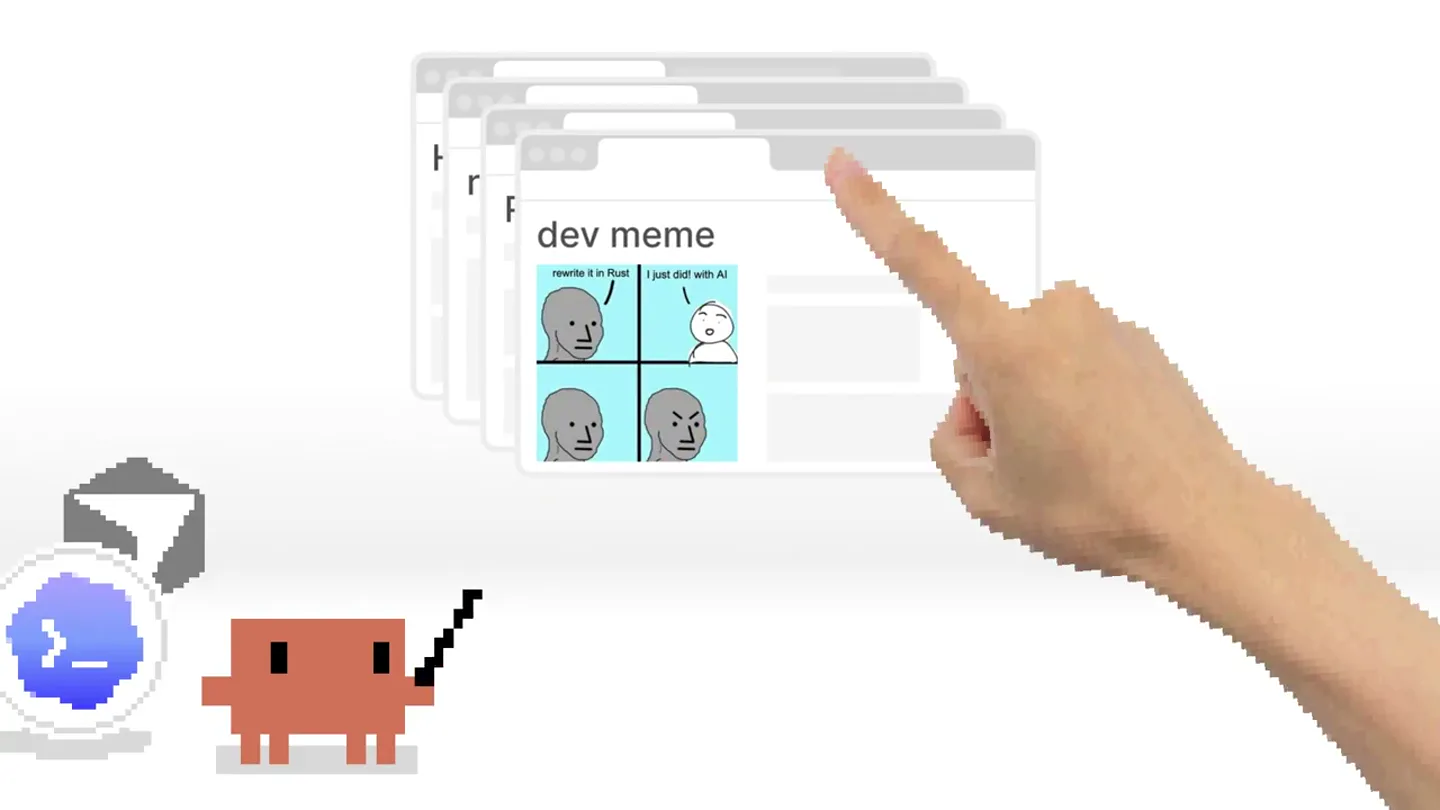
The Hook
The Frustration of Browser-Bridging
“Get out of here! Wait, was that a secret path? This game is insane!”
- On screen
- Hacker News Top Stories, r/Cats, Readwise, dev meme, rewrite it in Rust, I just did with AI, YouTube, Rick Astley - Never Gonna Give You Up (Official Video) (4K Remaster), Error occurred while reading browser, Error: Forbidden, GAME OVER
- Camera
- Static wide shot, then subtle zoom out as browser windows multiply and pixelated elements interact.
- Motion
- Rapid succession of browser window overlays, pixelated character interaction, simulated 'game over' screen, and glitch effects.
Product Reveal
Introducing ego: The AI-Native Browser
“(No spoken dialogue — A sub-bass drop/impact at 0:09 transitions into a driving electronic score with 8-bit synth melodies.)”
- On screen
- ego, The best browser for both you and your AI agents, An agent browser built for AI agents to run many browser automation tasks in parallel, much faster and cheaper every run., Download for Mac, yes, free!, Introducing ego (lite), browser for you & your agents
- Camera
- Static wide shot, then a slow zoom into the ego browser interface.
- Motion
- Product unboxing animation, UI elements appearing with a clean, modern aesthetic, contrasting with the previous pixel art. Pixelated lines animate to form a clean UI border.
Feature Teaser
AI Agent Capabilities in Action
“(No spoken dialogue — The energetic electronic score continues, underscoring the rapid demonstrations.)”
- On screen
- ego lite, File Edit View History Bookmarks Profiles Tab Window Help, Play chess vs computer, lichess.org, Google, Stockfish level 2, Browsing the web, Agent is in control, OpenAI, Follow, You might like, Les Friedman, Kaggle, Soumith Chintala, Show more, What's happening, Backrooms, OpenAI x-posts-78, jobs.ashbyhq.com, Software Engineer, Security Observability, Application, Parsing your resume. Autofilling key fields..., This job has application limits, Please note: we have set up limits for applications across roles. Candidates may not apply more than 5 times in any 180 day span., linkedin-security-observability-app, Expedia, Search flights, Los Angeles, CA (LAX-Los Angeles), Going to, Wed, Jan 10 - Wed, Jan 17, 1 traveler, Economy, Search, Popular airlines, Browsing the web, expedia-fl-mia-flight, Yahoo! Finance, Microsoft Corporation (MSFT), 412.67 -3.36 (-0.81%) 415.40 +2.73 (+0.66%), Trending tickers, yahoo-finance-stocks
- Camera
- Dynamic camera pans and zooms across multiple browser windows, highlighting agent interactions.
- Motion
- Split-screen layouts, rapid UI interactions (clicks, typing, scrolling) simulated by the AI agent, with a 'Browsing the web' overlay indicating agent activity. Smooth transitions between different use cases.
Call to Action
Download ego (lite)
“(No spoken dialogue — The electronic score builds to a final, conclusive flourish.)”
- On screen
- lite.ego.app, download ego (lite), yes, free!
- Camera
- Static shot, centered on the call to action.
- Motion
- Clean, minimalist display of the product URL and download button, with a subtle 'yes, free!' text pop-up.
Motion design primitives
Synthesizable in Remotion · key components of the pixel-perfect-agent-browser-launch template.
PixelatedGlitchTransition
Browser windows and UI elements rapidly multiply and distort with a pixelated, retro-game-like glitch effect, often accompanied by a 'game over' aesthetic.
+ Code construction recipe
Utilize Remotion's `interpolate` for rapid opacity and scale changes, `spring` for subtle bounce, and custom `Shader` components or SVG filters for pixelation, chromatic aberration, and scanline effects. Implement a `Sequence` of `AbsoluteFill` components with varying `pixelSize` and `offset` for the glitch.
AgentPathTracer
A pixelated line animates from a source (e.g., an icon) to various points within a browser window, simulating an AI agent's interaction path.
+ Code construction recipe
Render an SVG `<path>` element with `stroke-dasharray` and `stroke-dashoffset` animated using `interpolate` to create a drawing effect. The path coordinates should be dynamically calculated based on target UI elements. Apply a `pixelSize` prop to the line for the retro aesthetic.
MultiWindowGridReveal
Multiple browser windows or application instances are arranged in a dynamic grid, expanding or contracting to showcase parallel agent activity.
+ Code construction recipe
Use `AbsoluteFill` or `spring` for positioning and scaling individual browser `Composition` components within a grid layout. Animate `x`, `y`, `width`, and `height` properties to transition between a single large window and a multi-window grid. Implement `delay` and `stagger` for sequential reveals.
Style DNA & aesthetic system
Visual aesthetic
Typography
Motion
Special effects
Pacing & rhythm
Conceptual story rhythm
- 1
The Pain Point: Browser Chaos
Purpose. Establish the problem of inefficient, fragmented browser-based automation for AI agents.
Execution. Rapid, chaotic succession of browser windows, pixelated character struggling, and 'game over' screens, emphasizing frustration.
- 2
The Solution: ego Unboxed
Purpose. Introduce ego as the elegant, purpose-built solution for AI agent workflows.
Execution. Clean unboxing animation revealing the sleek ego browser UI, contrasting sharply with the previous chaos.
- 3
Demonstration: Agent in Control
Purpose. Showcase ego's core functionality through diverse, real-world AI agent use cases.
Execution. Dynamic split-screen views and rapid UI interactions demonstrating agents performing complex tasks across various websites.
- 4
The Call: Experience the Future
Purpose. Direct viewers to download and try ego.
Execution. Clear, minimalist display of the download URL and button, reinforcing ease of access.




