Glass Cluely (by Daniel Park) · Launch Video Breakdown: Hook, Pacing & Motion Design
Good morning, @im_roy_lee! In just 4 days we open-sourced the latest @cluely called Glass. Same real-time meeting assistant, sharper output & design, but 100% free. Distribution isn’t the moat; vel…
Scene-by-scene timeline & spoken transcript
The Hook
Product Name & Core Value Proposition
“(No spoken dialogue — High-energy audio riser/sweep culminates in a sub-bass drop/impact.)”
- On screen
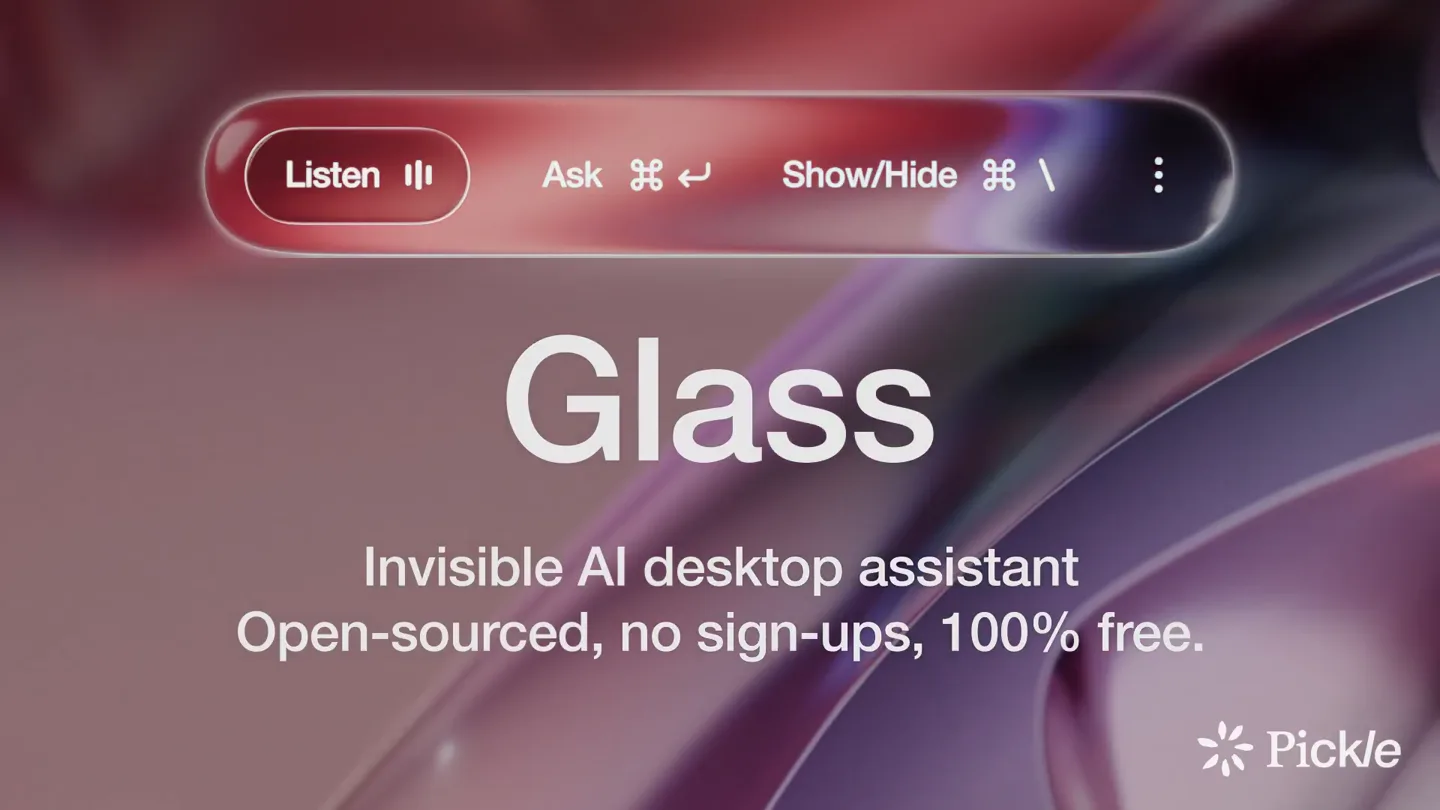
- Glass Invisible AI desktop assistant Open-sourced, no sign-ups, 100% free. Pickle
- Camera
- Static, centered shot of the product UI and text.
- Motion
- Subtle background animation with a glowing, translucent UI element.
Product Reveal
Interactive UI Demonstration
“(No spoken dialogue — Driving, rhythmic electronic score with consistent energetic pulse.)”
- On screen
- Listen Ask Show/Hide Glass Invisible AI desktop assistant Open-sourced, no sign-ups, 100% free. Pickle
- Camera
- Static, centered shot.
- Motion
- UI element 'Listen' button animates with a subtle glow and color shift, simulating user interaction.
Feature Teaser
Enhanced UI Interaction
“(No spoken dialogue — Intense audio riser builds to a significant sub-bass impact.)”
- On screen
- Listen Ask Show/Hide Glass Invisible AI desktop assistant Open-sourced, no sign-ups, 100% free. Pickle
- Camera
- Static, centered shot.
- Motion
- UI element 'Listen' button animates with a more pronounced glow and color shift, indicating active state.
Call to Action
Sustained Product Presence
“(No spoken dialogue — Energetic electronic score continues with layered synth textures and percussive elements.)”
- On screen
- Listen Ask Show/Hide Glass Invisible AI desktop assistant Open-sourced, no sign-ups, 100% free. Pickle
- Camera
- Static, centered shot.
- Motion
- The 'Listen' button's glow subtly pulsates, maintaining visual interest and suggesting ongoing functionality.
Motion design primitives
Synthesizable in Remotion · key components of the glass-syntax-ai-launch template.
GlassMorphismUI
A translucent, frosted glass-like UI element with soft internal glows and reflections, appearing to float above a blurred, abstract background.
+ Code construction recipe
Utilize CSS `backdrop-filter: blur()` for the frosted effect. Implement multiple `box-shadow` layers with varying opacities and colors for the internal glows. Animate `background-color` and `box-shadow` properties for interactive states.
PulsatingActionButton
A button element that subtly glows and changes color, indicating an active or interactive state, with a gentle, rhythmic pulsation.
+ Code construction recipe
Animate `background-color` and `box-shadow` using `interpolate` or `spring` functions. Use `keyframes` for a continuous, subtle pulsation effect on the `box-shadow` opacity or spread.
AbstractGradientBackground
A dynamic, softly shifting background composed of blurred, organic gradient shapes that subtly move and change color, creating a sense of depth and fluidity.
+ Code construction recipe
Employ SVG filters for complex blurs and distortions, or use a canvas element with Perlin noise to generate organic shapes. Animate `transform` properties (scale, position) and `color` values of gradient stops over time.
Style DNA & aesthetic system
Visual aesthetic
Typography
Motion
Special effects
Pacing & rhythm
Conceptual story rhythm
- 1
The Reveal
Purpose. Immediately introduces the product name and its core benefits.
Execution. Product name 'Glass' and key value propositions appear prominently over a dynamic, abstract background, accompanied by a strong audio impact.
- 2
Interactive Showcase
Purpose. Demonstrates the product's primary interaction point.
Execution. The 'Listen' button on the Glassmorphism UI subtly animates, simulating a user click and active state, holding the viewer's attention.
- 3
Feature Highlight
Purpose. Emphasizes a key feature or state of the product.
Execution. The 'Listen' button's animation becomes more pronounced, aligning with a second audio riser and impact, signaling a significant action.
- 4
Sustained Engagement
Purpose. Reinforces the product's continuous utility and presence.
Execution. The UI remains on screen with a subtle, ongoing pulsation of the 'Listen' button, maintaining visual interest until the end.