
Goldie (by Kacper Kapuściak) · Launch Video Breakdown: Hook, Pacing & Motion Design
Goldie generates App Store screenshots for coding agents and humans. Install with npx skills add kacperkapusciak/goldie.
Scene-by-scene timeline & spoken transcript
The Hook
AI Agent Automates App Store Screenshot Generation
“(No spoken dialogue — silent video with ambient visual)”
- On screen
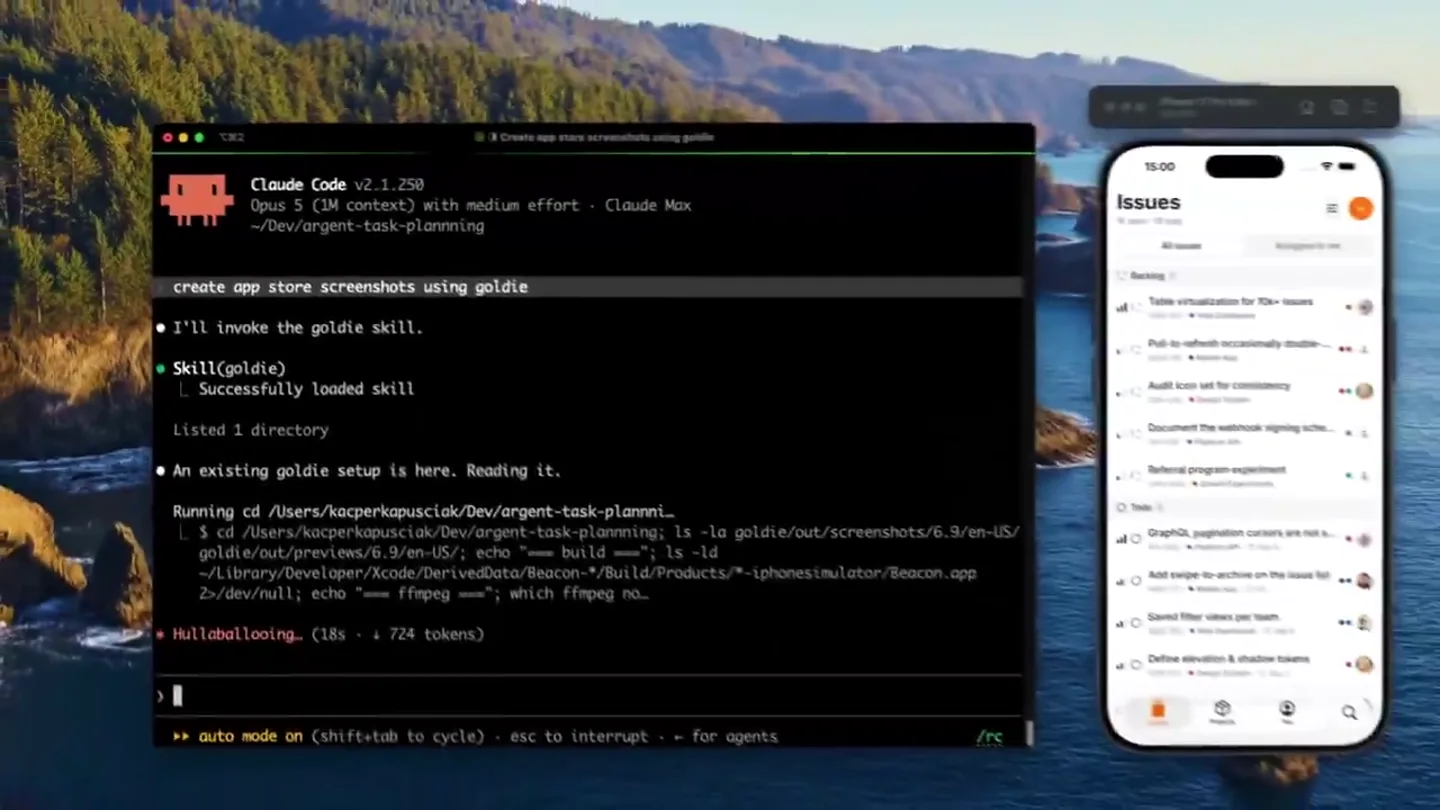
- Claude Code v2.1.250 Opus 5 (1M context) with medium effort - Claude Max ~/Dev/argent-task-plannning create app store screenshots using goldie I'll invoke the goldie skill. Skill(goldie) Successfully loaded skill Listing 1 directory... $ ls goldie/>/dev/null; echo "---flows---"; ls .argent/flows/ 2>/dev/null; echo "GOLDIE_CONFIG=$GOLDIE_CONFIG"; echo "---repo---"; ls
- Camera
- Static wide shot of a desktop with a terminal window and a floating iPhone simulator.
- Motion
- Terminal text typing animation, iPhone simulator appearing with a subtle zoom-in.
Problem Agitation
The Tedious Manual Process of Screenshot Creation
“(No spoken dialogue — silent video with ambient visual)”
- On screen
- Claude Code v2.1.250 Opus 5 (1M context) with medium effort - Claude Max ~/Dev/argent-task-plannning create app store screenshots using goldie I'll invoke the goldie skill. Skill(goldie) Successfully loaded skill An existing goldie setup is here. Reading it. Running cd /Users/kacperkapusciak/Dev/argent-task-plannning; ls -la goldie/out/screenshots/6.9/en-US/; echo "---flows---"; ls -ld -L/Library/Developer/Xcode/DerivedData/Beacon-*/Build/Products/*-iphonesimulator/Beacon.app 2>/dev/null; echo "ffmpeg ---", which ffmpeg --- Hullaballooing... (20s + 829 tokens) auto mode on (shift+tab to cycle) - esc to interrupt - for agents Running 1 shell command - 4s... $ cd /Users/kacperkapusciak/Dev/argent-task-plannning; GOLDIE_CONFIG=goldie/goldie.config.ts npx -y goldie@0 capture 2-A1 | tail -40 (3s) (ctrl+c to run in background) Hullaballooing... (35s + 1.3k tokens) Running 1 shell command - 19s... $ cd /Users/kacperkapusciak/Dev/argent-task-plannning; GOLDIE_CONFIG=goldie/goldie.config.ts npx -y goldie@0 capture 2-A1 | tail -40 (18s) Hullaballooing... (50s + 1.4k tokens) Running 1 shell command - 34s... Running 1 shell command - 49s... Running 2 shell commands - 2s... $ cd /Users/kacperkapusciak/Dev/argent-task-plannning; GOLDIE_CONFIG=goldie/goldie.config.ts npx -y goldie@0 preview 2-A1 | tail -20 && GOLDIE_CONFIG=goldie/goldie.config.ts npx -y goldie@0 manifest 2-A1 | tail -10 Hullaballooing... (1m 35s + 1.4k tokens) Successfully loaded skill Listed 1 directory An existing goldie setup is here. Reading it. Ran 3 shell commands Doctor is clean. Running a fresh capture of all flows. Ran 2 shell commands Stills are done. Starting the studio and rendering the preview video in the background. Reading 1 file, running 3 shell commands... goldie/out/screenshots/6.9/en-US/01-issues-1.png Background command 'cd /Users/kacperkapusciak/Dev/argent-task-plannning; GOLDIE_CONFIG=goldie/goldie.config.ts npx -y goldie@0 preview 2-A1 | tail -3' completed (exit code 0) Hullaballooing... (1m 49s + 2.2k tokens - thinking with medium effort) All six stills are 1320x2868 (6.9" iPhone) and the video sits inside Apple's 15-30s window. Note on the current look: the studio's goldie/goldie.design.json overrides the config with the editorial template, a silver 17 Pro bezel, and a blue gradient, so that's what rendered - not the orange/cream values still sitting in goldie.config.ts. If you want the blue-and-silver look to be permanent, say so and I'll copy those three values into the config; if you'd rather have the orange back, deleting goldie.design.json and re-running frame does it. Cooked for 2m 3s - done 3:26 PM. 1 shell still running
- Camera
- Static wide shot, focusing on the terminal output and iPhone simulator.
- Motion
- Rapid terminal text scrolling, iPhone simulator screen content changing dynamically to reflect app states.
Product Reveal
Goldie's Intuitive Web UI for Customization
“(No spoken dialogue — silent video with ambient visual)”
- On screen
- goldie Background Font Aa System (SF Pro) Aa Merriweather Aa Lato Aa DM Sans Aa Montserrat Template Basic Editorial Showcase Magazine Storyboard Dynamic Frame Bezel Screen only Silver Deep Blue Cosmic Orange Export screenshots Your backlog, already sorted Change anything in one tap See every project move Issues Projects Default (Duo tilt) Classic Copy below Hero appstore-assets (1).zip 19.1 MB - Done
- Camera
- Smooth pan and zoom from the terminal to a web browser interface, then close-ups on UI elements.
- Motion
- Seamless UI transitions, cursor interaction highlighting features, dynamic content updates within the web app.
Feature Teaser
Effortless Customization and Export
“(No spoken dialogue — silent video with ambient visual)”
- On screen
- goldie Background Font Aa System (SF Pro) Aa Merriweather Aa Lato Aa DM Sans Aa Montserrat Template Basic Editorial Showcase Magazine Storyboard Dynamic Frame Bezel Screen only Silver Deep Blue Cosmic Orange Export screenshots Your backlog, already sorted Change anything in one tap See every project move Issues Projects Default (Duo tilt) Classic Copy below Hero appstore-assets (1).zip 19.1 MB - Done
- Camera
- Continued close-ups on UI elements, demonstrating interactive changes and final export.
- Motion
- Interactive UI elements responding to cursor clicks, instant visual feedback on design changes, download animation.
Motion design primitives
Synthesizable in Remotion · key components of the developer-workflow-ui-simplify template.
TerminalTypewriter
Text appears character by character in a terminal window, simulating live typing, often with a blinking cursor. Commands and outputs scroll rapidly.
+ Code construction recipe
Use Remotion's `Sequence` and `spring` for cursor blink. For text, `interpolate` the `slice` property of the string based on `frame` to reveal characters. Implement a `scrollIntoView` effect for new lines.
FloatingDeviceReveal
A device (e.g., iPhone simulator) smoothly slides into view from the side or bottom, often with a slight bounce and a subtle scale-up effect.
+ Code construction recipe
Animate `translateX` or `translateY` with a `spring` function for the initial slide. Combine with `scale` using another `spring` for the subtle zoom. Use `AbsoluteFill` for positioning.
InteractiveUIDemo
A cursor interacts with a web application UI, clicking buttons, selecting options, and triggering immediate visual changes and animations within the interface.
+ Code construction recipe
Overlay a custom cursor component animated with `interpolate` for path following. Use `Sequence` and `spring` for UI element state changes (e.g., dropdowns opening, color pickers updating). Implement `measureText` for dynamic text resizing.
Style DNA & aesthetic system
Visual aesthetic
Typography
Motion
Special effects
Pacing & rhythm
Conceptual story rhythm
- 1
The Developer's Workflow
Purpose. Establish the context of a developer using an AI agent, highlighting the initial command-line interaction.
Execution. Terminal window with rapid typing and command execution, setting a technical, efficient tone.
- 2
Automated Output & Preview
Purpose. Showcase the immediate, tangible results of the automation and the problem it solves.
Execution. iPhone simulator dynamically displaying generated app screens, demonstrating the 'before' state of manual effort.
- 3
The Creative Control Layer
Purpose. Introduce the product's intuitive UI, empowering users with customization options.
Execution. Transition to a web-based design studio, with a cursor interacting with color palettes, fonts, and templates.
- 4
Final Polish & Export
Purpose. Conclude by demonstrating the ease of refining and exporting the final assets.
Execution. Cursor making final adjustments, clicking 'Export screenshots', and showing a download notification.




