
Hermes Agent 5373 (by atomicbot.ai) · Launch Video Breakdown: Hook, Pacing & Motion Design
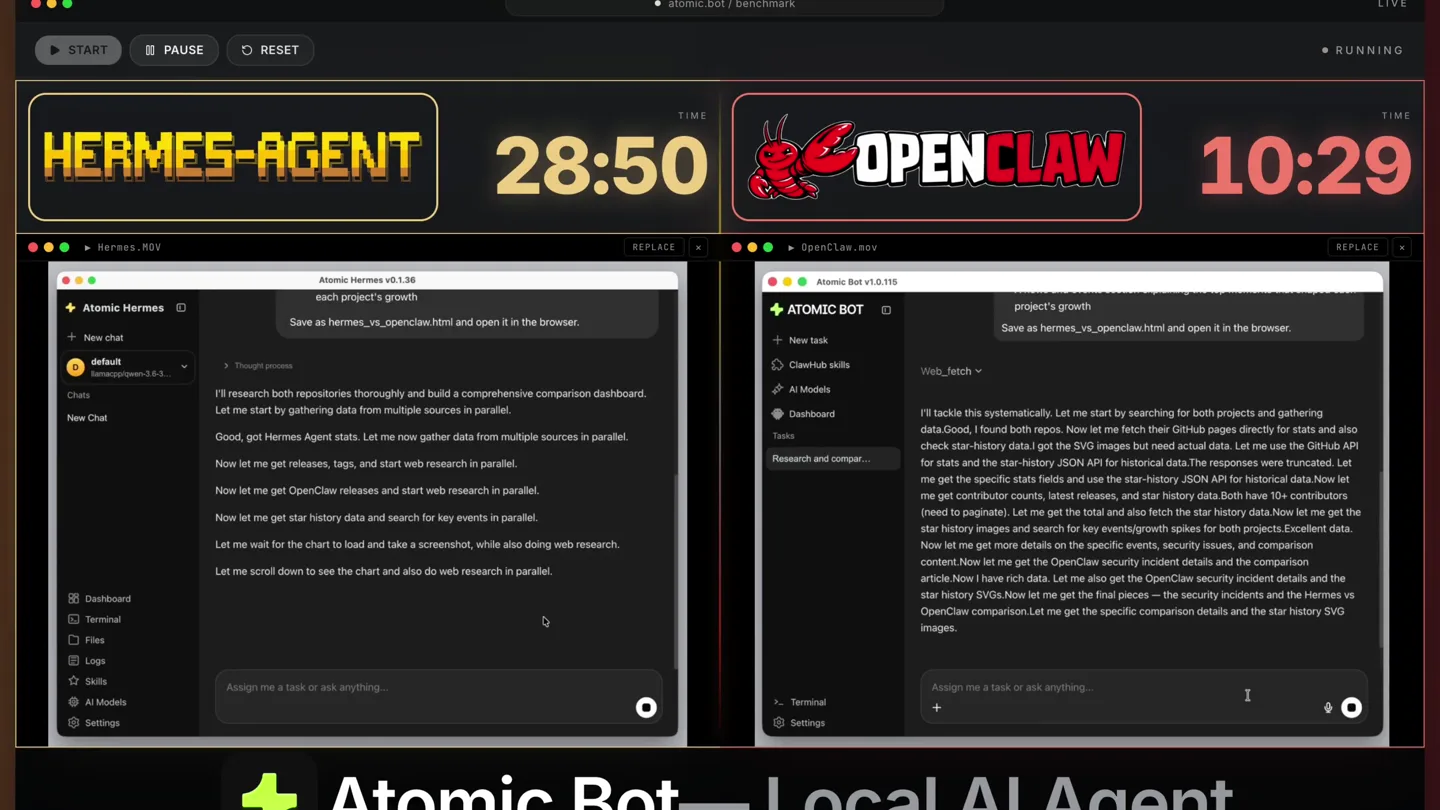
Hermes Agent vs OpenClaw using Qwen 35B Local Model We asked agents to scrape GitHub star history for both tools, find what caused the growth spikes, build a live dashboard in the browser. MacBook…
Scene-by-scene timeline & spoken transcript
The Hook
Dual Agent Race Setup
“(No spoken dialogue — ambient visual of two AI agents initiating tasks)”
- On screen
- HERMES-AGENT 8:31 OPENCLAW 3:06 Atomic Hermes v0.1.36 Each project's growth Save as hermes_vs_openclaw.html and open it in the browser. Thought process I'll research both repositories thoroughly and build a comprehensive comparison dashboard. Let me start by gathering data from multiple sources in parallel. 1. Find GitHub pages and collect stats 2. Get star history data 3. Research key events and growth spikes 4. Build an HTML dashboard Let me start by researching both repos and Assign me a task or ask anything... Atomic Bot v1.0.115 ATOMIC BOT New task Clawhub skills AI Models Dashboard Tasks Research and compar... project's growth Save as hermes_vs_openclaw.html and open it in the browser. I'll tackle this systematically. Let me start by searching for both projects and gathering data.Good, I found both repos. Now let me fetch their GitHub pages directly for stats and also check star-history data.I'll get the SVG images but need actual data. Let me use the GitHub API for stats and the star-history JSON API for historical data. Let me use the GitHub API Let me get the specific stats fields and use the star-history JSON API for historical data.Now I'll me get contributor counts, latest releases, and star history data.Both have 10+ contributors (need to paginate). Let me get the total and also fetch the star history data. Let me get the star history images and search for key events/growth spikes for both projects.Excellent data. Now let me get more details on the specific events, security issues, and comparison article.Now I have more data. Let me also get the OpenClaw security incident details and the star history SVGs.Now let me get the final pieces - the security incidents and the Hermes vs OpenClaw comparison.Let me get the specific comparison details and the star history SVG images.Excellent, I have a comprehensive picture. Let me get the final star history SVG and then build the dashboard.Now let me build the HTML dashboard. I have all the data I Assign me a task or ask anything... Atomic Bot — Local AI Agent
- Camera
- Static wide shot of a MacBook screen, displaying two side-by-side terminal windows and a top-level benchmark timer.
- Motion
- Real-time text generation (typing effect) within terminal windows, with numerical counters rapidly incrementing.
Problem Agitation
Agentic Research & Data Scraping
“(No spoken dialogue — continued visual of agents processing information)”
- On screen
- HERMES-AGENT 33:01 OPENCLAW 12:01 Atomic Hermes v0.1.36 Thought process I'll research both repositories thoroughly and build a comprehensive comparison dashboard. Let me start by gathering data from multiple sources in parallel. Good, got Hermes Agent stats. Let me now gather data from multiple sources in parallel. Now let me get releases, tags, and start web research in parallel. Now let me get OpenClaw releases and start web research in parallel. Now let me get star history data and search for key events in parallel. Let me wait for the chart to load and take a screenshot, while also doing web research. Let me scroll down to see the chart and also do web research in parallel. Let me use the GitHub API for contributor data and search for key events in parallel. Let me fetch GitHub API data and do web research in parallel. Excellent. Now let me do web research for key events and get contributor counts. Now let me do web research for key events and viral moments. Now let me search for key events and viral moments for both projects. Let me use the browser for web searches. Google blocked. Let me try DuckDuckGo directly. Let me use the search skill for web research. ddgs is available. Let me now run comprehensive web searches for key events. Now let me get more detailed information on the key events and the star history data. Assign me a task or ask anything... Atomic Bot v1.0.115 ATOMIC BOT New task Clawhub skills AI Models Dashboard Tasks Run Command I'll tackle this systematically. Let me start by searching for both projects and gathering data.Good, I found both repos. Now let me fetch their GitHub pages directly for stats and also check star-history data.I'll get the SVG images but need actual data. Let me use the GitHub API for stats and the star-history JSON API for historical data. Let me use the GitHub API Let me get the specific stats fields and use the star-history JSON API for historical data.Now I'll me get contributor counts, latest releases, and star history data.Both have 10+ contributors (need to paginate). Let me get the total and also fetch the star history data. Let me get the star history images and search for key events/growth spikes for both projects.Excellent data. Now let me get more details on the specific events, security issues, and comparison article.Now I have more data. Let me also get the OpenClaw security incident details and the star history SVGs.Now let me get the final pieces - the security incidents and the Hermes vs OpenClaw comparison.Let me get the specific comparison details and the star history SVG images.Excellent, I have a comprehensive picture. Let me get the final star history SVG and then build the dashboard.Now let me build the HTML dashboard. I have all the data I need.Now let me fix the broken HTML (I see some issues from the trimming) and also copy the SVG images into the workspace directory.Now let me fix the HTML - there were some broken lines from the trimming. Let me rewrite it properly.Now let me copy the SVG files and open the dashboard in the browser. Assign me a task or ask anything... search or enter website name Extensions Supercharge your Safari browsing with apps that let you find discounts, block ads, and more. A Browser Extensions Favorites Yahoo! B G W F T Apple iCloud Bing Google Wikipedia Facebook Twitter LinkedIn Yahoo TripAdvisor Privacy Report Edit Atomic Bot — Local AI Agent
- Camera
- Static wide shot, with the right terminal window transitioning to a web browser view.
- Motion
- Seamless UI transition (terminal to browser), continued rapid text generation, and subtle UI element changes.
Product Reveal
Live Dashboard Generation
“(No spoken dialogue — visual demonstration of dashboard creation)”
- On screen
- HERMES-AGENT 33:01 OPENCLAW 12:01 Atomic Hermes v0.1.36 Thought process I'll research both repositories thoroughly and build a comprehensive comparison dashboard. Let me start by gathering data from multiple sources in parallel. Good, got Hermes Agent stats. Let me now gather data from multiple sources in parallel. Now let me get releases, tags, and start web research in parallel. Now let me get OpenClaw releases and start web research in parallel. Now let me get star history data and search for key events in parallel. Let me wait for the chart to load and take a screenshot, while also doing web research. Let me scroll down to see the chart and also do web research in parallel. Let me use the GitHub API for contributor data and search for key events in parallel. Let me fetch GitHub API data and do web research in parallel. Excellent. Now let me do web research for key events and get contributor counts. Now let me do web research for key events and viral moments. Now let me search for key events and viral moments for both projects. Let me use the browser for web searches. Google blocked. Let me try DuckDuckGo directly. Let me use the search skill for web research. ddgs is available. Let me now run comprehensive web searches for key events. Now let me get more detailed information on the key events and the star history data. Now I have all the data I need. Let me build the comprehensive HTML dashboard. Assign me a task or ask anything... Atomic Bot v1.0.115 ATOMIC BOT New task Clawhub skills AI Models Dashboard Tasks Run Command file:///Users/atomic/Library/Application%20Support/atomicbot/hermes_vs_openclaw.html Hermes Agent vs OpenClaw The two fastest-growing Al agent projects on GitHub, compared side by side Data as of May 15, 2026 - Sources: GitHub API, Star History, Tech Press Stats Comparison METRIC HERMES AGENT SOURCE OPENCLAW Stars 151,403 GitHub API 372,074 Forks 24,003 GitHub API 77,529 Contributors 386+ GitHub API 366+ Open Issues 11,336 GitHub API 7,048 Subscribers 586 GitHub API 1,601 file:///Users/atomic/Library/Application%20Support/atomicbot/hermes_vs_openclaw.html 350K 300K 250K 200K 150K 100K 50K 0 September October November December 2025 Date February March April May star-history.com GitHub Stars Hermes Agent OpenClaw Assign me a task or ask anything... Atomic Bot — Local AI Agent
- Camera
- Static wide shot, with the browser window dynamically populating with a data dashboard.
- Motion
- Data visualization animation (charts drawing, numbers incrementing) within the browser, simulating real-time dashboard generation.
Feature Teaser
Deep Dive & Timeline Analysis
“(No spoken dialogue — final visual showcasing comprehensive data)”
- On screen
- HERMES-AGENT 33:01 OPENCLAW 12:01 Atomic Hermes v0.1.36 Thought process I'll research both repositories thoroughly and build a comprehensive comparison dashboard. Let me start by gathering data from multiple sources in parallel. Good, got Hermes Agent stats. Let me now gather data from multiple sources in parallel. Now let me get releases, tags, and start web research in parallel. Now let me get OpenClaw releases and start web research in parallel. Now let me get star history data and search for key events in parallel. Let me wait for the chart to load and take a screenshot, while also doing web research. Let me scroll down to see the chart and also do web research in parallel. Let me use the GitHub API for contributor data and search for key events in parallel. Let me fetch GitHub API data and do web research in parallel. Excellent. Now let me do web research for key events and get contributor counts. Now let me do web research for key events and viral moments. Now let me search for key events and viral moments for both projects. Let me use the browser for web searches. Google blocked. Let me try DuckDuckGo directly. Let me use the search skill for web research. ddgs is available. Let me now run comprehensive web searches for key events. Now let me get more detailed information on the key events and the star history data. Now I have all the data I need. Let me build the comprehensive HTML dashboard. Assign me a task or ask anything... Atomic Bot v1.0.115 ATOMIC BOT New task Clawhub skills AI Models Dashboard Tasks Run Command file:///Users/atomic/Library/Application%20Support/atomicbot/hermes_vs_openclaw.html Hermes Agent vs OpenClaw The two fastest-growing Al agent frameworks in GitHub history. A complete comparison of their origins, milestones, growth patterns, and what shaped their trajectories. Data as of May 15, 2026 - Sources: GitHub API, DuckDuckGo, Hermes Atlas, Inbounder Blog, Forbes, Wikipedia Current Statistics HERMES AGENT GitHub Stars 151,589 Forks 24,003 Language: Python Created: July 22, 2025 Founder: Remium (Nexus Research) OPENCLAW GitHub Stars 372,122 Forks 77,048 Language: TypeScript Created: Nov 24, 2025 Founder: Peter Steinberger (PSPorko) METRIC HERMES AGENT OPENCLAW GitHub Stars 151,589 372,122 Forks 24,003 77,048 Repository 10 months (July 2025) 5.5 months (Nov 2025) file:///Users/atomic/Library/Application%20Support/atomicbot/hermes_vs_openclaw.html APR 11, 2026 Q1 Community Report - Hermes at ~57k stars in 6 weeks (faster than OpenClaw at same stage). 80+ quality- filtered repos in ecosystem. MAY 7, 2026 v0.13.0 (2026.5.7) - The Tenacity Release OpenClaw Timeline NOV 24, 2025 First Commit (Clawbot) - Peter Steinberger pushes the first commit. 80k+ Within 72 hours: 80,000+ stars. The fastest start to any open-source project in history. JAN 27, 2026 Rebrand: Clawbot -> Mailbot - Name change driven by community preference. MAR 11, 2026 MarkTechPost, Bitcoin News, and The Top Al Product Blog all pick up the story. The framing is "Al that firmly remembers everything". Creates crypto/Al droids with Bitcoin news coverage. 100-200k stars in just 3 weeks. MAR 15, 2026 SKILL ECOSYSTEM EXPLOSION Three massive ecosystem events in 10 days: Versa (Labs release agent skills), Black Forest (Late FLUX team) ships image gen skills, Anthropic releases 754 cybersecurity skills mapped to MITRE ATT&CK. Network effects create a developer explosion. APR 9, 2026 - THE BIG ONE Anthropic blocks OpenClaw - Hermes Migration Surge Anthropic blocks OpenClaw from accessing Claude Code subscriptions. HN thread hits #1 with 1,064 points and 811 comments. OpenClaw loses 10k stars in 24 hours. The lawsuit gets 813 likes and drives massive migration traffic. This is the single biggest growth event in Hermes history. Star Growth Timeline GitHub Stars Over Time Event annotations mark major milestones for each project Hermes Agent OpenClaw Model Support 20+ (OpenRouter, Nova Portal, Novikai), NVIDIA Inno, Atomic Minds, OLLaMa, Kimi, Minotaur, HuggingFace, OpenAl, Meta Multi-provider, prefers OpenAl flagship (after Anthropic block) Sub-agents Yes - spawn isolated subagents Yes - sessions, spawn orchestration Deployment Local, Docker, SSH, Singularity, Modal, Daytona, Virtual Sandbox rem/npm/bun, Docker, Nix, systemd daemon License MIT Open source First Commit Jul 22, 2025 Nov 24, 2025 Public Launch Feb 25, 2026 Nov 24, 2025 (immediate) News & Events That Shaped Growth APR 9, 2026 - THE DEFINING MOMENT The Anthropic Block Anthropic blocks OpenClaw from accessing Claude Code subscriptions. This is THE pivotal event of Q1 2026 for both file:///Users/atomic/Library/Application%20Support/atomicbot/hermes_vs_openclaw.html file:///Users/atomic/Library/Application%20Support/atomicbot/hermes_vs_openclaw.html use it. [agent skills to standard]. Gets smarter the more you 3-Layer Memory: MEMORY.md (bounded context), SQLite+HTS (session history), 8 external providers (Honcho, Mamba), Mindsight, Supermemory, RetainCB, ByteRover, OpenViking, Holographic) 20+ Platforms: Telegram, Discord, Slack, WhatsApp, Signal, SMS, Email, Matrix, Mattermost, Google Chat, and more - all from one daemon 20+ LLM Providers: OpenAI, OpenRouter, Nova Portal, Anthropic, OpenAI, Gemini, OLLaMa, vLLM, and more Multi-Agent (Kardian): v0.13.0 introduced Kardian board with heartbeat, zombie detection, per-task retries, hallucination recovery SKILL Ecosystem: 200+ published skills at peak. Install to capability, uninstall to remove. Enterprise Cred: NVIDIA GTC 2026 partnership, OpenAI integration, PSPorko founder (13 years shipping production software) Lean architecture: Externalized dependency comes - WhatsApp, Slack, Bedrock, Vertex all optional. Core install stays small. Vibe Code Appeal: Peter Steinberger's "craftsman-built" tools (personally respected deeply with the developer community) Built with data from GitHub API, DuckDuckGo search, Hermes Atlas, Inbounder Blog, Forbes, Wikipedia, and multiple tech publications. Data snapshot: May 15, 2026 - All user counts from GitHub API. Events sourced from public reports and news articles MAR 23, 2026 Hermes v4.0 - The Platform Expansion Release 300 libs in 5 days, 6 new messaging adapters, MCP server management with OAuth 2.0, OpenAI-compatible API server, ultimately prompt caching. "Helium calls" is the platform expansion release - the version that transforms Hermes from a cool experiment to a serious competitor. MAR 26, 2026 OpenClaw Dethrones React OpenClaw becomes the most-starred project on GitHub, surpassing React which held the title for over a decade. Headlines read "The lobotome dethrones React". The achievement reinforces the viral loop. Q2 2026 - THE COMPARISON WARS BEGIN Head-to-Head Coverage Multiple comparison articles appear. Both projects are now established in the top tier of Al agent frameworks, but with different positioning. OpenClaw wins on platform breadth and scale; Hermes wins on learning loop and agent autonomy. Hermes Agent vs OpenClaw Dashboard - Built May 15, 2026 Data sources: GitHub API, Star History (star-history.com), Tech Press Coverage This dashboard is for informational/educational purposes only. 0:12 / 0:12
- Camera
- Static wide shot, with the browser window scrolling through the generated dashboard, revealing more detailed data and timelines.
- Motion
- Smooth vertical scrolling animation within the browser, revealing extensive data points and historical timelines.
Motion design primitives
Synthesizable in Remotion · key components of the dual-agent-code-race template.
DualTerminalRaceSplit
Two distinct terminal windows, side-by-side, each displaying rapid, real-time text generation and numerical counters, simulating a competitive task execution.
+ Code construction recipe
Utilize Remotion's <Sequence> and <AbsoluteFill> for layout. Implement a custom <TypewriterEffect> component for text generation, using `interpolate` for character reveal based on frame. Use `spring` for subtle counter updates and a shared `useCurrentFrame` to synchronize the race.
BrowserDashboardReveal
A terminal window seamlessly transforms into a fully rendered web browser displaying a complex, data-rich dashboard with animated charts and statistics.
+ Code construction recipe
Employ `AbsoluteFill` and `interpolate` for a smooth scale/fade transition from the terminal UI to the browser UI. For the dashboard, use SVG animations or Lottie files for chart drawing, and `spring` or `interpolate` for number counters and text reveals within the browser content.
DynamicDataScroll
A web browser window smoothly scrolls vertically, revealing extensive data, timelines, and detailed information within a generated report.
+ Code construction recipe
Use `AbsoluteFill` for the browser frame. Implement a scrollable content area using `interpolate` on the `translateY` property of the content div, driven by `useCurrentFrame`. Ensure smooth easing functions (e.g., `Easing.easeOutCubic`) for a natural scroll feel.
Style DNA & aesthetic system
Visual aesthetic
Typography
Motion
Special effects
Pacing & rhythm
Conceptual story rhythm
- 1
The Challenge
Purpose. Introduce the core problem: comparing two competing AI agents and their performance.
Execution. Side-by-side terminal windows with agent names and a timer, immediately setting up a 'race' scenario.
- 2
The Process
Purpose. Demonstrate the AI agent's capability to autonomously research and gather data.
Execution. Rapid text generation in terminals, showing the agents' thought processes and data scraping actions.
- 3
The Solution
Purpose. Showcase the product's ability to synthesize raw data into actionable insights.
Execution. Seamless transition to a live, interactive dashboard being built and populated with comparison metrics.
- 4
The Depth
Purpose. Highlight the comprehensive nature of the generated report and the depth of analysis.
Execution. Smooth scrolling through the detailed dashboard, revealing timelines, events, and granular statistics.




