
Heygen Video Agent Video Creation Creative Os (by Joshua Xu) · Launch Video Breakdown: Hook, Pacing & Motion Design
Today we're introducing you to the future of video. The world's first Creative Operating System, we call it the HeyGen Video Agent.
Scene-by-scene timeline & spoken transcript
The Hook
Instant UGC Ad Generation
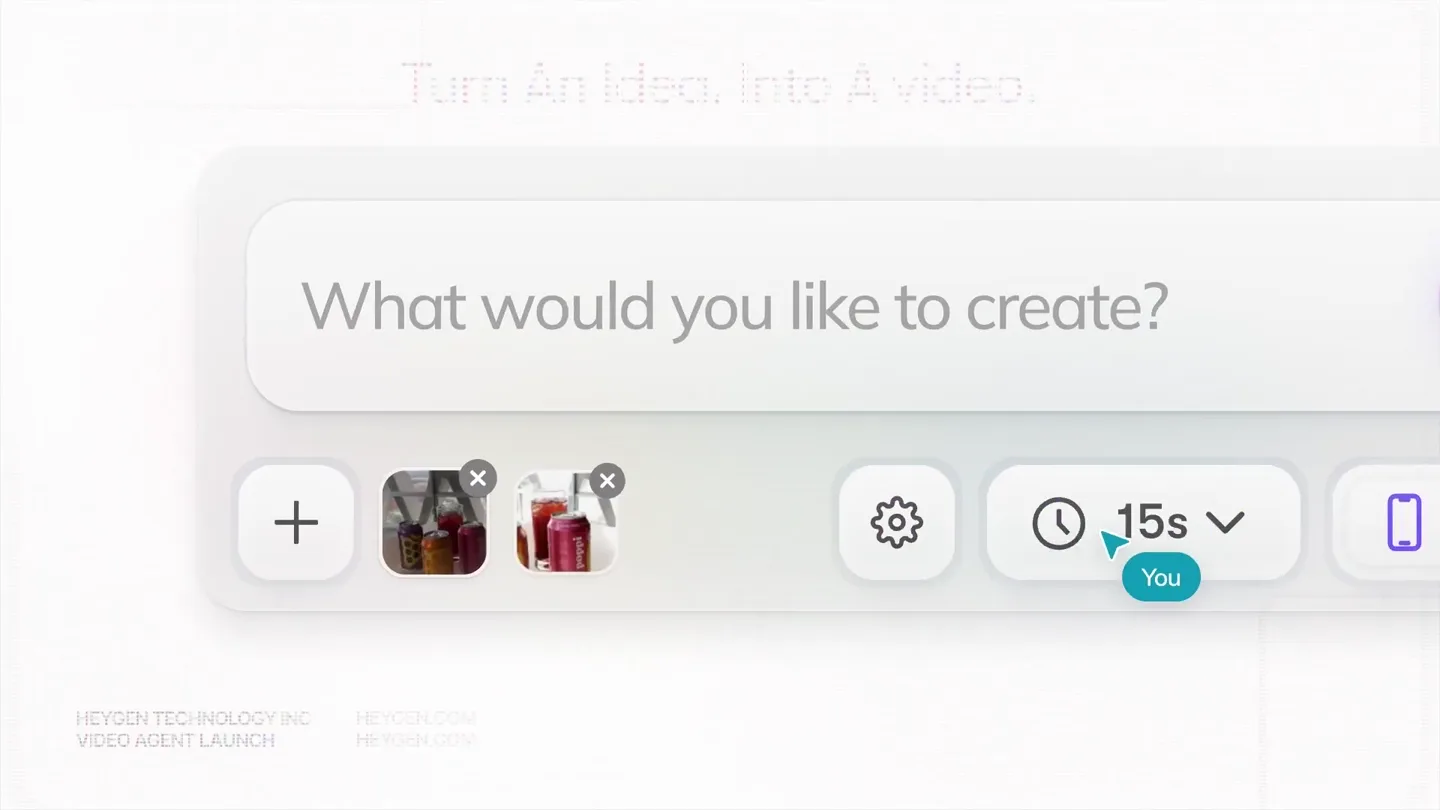
“Today we're introducing you to the future of video. The world's first Creative Operating System, we call it the HeyGen Video Agent. Make a UGC style ad promoting Poppi. Delicious this bubbly drink that's actually good for your gut? This isn't just any soda. It's packed with probiotics and apple cider vinegar. I just recorded and it took only a few minutes to create.”
- On screen
- Turn An Idea. Into A Video. Ma + DOCX DOCX You 15s Poppi Video 1 Poppi Video 3 Generating Poppi Video 2 HEYGEN TECHNOLOGY INC VIDEO AGENT LAUNCH HEYGEN.COM HEYGEN.COM
- Camera
- Close-up on a digital interface, then a split-screen showing a user recording a product and the generated video output.
- Motion
- Split-screen reveal, UI element animation, rapid content generation visualization.
Problem Agitation
The Pain of Video Production
“But first, let's talk about what's really been stopping you from creating videos. Tools.”
- On screen
- (No on-screen text)
- Camera
- Medium shot of the founder, then a wide shot of an empty, stylized office space.
- Motion
- Camera zoom out, subtle environmental fog/light effects to emphasize emptiness.
Product Reveal
Introducing HeyGen Video Agent
“I want to introduce you to the World's first creative operating system, the HeyGen Video Agent. It thinks like a creative team and works like a production or crew. Before Agent, most people couldn't make a single video in a week. Use your own footage or use existing footage.”
- On screen
- What would you like to create? Casting Talent Picking Music HEYGEN TECHNOLOGY INC VIDEO AGENT LAUNCH HEYGEN.COM
- Camera
- Medium shot of the founder, with UI elements and text overlays appearing dynamically.
- Motion
- Animated text overlays, UI pop-ups, subtle background parallax scroll.
Feature Teaser
Agent's AI Workflow
“Just upload your file, type a prompt and our Video Agent takes care of the rest. It analyze your footage and then it plans your story around that footage. Select the shots and write a script, delivering a full edited, The most realistic, expressive AI performer available, all powered by our Avatar 4 model.”
- On screen
- Use thes video001.mp4 video002.mp4 Video File Video File You 15s Prebiotic Soda poppi Agent Selecting Clips Analyze Description In this frame, a person is placing 2 cans down on a table labeled "Probiotic Soda". A clear glass filled with a dark red drink, likely one of the sodas, is positioned behind the cans. Tags: Orange Flavour Daytime City Healthy Soda Cans Plan Analyze Description In this frame, a person is placing 2 cans down on a table labeled "Probiotic Soda". A clear glass filled with a dark red drink, likely one of the sodas, is positioned behind the cans. Tags: Orange Flavour Daytime City Healthy Soda Cans Plan Analyze Description In this frame, a person is placing 2 cans down on a table labeled "Probiotic Soda". A clear glass filled with a dark red drink, likely one of the sodas, is positioned behind the cans. Tags: Orange Flavour Daytime City Healthy Soda Cans Plan HEYGEN TECHNOLOGY INC VIDEO AGENT LAUNCH HEYGEN.COM
- Camera
- Dynamic UI walkthrough, showcasing file uploads, analysis, and content generation. Zoom out to reveal a complex grid of AI processes.
- Motion
- Interactive UI animations, data visualization, grid-based content arrangement, subtle glow effects.
Call to Action
Join the Future of Video
“All you need is an idea and our video agent bring it to life.”
- On screen
- Join the waitlist. heygen.com/agent HEYGEN TECHNOLOGY INC VIDEO AGENT LAUNCH HEYGEN.COM
- Camera
- Medium shot of the founder, transitioning to a full-screen call to action.
- Motion
- Smooth transition to static text, bold typography, clean fade-in.
Motion design primitives
Synthesizable in Remotion · key components of the ai-creative-os-launch template.
DynamicUIPopup
UI elements (like chat bubbles, file cards, or process indicators) animate into view with a subtle bounce or spring effect, often accompanied by a soft glow or shadow.
+ Code construction recipe
Use `spring()` for position and scale, `interpolate()` for opacity. Apply `box-shadow` with `filter: drop-shadow()` for glow. SVG paths for speech bubbles.
GridContentReveal
A grid of content cards or process steps animates into view, often with a staggered delay, revealing complex workflows or multiple outputs.
+ Code construction recipe
Map over an array of data, applying `delayRender()` and `spring()` to each item's `x`, `y`, and `opacity` based on its index. Use `GridLayout` component for arrangement.
InteractiveCursorHighlight
A glowing, animated cursor or pointer highlights specific UI elements, simulating user interaction and guiding the viewer's eye.
+ Code construction recipe
Animate an SVG cursor path using `interpolate()` for position. Apply a `radial-gradient` or `filter: drop-shadow()` for the glow effect, with `opacity` and `scale` variations.
Style DNA & aesthetic system
Visual aesthetic
Typography
Motion
Special effects
Pacing & rhythm
Conceptual story rhythm
- 1
The 'Wow' Moment
Purpose. Immediately showcase the product's core value proposition with a compelling, tangible example.
Execution. Rapid-fire demonstration of AI-generated content, split-screen comparison, and quick results.
- 2
Problem & Solution
Purpose. Agitate the audience's pain points with existing solutions, then introduce the product as the ultimate answer.
Execution. Founder speaking directly to camera, transitioning to abstract visuals representing complexity, then back to founder introducing the 'Creative OS'.
- 3
Deep Dive & Mechanics
Purpose. Explain how the product works, highlighting its intelligence and comprehensive capabilities.
Execution. Detailed UI walkthroughs, data visualization grids, animated process flows, and AI avatar demonstrations.
- 4
Vision & Call to Action
Purpose. Inspire viewers with the future potential of the product and guide them to the next step.
Execution. Founder's concluding remarks, followed by a clear, bold on-screen call to action with a URL.




