
Liteparse (by LlamaIndex) · Launch Video Breakdown: Hook, Pacing & Motion Design
The fastest PDF-to-markdown parser, and more accurate than the open-source pack.
Scene-by-scene timeline & spoken transcript
The Hook
Instant PDF-to-Markdown Conversion
“(No spoken dialogue — The track features a slow, ambient electronic score with sustained synth pads and a prominent sub-bass drone. The overall mood is calm and slightly mysterious, with a consistent, low-frequency hum throughout.)”
- On screen
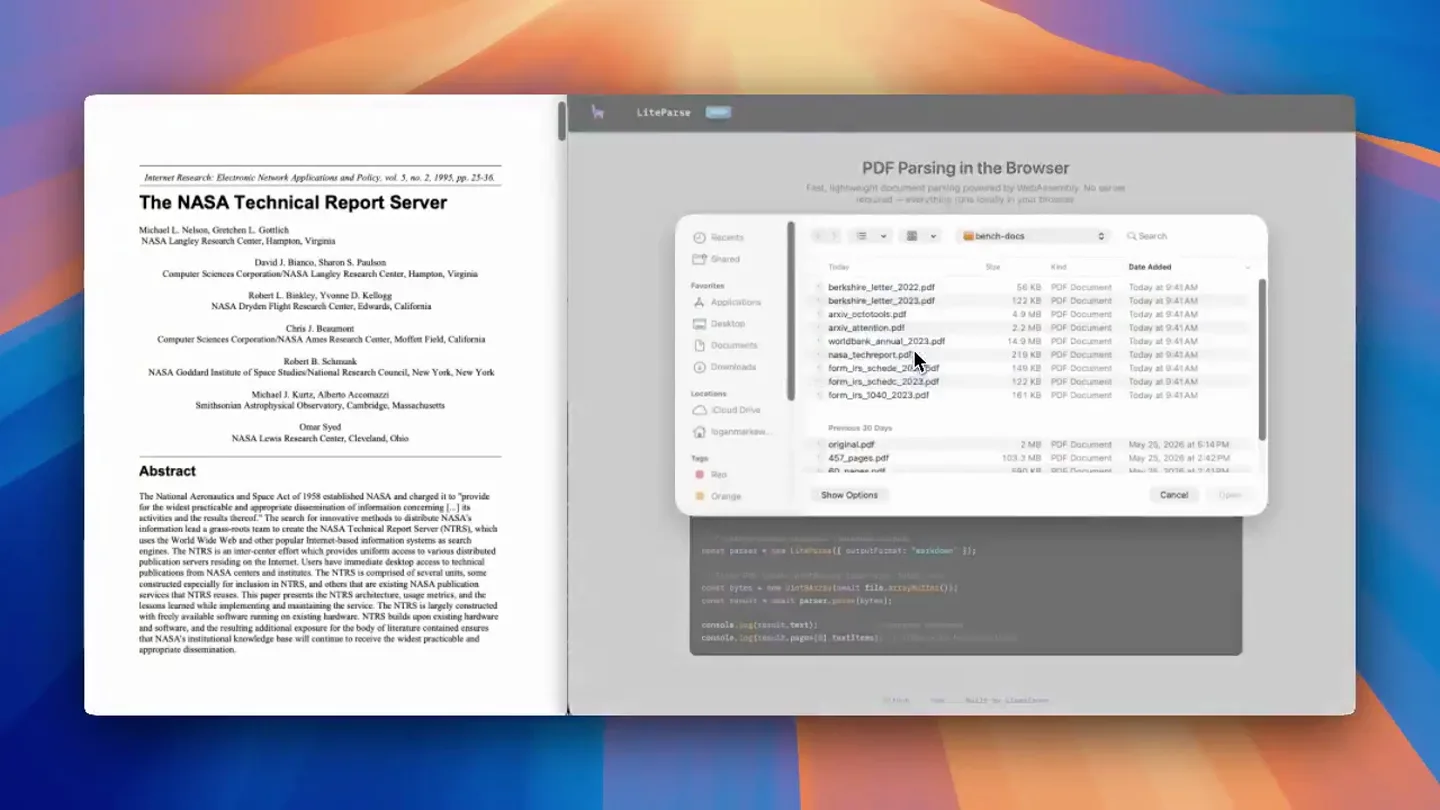
- LiteParse PDF Parsing in the Browser Fast, lightweight document parsing powered by WebAssembly. No server required - everything runs locally in your browser. $ npm install @llamaindex/liteparse-wasm Drop a PDF here or click to browse Ready, drop a PDF to parse. Usage import { LiteParse } from '@llamaindex/liteparse-wasm'; // Initialize the WASM engine await init(); // Create a parser instance. Markdown output. const parser = new LiteParse({ outputFormat: 'markdown' }); // Parse a PDF file. For demo, we'll use a local file. const bytes = new Uint8Array(await file.arrayBuffer()); const result = await parser.parse(bytes); console.log(result.text); console.log(result.pages[0].textBoxes); // JSON with bounding boxes
- Camera
- Static wide shot of a browser window, then a system file dialog appears centered.
- Motion
- UI overlay, cursor interaction, modal window animation.
Product Reveal
Blazing Fast Parsing in Action
“(No spoken dialogue — The track features a slow, ambient electronic score with sustained synth pads and a prominent sub-bass drone. The overall mood is calm and slightly mysterious, with a consistent, low-frequency hum throughout.)”
- On screen
- Parsed 16 page(s) in 0.03s Output: Markdown # The NASA Technical Report Server Michael L. Nelson, Gretchen L. Gottlich NASA Langley Research Center, Hampton, Virginia David J. Bianco, Sharon S. Paulson Computer Sciences Corporation/NASA Langley Research Center, Hampton, Virginia Robert L. Binkley, Yvonne D. Kellogg NASA Dryden Flight Research Center, Edwards, California Chris J. Beaumont Computer Sciences Corporation/NASA Ames Research Center, Moffett Field, California Robert B. Schmunk NASA Goddard Institute of Space Studies/National Research Council, New York, New York Michael J. Kurtz, Alberto Accomazzi Smithsonian Astrophysical Observatory, Cambridge, Massachusetts Omar Syed NASA Lewis Research Center, Cleveland, Ohio ## Abstract The National Aeronautics and Space Administration (NASA) and charged it to "provide for the widest practicable and appropriate dissemination of information concerning [...] its activities and the results thereof." The search for innovative methods to distribute NASA's information lead a grass-roots team to create The NASA Technical Report Server (NTRS), which uses the World Wide Web and other popular Internet-based information systems as search engines. The NTRS is an inter-center effort which provides uniform access to various distributed publication servers residing on the Internet. Users have immediate desktop access to technical publications from NASA centers and institutes. The NTRS is largely constructed with freely available software running on existing hardware. NTRS builds upon existing hardware and software, and the resulting additional exposure for the body of literature contained ensures that NASA's institutional knowledge base will continue to receive the widest practicable and appropriate dissemination. ## Introduction
- Camera
- Rapid zoom-in and pan to the right, focusing on the parsed markdown output.
- Motion
- Fast camera pan, content reveal, text highlight.
Feature Teaser
Markdown Output & Text Highlighting
“(No spoken dialogue — The track features a slow, ambient electronic score with sustained synth pads and a prominent sub-bass drone. The overall mood is calm and slightly mysterious, with a consistent, low-frequency hum throughout.)”
- On screen
- Output: Markdown # The NASA Technical Report Server Michael L. Nelson, Gretchen L. Gottlich NASA Langley Research Center, Hampton, Virginia David J. Bianco, Sharon S. Paulson Computer Sciences Corporation/NASA Langley Research Center, Hampton, Virginia Robert L. Binkley, Yvonne D. Kellogg NASA Dryden Flight Research Center, Edwards, California Chris J. Beaumont Computer Sciences Corporation/NASA Ames Research Center, Moffett Field, California Robert B. Schmunk NASA Goddard Institute of Space Studies/National Research Council, New York, New York Michael J. Kurtz, Alberto Accomazzi Smithsonian Astrophysical Observatory, Cambridge, Massachusetts Omar Syed NASA Lewis Research Center, Cleveland, Ohio ## Abstract The National Aeronautics and Space Administration (NASA) and charged it to "provide for the widest practicable and appropriate dissemination of information concerning [...] its activities and the results thereof." The search for innovative methods to distribute NASA's information lead a grass-roots team to create The NASA Technical Report Server (NTRS), which uses the World Wide Web and other popular Internet-based information systems as search engines. The NTRS is an inter-center effort which provides uniform access to various distributed publication servers residing on the Internet. Users have immediate desktop access to technical publications from NASA centers and institutes. The NTRS is largely constructed with freely available software running on existing hardware. NTRS builds upon existing hardware and software, and the resulting additional exposure for the body of literature contained ensures that NASA's institutional knowledge base will continue to receive the widest practicable and appropriate dissemination. ## Introduction
- Camera
- Slow, deliberate pan across the original PDF and the generated markdown, with a cursor highlighting text.
- Motion
- Smooth camera pan, cursor interaction, text highlighting.
Call to Action
Flexible Output Formats
“언니 (Eonni - Sister)”
- On screen
- Parsed 16 page(s) in 0.03s Output: Markdown Wrap: On Copy # The NASA Technical Report Server Michael L. Nelson, Gretchen L. Gottlich NASA Langley Research Center, Hampton, Virginia David J. Bianco, Sharon S. Paulson Computer Sciences Corporation/NASA Langley Research Center, Hampton, Virginia Robert L. Binkley, Yvonne D. Kellogg NASA Dryden Flight Research Center, Edwards, California Chris J. Beaumont Computer Sciences Corporation/NASA Ames Research Center, Moffett Field, California Robert B. Schmunk NASA Goddard Institute of Space Studies/National Research Council, New York, New York Michael J. Kurtz, Alberto Accomazzi Smithsonian Astrophysical Observatory, Cambridge, Massachusetts Omar Syed NASA Lewis Research Center, Cleveland, Ohio ## Abstract The National Aeronautics and Space Administration (NASA) and charged it to "provide for the widest practicable and appropriate dissemination of information concerning [...] its activities and the results thereof." The search for innovative methods to distribute NASA's information lead a grass-roots team to create The NASA Technical Report Server (NTRS), which uses the World Wide Web and other popular Internet-based information systems as search engines. The NTRS is an inter-center effort which provides uniform access to various distributed publication servers residing on the Internet. Users have immediate desktop access to technical publications from NASA centers and institutes. The NTRS is largely constructed with freely available software running on existing hardware. NTRS builds upon existing hardware and software, and the resulting additional exposure for the body of literature contained ensures that NASA's institutional knowledge base will continue to receive the widest practicable and appropriate dissemination. ## Introduction Output: JSON (with bounding boxes) Plain Text Markdown
- Camera
- Zoom out to reveal the full browser window, then a cursor interacts with a dropdown menu to change output formats.
- Motion
- UI interaction, dropdown menu animation, content re-render.
Motion design primitives
Synthesizable in Remotion · key components of the dual-panel-code-flow-reveal template.
DualPanelContentSync
Two side-by-side panels display synchronized content, with one panel showing the original PDF and the other showing the parsed output. Cursor interaction in one panel can trigger highlights or changes in the other.
+ Code construction recipe
Use two <AbsoluteFill> components for the panels. Implement a shared state for scroll position and highlighted text. Use <Sequence> for cursor movement and text highlighting, interpolating opacity and background color for highlights. Utilize <OffthreadVideo> for the PDF display and a custom text component for markdown/JSON output.
FastZoomPanReveal
A rapid, dynamic camera movement that zooms into a specific area of the UI and simultaneously pans to reveal new content, creating a sense of speed and efficiency.
+ Code construction recipe
Employ <interpolate> for 'scale' and 'translateX/Y' properties of the main content container. Use an 'easeOutCubic' or 'easeInOutQuad' curve for a snappy yet smooth transition. Combine with a quick fade-in for the newly revealed content.
DropdownMenuInteraction
A user interface element where a dropdown menu is clicked, expands to show options, and an option is selected, triggering a content change.
+ Code construction recipe
Animate the dropdown menu's 'height' and 'opacity' using <spring> for a natural feel when expanding/collapsing. Use <Sequence> to choreograph the click, menu expansion, option selection, and subsequent content update. The content update can be a simple re-render with a cross-fade.
Style DNA & aesthetic system
Visual aesthetic
Typography
Motion
Special effects
Pacing & rhythm
Conceptual story rhythm
- 1
The Setup
Purpose. Introduce the product's core promise and initial interaction.
Execution. Wide shot of the browser, showing the product landing page and the initial call to action (upload PDF).
- 2
The Breakthrough
Purpose. Demonstrate the product's speed and core functionality.
Execution. Rapid file upload, instant parsing, and a quick zoom to the markdown output, highlighting the speed metric.
- 3
The Detail
Purpose. Showcase the accuracy and quality of the output.
Execution. Slow pan across the original PDF and the generated markdown, with a cursor highlighting corresponding sections, emphasizing fidelity.
- 4
The Versatility
Purpose. Highlight additional features and flexibility.
Execution. Interaction with output format dropdown, demonstrating Markdown, JSON, and Plain Text options.




