Loora · Launch Video Breakdown: Hook, Pacing & Motion Design
An open-source design tool where your agents have full control: self-host it, fork it. Version history, branches, and one-way export to React/HTML.
Scene-by-scene timeline & spoken transcript
The Hook
AI-Powered Design Generation
“(No spoken dialogue — The track begins with a sustained, evolving synth pad and a subtle sub-bass drone. A high-energy riser builds from 0:03 to 0:05, culminating in a percussive impact and a short, sharp synth sweep.)”
- On screen
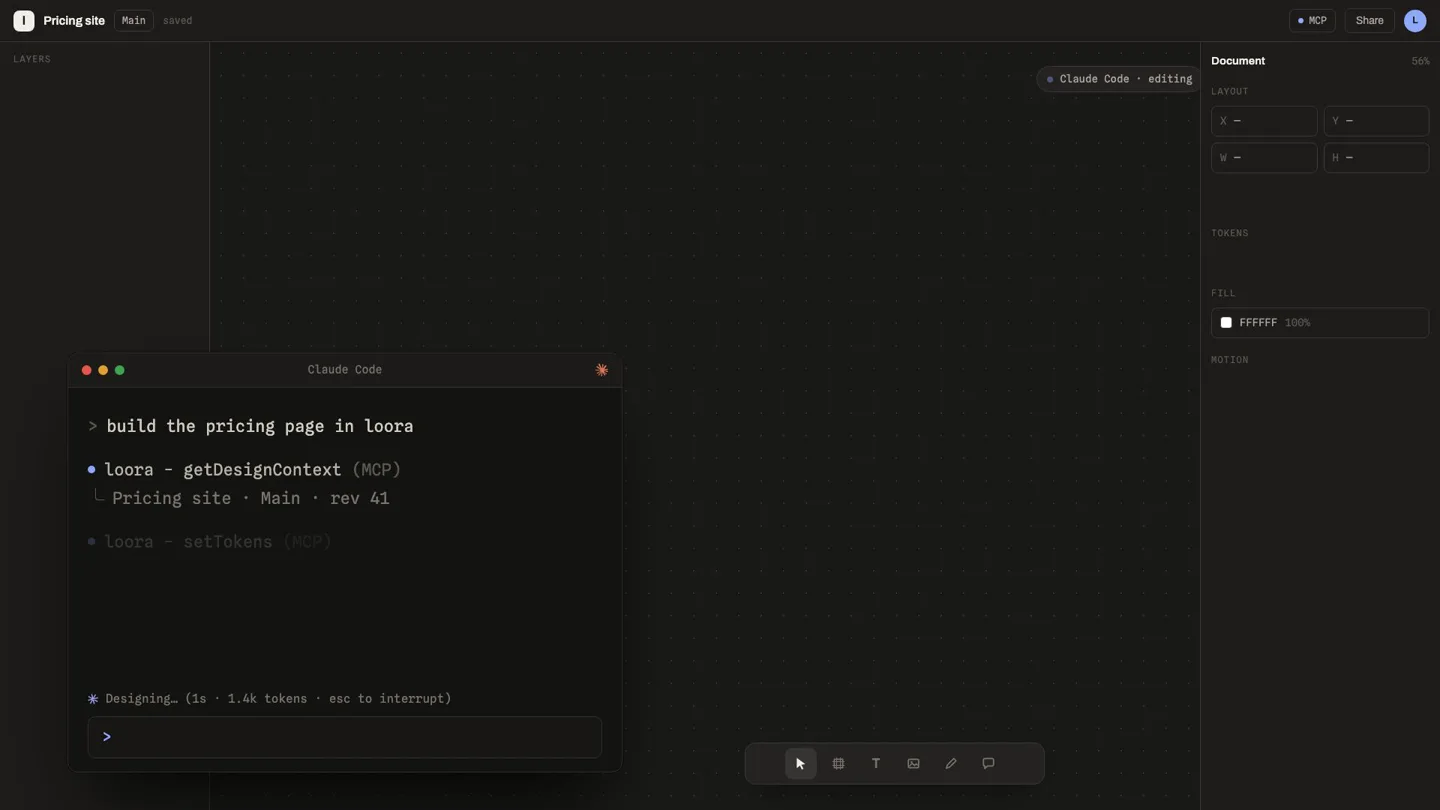
- > build the pricing page in loora • loora - getDesignContext (MCP) └ Pricing site • Main • rev 41 • loora - setTokens (MCP) └ 14 tokens • color, space, radius, text • loora - createPage (MCP) └ Pricing • 1440 × 1024 • loora - insertNodes (MCP)
- Camera
- Static, wide shot of a desktop UI with a terminal window and a design canvas.
- Motion
- Terminal-style text typing animation, rapid UI element generation and population.
Product Reveal
Instant Design Iteration
“(No spoken dialogue — A rhythmic, arpeggiated synth pattern emerges around 0:06, accompanied by a driving sub-bass line and crisp, electronic percussion. Another significant riser occurs from 0:10 to 0:12, leading into a more intense section with layered synth melodies and a prominent sub-bass drop/impact at 0:12.)”
- On screen
- loora. Design files your agent can edit. Start free. Connect your agent over MCP and it works on the same document. Free $0 /mo 50 design files 1 GB of assets 200 MCP calls/week 2 days of history Start free Pro $20 /mo Unlimited design files 100 GB of assets 2K MCP calls/week Go Pro Studio Custom Everything in Pro Shared workspace Custom limits Priority support Talk to us RECOMMENDED • loora - insertNodes (MCP) └ Header, Hero → Pricing (9 nodes) • loora - insertNodes (MCP) └ PlanGrid → Free, Pro, Studio (21 nodes) • loora - animateNodes (MCP) └ fade-in-up • stagger 120ms • loora - getScreenshot (MCP) └ pricing.png • 1440 × 1024 Pricing page is on the canvas. The three cards are instances of one PlanCard component – restyle one, restyle all.
- Camera
- Static, wide shot. Focus remains on the design canvas and terminal.
- Motion
- Staggered fade-in-up animation for UI elements, simulating a design being built programmatically.
Feature Teaser
Version Control & Theming
“(No spoken dialogue — The energy continues to build with additional synth layers and a faster rhythmic pulse. A final, powerful riser and sweep build from 0:19 to 0:21, concluding with a strong sub-bass impact and a sustained, resonant synth chord.)”
- On screen
- > now branch it and try a dark variant • loora - createBranch (MCP) └ dark-variant • from Main rev 42 • loora - setTokens (MCP) └ 6 tokens • surface, ink, line • loora - patchNodes (MCP) └ Page, PlanGrid, PlanCard (14 nodes) • loora - getScreenshot (MCP) └ dark.png • 1440 × 1024 • loora - compareBranch (MCP) └ 14 changed • 0 conflicts dark-variant is ready to compare against • Main. Nothing on Main moved – applyBranch when you want it there.
- Camera
- Static, wide shot. The design canvas dynamically changes theme.
- Motion
- Instantaneous theme change (dark mode toggle) on the design canvas, simulating branching and styling capabilities.
Motion design primitives
Synthesizable in Remotion · key components of the ai-dev-tool-showcase template.
TerminalTypewriter
Text appears character by character in a terminal window, simulating live coding or command-line input. Each line of output then appears instantly or with a slight delay.
+ Code construction recipe
Use Remotion's `Sequence` and `spring` for character-by-character reveal. For output lines, use `interpolate` with `delay` to make them appear after the command is 'typed'.
StaggeredFadeInUp
Multiple UI elements (e.g., pricing cards, header components) fade in and slide up slightly from their initial positions, with each element appearing sequentially after a short delay.
+ Code construction recipe
Apply `spring` or `interpolate` for opacity and Y-translation. Wrap elements in a `Sequence` and use `delay` or `stagger` utility functions to achieve the sequential reveal.
InstantThemeSwap
The entire design canvas instantly or near-instantly switches its color palette (e.g., from light mode to dark mode) while maintaining layout and content.
+ Code construction recipe
Utilize Remotion's `AbsoluteFill` or `Composition` to manage global CSS variables or React Context for theme. Trigger a state change that updates color values, resulting in an immediate visual switch.
Style DNA & aesthetic system
Visual aesthetic
Typography
Motion
Special effects
Pacing & rhythm
Conceptual story rhythm
- 1
Command Line Creation
Purpose. Introduce the core concept of AI-driven design generation through a familiar developer interface.
Execution. A terminal window showing commands being typed and executed, leading to the initial rendering of a design page.
- 2
Rapid UI Assembly
Purpose. Showcase the speed and efficiency of the design tool in populating a page with complex components.
Execution. Staggered fade-in-up animations of pricing cards and other UI elements, building out a complete pricing page.
- 3
Version Control & Theming
Purpose. Highlight advanced features like branching and instant theme switching, demonstrating flexibility and power.
Execution. A command to 'branch' and 'try a dark variant' is typed, followed by an immediate, full-page dark mode transformation.
- 4
Conflict Resolution & Comparison
Purpose. Emphasize the robust version control system and the ability to compare design states.
Execution. Terminal output showing '0 conflicts' and a summary of the branch comparison, reinforcing the tool's reliability.