
Omi (by Nik Shevchenko) · Launch Video Breakdown: Hook, Pacing & Motion Design
Spent 4 months and built Omi for Desktop, your life architect It sees your screen, hears your conversations and tells you what to do next It’s like having a second brain that actually pays attentio…
Scene-by-scene timeline & spoken transcript
The Hook
AI Assistant Intervenes in Social Situations
“(No spoken dialogue — 'whoosh' sound at 0:04, 'ding' at 0:07, 'thump' at 0:08. Low-frequency ambient electronic score with subtle synth pads and a slow, rhythmic pulse.)”
- On screen
- Nolan, Epstein out here in South Florida, Donal J. Trump, TIP That's not actually Epstein., EVIDENCE PRIME TIME CBS NEWS CNN Is Jeffrey Viral highwaystein driving Epstein driving footage video debunked is fake. March 14, 2023 March 13, 2026 March 14, 2023 A viral video Jeffrey Epstein is alive in drive showing a South Florida rumor went viral. Epstein's supposed has ignited, TIP Don't apologize, To: Mark Lee, Subject: Compensation Follow Up, Hi Mark, I just wanted to circle back on our conversation regarding compensation. I totally understand if now isn't a great time, Send
- Camera
- Static wide shot of the presenter, with UI elements overlaying the scene. Occasional slight camera shake to simulate handheld.
- Motion
- Augmented reality UI overlays with animated text and data cards. Elements slide in and out with subtle easing. The UI elements appear to be 'floating' in the room.
Problem Agitation
Navigating Awkward Social Cues with AI
“Hey, what are you doing tonight? I'm so tired. I'm just gonna stay in. Oh, come on. I'm gonna show you something. Oh, that's sweet. Oh, I gotta take this. Okay. Hey, what's up? Yeah, I'm just gonna order some Thai food for Maya. Should I order for two people?”
- On screen
- OMI, The painting was thoughtful, ACTION Ordering Thai Food for Maya, TIP Should I order for 2 people?
- Camera
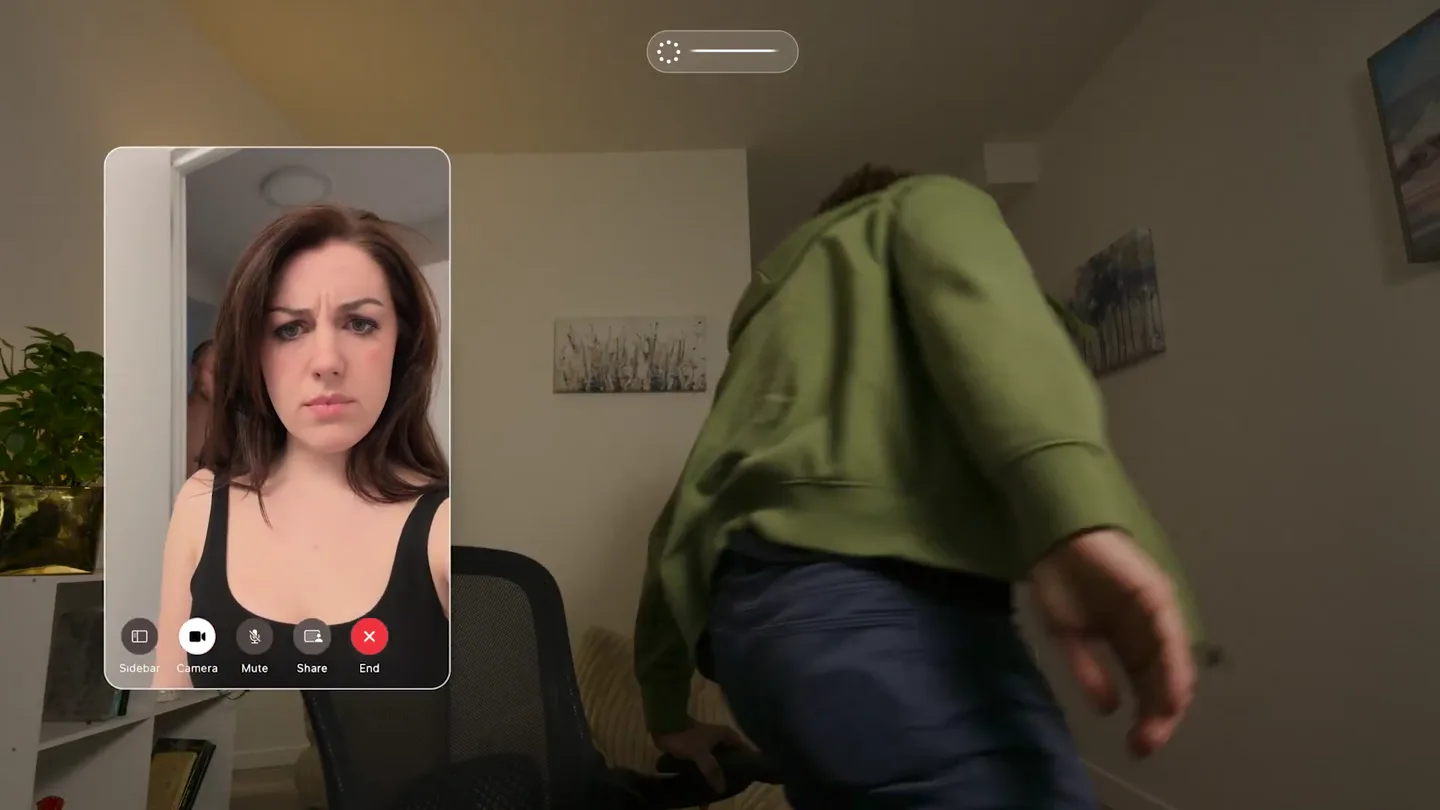
- Static wide shot of the presenter, with a video call UI element on the left. The camera remains fixed, focusing on the presenter's interaction with the call and the AI.
- Motion
- Video call UI with dynamic resizing and content changes. AI 'tip' and 'action' cards animate in from the right, using a subtle bounce or spring effect. The phone ringing sound is prominent, enhancing the narrative.
Product Reveal
Omi: Your Life Architect
“(No spoken dialogue — Phone ringing sound at 1:08, 'thud' at 1:12, 'whoosh' at 1:13. The ambient electronic score continues.)”
- On screen
- 20 seconds into the call I noticed another person in the background.
- Camera
- Static wide shot of the presenter. A large, translucent UI element with a video playback and timeline appears, obscuring part of the screen.
- Motion
- Large, translucent UI overlay with a video playback and timeline. The UI element expands and contracts with a smooth, elastic motion. A red bounding box highlights a face in the video, indicating AI detection.
Call to Action
Omi for macOS
“(No spoken dialogue — The ambient electronic score fades out.)”
- On screen
- omi For macOS.
- Camera
- Static shot of the Omi logo and tagline on a black background.
- Motion
- Simple fade-in animation for the logo and text. Clean, minimalist presentation for the final branding.
Motion design primitives
Synthesizable in Remotion · key components of the ar-productivity-assistant-launch template.
ARCardSlideIn
Translucent, rounded-rectangle cards slide in from the right or left of the screen, often containing text or images. They appear to float in 3D space relative to the camera.
+ Code construction recipe
Utilize `AbsoluteFill` for positioning, `spring()` for x-axis translation and opacity, and `CSS backdrop-filter: blur()` for translucency. Implement `z-index` for perceived depth.
DynamicVideoCallOverlay
A video call interface, typically a vertical rectangle, appears on the left side of the screen, showing a participant. It can dynamically resize or change content within its frame.
+ Code construction recipe
Use `AbsoluteFill` with `transform: translateX` and `scale` for positioning and resizing. Implement `Video` component for playback and `Image` for static content. Use `interpolate()` for smooth transitions between states.
ContextualTipPop
Small, concise 'TIP' or 'ACTION' cards appear near the top right of the screen, providing real-time advice or information. They often have a subtle bounce or elastic entry.
+ Code construction recipe
Employ `AbsoluteFill` for fixed positioning. Animate `translateY` and `opacity` using `spring()` with a low damping ratio for the bounce effect. Use `Text` component for content.
Style DNA & aesthetic system
Visual aesthetic
Typography
Motion
Special effects
Pacing & rhythm
Conceptual story rhythm
- 1
The AI's Subtle Intervention
Purpose. Introduce the AI's capability to analyze and provide context in everyday digital interactions, highlighting its intelligence without direct user input.
Execution. AR-style cards appear, offering 'TIP' and 'EVIDENCE' based on on-screen content (e.g., debunking a viral video, suggesting email etiquette).
- 2
Navigating Social Dynamics
Purpose. Demonstrate the AI's ability to understand and assist in complex social situations, such as video calls and personal interactions.
Execution. A video call UI is prominent, with the AI providing real-time 'TIP' and 'ACTION' suggestions based on the conversation and visual cues.
- 3
The 'Second Brain' in Action
Purpose. Showcase the AI's advanced analytical capabilities, such as detecting subtle background details and inferring context.
Execution. A large, translucent UI overlay displays a video playback with a timeline, highlighting AI-detected elements (e.g., a person in the background) and providing a summary.
- 4
Product Identity & Call to Action
Purpose. Conclude with a clear product name and platform, reinforcing the brand and guiding potential users.
Execution. A clean, full-screen display of the 'omi' logo and 'For macOS' tagline, with a simple fade-in animation.




