
Ori Harness (by OpenRouter) · Launch Video Breakdown: Hook, Pacing & Motion Design
The easiest way to use your favorite coding harness with OpenRouter: configures Codex, Claude Code, OpenCode, and Hermes out of the box with optimized settings for any model.
Scene-by-scene timeline & spoken transcript
The Hook
Instant Harness Configuration
“(No spoken dialogue — silent video with ambient visual rhythm.)”
- On screen
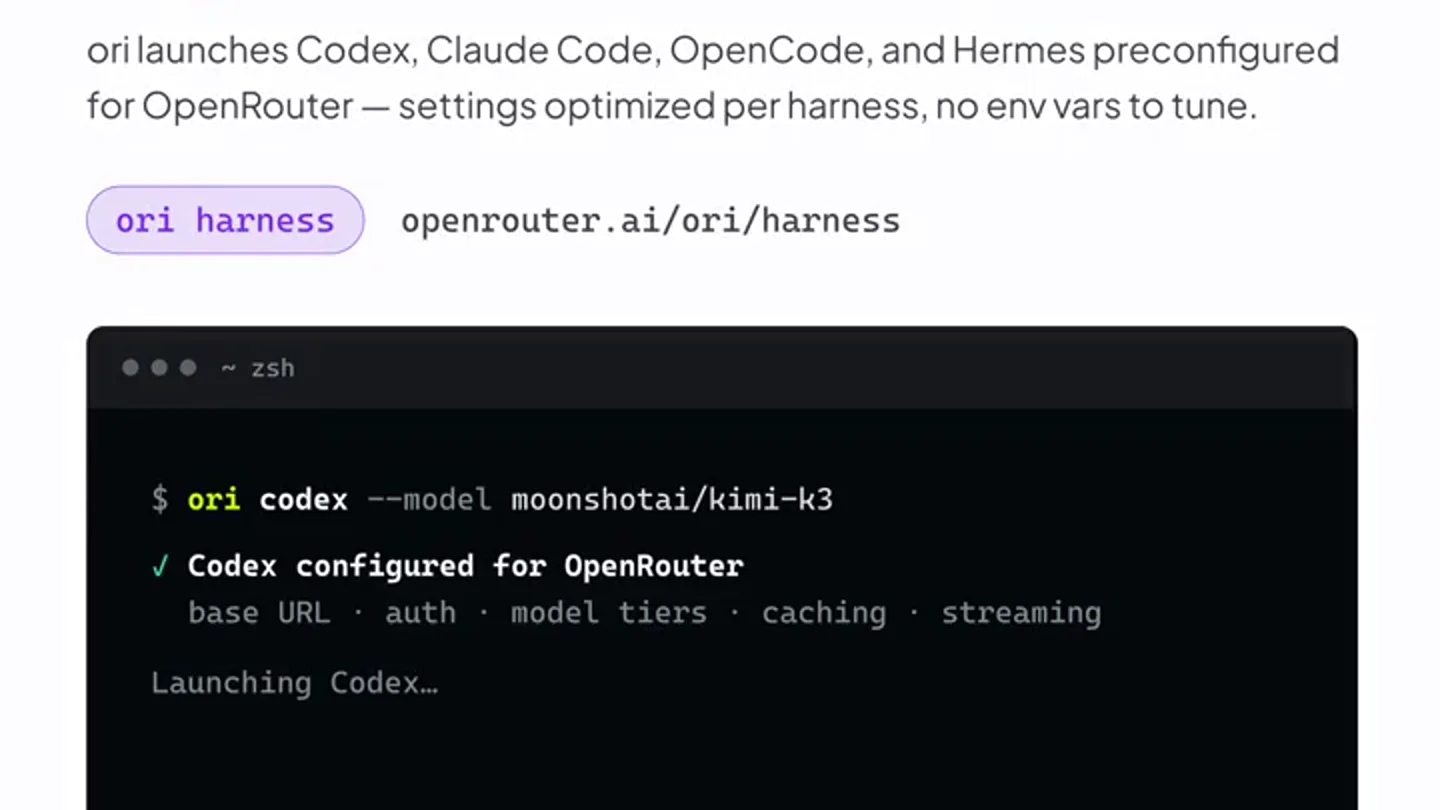
- Your harness, any model, zero setup. ori launches Codex, Claude Code, OpenCode, and Hermes preconfigured for OpenRouter — settings optimized per harness, no env vars to tune. ori harness openrouter.ai/ori/harness ~ zsh $ ori codex --model moonshotai/kimi-k3
- Camera
- Static, top-down view of a split-screen interface, focusing on a terminal window.
- Motion
- Text typing animation in a terminal, revealing a command and immediate configuration confirmation.
Product Reveal
Seamless Model Launch
“(No spoken dialogue — silent video with ambient visual rhythm.)”
- On screen
- Your harness, any model, zero setup. ori launches Codex, Claude Code, OpenCode, and Hermes preconfigured for OpenRouter — settings optimized per harness, no env vars to tune. ori harness openrouter.ai/ori/harness ~ zsh $ ori codex --model moonshotai/kimi-k3 ✓ Codex configured for OpenRouter base URL · auth · model tiers · caching · streaming Launching Codex...
- Camera
- Static, maintaining the split-screen view.
- Motion
- Rapid text reveal, simulating a 'launching' process within the terminal, followed by a brief pause.
Feature Teaser
Multi-Harness Compatibility
“(No spoken dialogue — silent video with ambient visual rhythm.)”
- On screen
- Your harness, any model, zero setup. ori launches Codex, Claude Code, OpenCode, and Hermes preconfigured for OpenRouter — settings optimized per harness, no env vars to tune. ori harness openrouter.ai/ori/harness ~ zsh $ ori codex --model moonshotai/kimi-k3 ✓ Codex configured for OpenRouter base URL · auth · model tiers · caching · streaming Launching Codex... Works with your other harnesses too: $ ori claude --model anthropic/claude-opus-5
- Camera
- Static, consistent split-screen framing.
- Motion
- Sequential text typing, introducing the concept of compatibility with 'other harnesses' and demonstrating a second command.
Call to Action
Broad Model Support
“(No spoken dialogue — silent video with ambient visual rhythm.)”
- On screen
- Your harness, any model, zero setup. ori launches Codex, Claude Code, OpenCode, and Hermes preconfigured for OpenRouter — settings optimized per harness, no env vars to tune. ori harness openrouter.ai/ori/harness ~ zsh $ ori codex --model moonshotai/kimi-k3 ✓ Codex configured for OpenRouter base URL · auth · model tiers · caching · streaming Launching Codex... Works with your other harnesses too: $ ori claude --model anthropic/claude-opus-5 $ ori opencode --model anthropic/claude-opus-5 $ ori hermes --model deepseek/deepseek-v4-flash-lite
- Camera
- Static, maintaining the established split-screen composition.
- Motion
- Further rapid text typing, showcasing additional commands for different models, reinforcing the breadth of support.
Motion design primitives
Synthesizable in Remotion · key components of the devtool-cli-showcase template.
TerminalTypewriterEffect
Text appears character by character, simulating a user typing in a command-line interface, with a distinct cursor blink.
+ Code construction recipe
Use Remotion's `Sequence` and `spring` for cursor blink. Implement `split()` on text strings and map over characters, using `delayRender` or `interpolate` with `linear` easing for sequential appearance.
InstantConfirmationReveal
A line of text, often a confirmation or status update, appears almost instantly after a command is 'typed', sometimes with a preceding checkmark.
+ Code construction recipe
Employ `AbsoluteFill` for text layers. Use `spring` with high damping and stiffness for a quick, snappy opacity and scale animation, or simply `delayRender` for immediate appearance after a short pause.
SplitScreenProductShowcase
The screen is divided into two distinct areas: a static, branded header/tagline section and a dynamic, interactive product demonstration area (e.g., a terminal).
+ Code construction recipe
Utilize `AbsoluteFill` and `static` positioning for the header. The lower section can be a `Composition` with its own animations, ensuring clear visual separation and hierarchy.
Style DNA & aesthetic system
Visual aesthetic
Typography
Motion
Special effects
Pacing & rhythm
Conceptual story rhythm
- 1
The Promise
Purpose. Immediately state the core value proposition: ease of use and broad compatibility.
Execution. Prominent headline 'Your harness, any model, zero setup.' at the top, setting the stage.
- 2
The Demonstration
Purpose. Show, don't tell, how easy it is to configure and launch a model.
Execution. Terminal typing 'ori codex' command, followed by instant 'configured' confirmation and 'Launching Codex...' message.
- 3
The Expansion
Purpose. Illustrate the product's versatility and support for multiple models/harnesses.
Execution. Text 'Works with your other harnesses too:' followed by rapid typing of 'ori claude', 'ori opencode', 'ori hermes' commands.
- 4
The Reinforcement
Purpose. Solidify the message of comprehensive, out-of-the-box support.
Execution. The continuous flow of commands and configurations in the terminal, reinforcing the 'any model, zero setup' claim.




