
Pdfcn (by Shadcn Labs) · Launch Video Breakdown: Hook, Pacing & Motion Design
pdfcn builds PDFs the way you build UI. It is powered by Takumi and Forme, with themes, components, and blocks, and it is shadcn/ui compatible and open source.
Scene-by-scene timeline & spoken transcript
The Hook
Terminal Install & Component Add
“(No spoken dialogue — A distinct riser/sweep leads into a percussive impact, setting a high-energy tone.)”
- On screen
- 01 - Install pdfcn.dev bun npm pnpm yarn $ npx shadcn add @p| $ npx shadcn add @pdfcn/takumi/invoice-corporate
- Camera
- Static, slightly angled perspective on a terminal window, then a quick cut to a slightly wider, still angled view.
- Motion
- Rapid text typing animation, followed by a quick scene cut.
Product Reveal
PDF Composition & Theming
“(No spoken dialogue — Ambient electronic score with pizzicato synths and percussive elements continues.)”
- On screen
- 02 - Compose PageHeader: pdfcn Innovative PDF Solutions • Nagpur, IN Invoice # Issue Date Due Date Payment Table Subtotal Tax (8%) Total Due PageFooter: Corporate billing - Net 30 terms apply. For inquiries, contact accounts@pdfcn.app pdfcn.dev 03 - Theme THEME 04/09 Minimal TOKENS primary #FD3DCA accent #FC6B0A muted #88D79F border #58E507 THEME 08/09 Forest TOKENS primary #15803D accent #16A34A muted #F0FDF4 border #BBF700
- Camera
- Camera rotates around a 3D PDF document, showcasing different sections and then zooms out slightly to reveal theme options.
- Motion
- 3D object rotation, UI element highlighting, color palette transitions, and text reveal animations.
Feature Teaser
Underlying Technologies & Ecosystem
“(No spoken dialogue — A significant riser/sweep culminates in a sub-bass drop/impact, emphasizing a transition.)”
- On screen
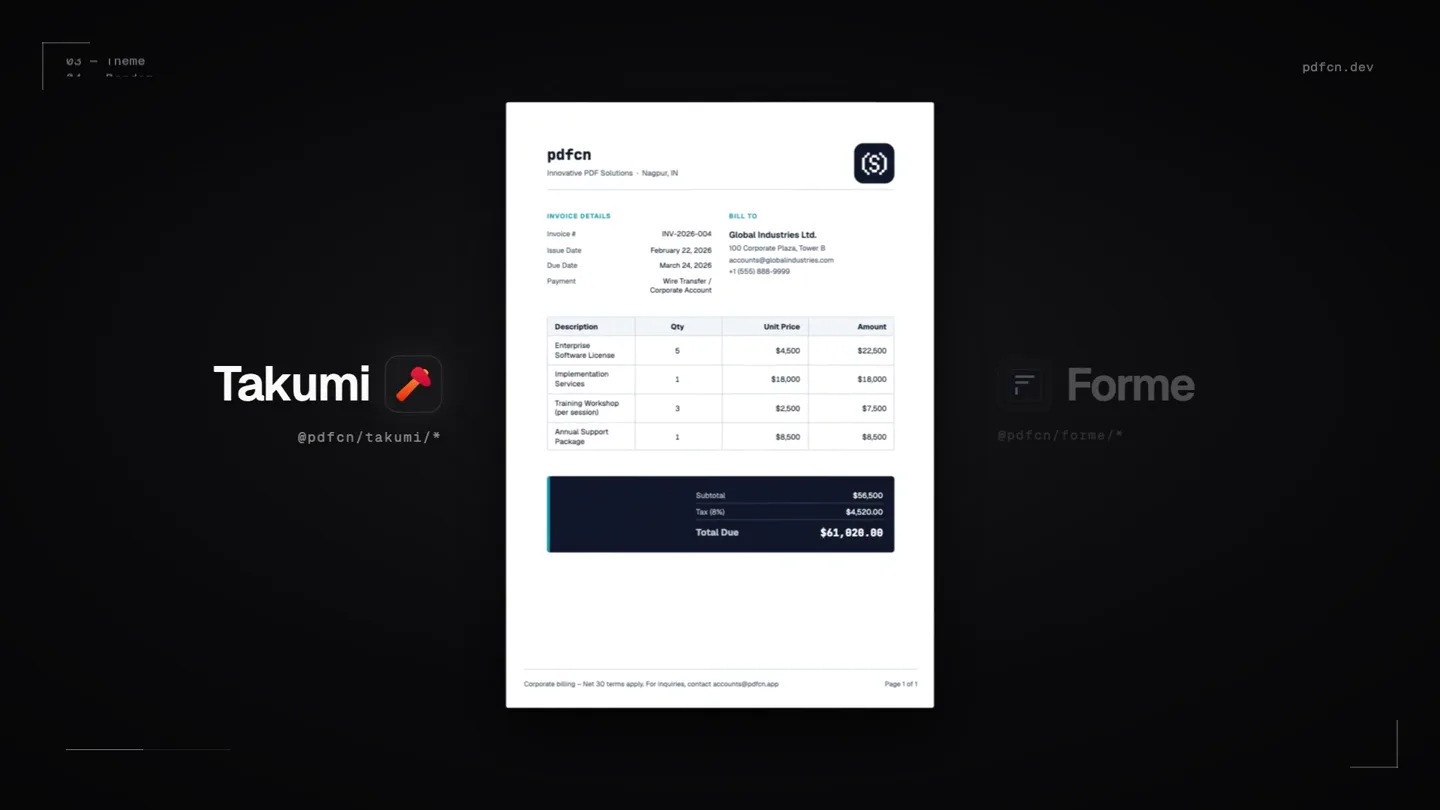
- 04 - Rendez pdfcn.dev Takumi ⚡️ @pdfcn/takumi/* Forme @pdfcn/forme/* Same components. Two renderers. 05 - Ship 24 COMPONENTS 20 BLOCKS 9 THEMES 2 RENDERERS Invoices • Reports • Tickets • Labels • Certificates • Forms
- Camera
- Static view of the PDF with text elements animating in, then a wide, slightly angled shot of numerous PDF documents arranged in a grid, slowly zooming out.
- Motion
- Text reveal with subtle glow, grid array generation, numerical counter animation, and text fade-in.
Call to Action
Brand Reveal & Tagline
“(No spoken dialogue — A final riser/sweep is followed by a percussive impact, concluding the video with a strong beat.)”
- On screen
- (S) / pdfcn Beautiful Beautiful PDFs, made simple. pdfcn.dev • Free & open source
- Camera
- Close-up on a pixelated logo forming, then a quick zoom out to reveal the full logo and tagline, with a subtle camera push-in.
- Motion
- Pixelated logo reveal, text pop-in, and subtle camera push.
Motion design primitives
Synthesizable in Remotion · key components of the shadcn-pdfcn-inspired-launch template.
TerminalTypewriter
Text appears character by character in a terminal window, simulating live typing, with a blinking cursor. Package manager tabs are highlighted.
+ Code construction recipe
Use Remotion's 'Sequence' and 'spring' for character reveal, 'interpolate' for cursor blink opacity. Implement a 'Loop' component for the blinking cursor. Highlight active tabs with 'spring' for scale and opacity.
PDF3DRotateThemer
A 3D PDF document rotates and scales, allowing UI elements to be highlighted and color themes to dynamically change its appearance.
+ Code construction recipe
Utilize Remotion's 'AbsoluteFill' and 'interpolate' for 3D rotation and scaling. Implement 'spring' for UI element highlights and 'useCurrentFrame' to drive color changes based on a predefined palette array.
GridArrayCounterReveal
Numerous PDF documents are arranged in a dynamic grid, while large numbers and associated labels animate into view, counting up to their final values.
+ Code construction recipe
Create a grid of 'Image' components with 'map' and 'AbsoluteFill'. Use 'spring' for the numerical counter animation and 'interpolate' for text fade-in and scale. Implement a subtle camera 'translateZ' for depth.
Style DNA & aesthetic system
Visual aesthetic
Typography
Motion
Special effects
Pacing & rhythm
Conceptual story rhythm
- 1
Developer Workflow Intro
Purpose. Hook developers by showing immediate utility and ease of integration.
Execution. Terminal typing animation, quick install command, and component addition.
- 2
Visual Customization Showcase
Purpose. Demonstrate the product's flexibility in design and theming.
Execution. 3D PDF rotation, UI element highlighting, and dynamic theme changes.
- 3
Ecosystem & Scale
Purpose. Highlight the underlying technology and the breadth of available components.
Execution. Reveal of Takumi and Forme, followed by a grid of PDFs and numerical counters.
- 4
Brand & Value Proposition
Purpose. Conclude with a memorable brand identity and core benefit.
Execution. Pixelated logo reveal, tagline, and call to action.