
session-migrate · Launch Video Breakdown: Hook, Pacing & Motion Design
Migrate coding agent sessions across Claude Code, Codex, Pi, OpenCode, and more in one command when you run out of usage.
Scene-by-scene timeline & spoken transcript
The Hook
Initial Coding Session & Context Window
“(No spoken dialogue — silent video with ambient typing sounds implied by visual text progression.)”
- On screen
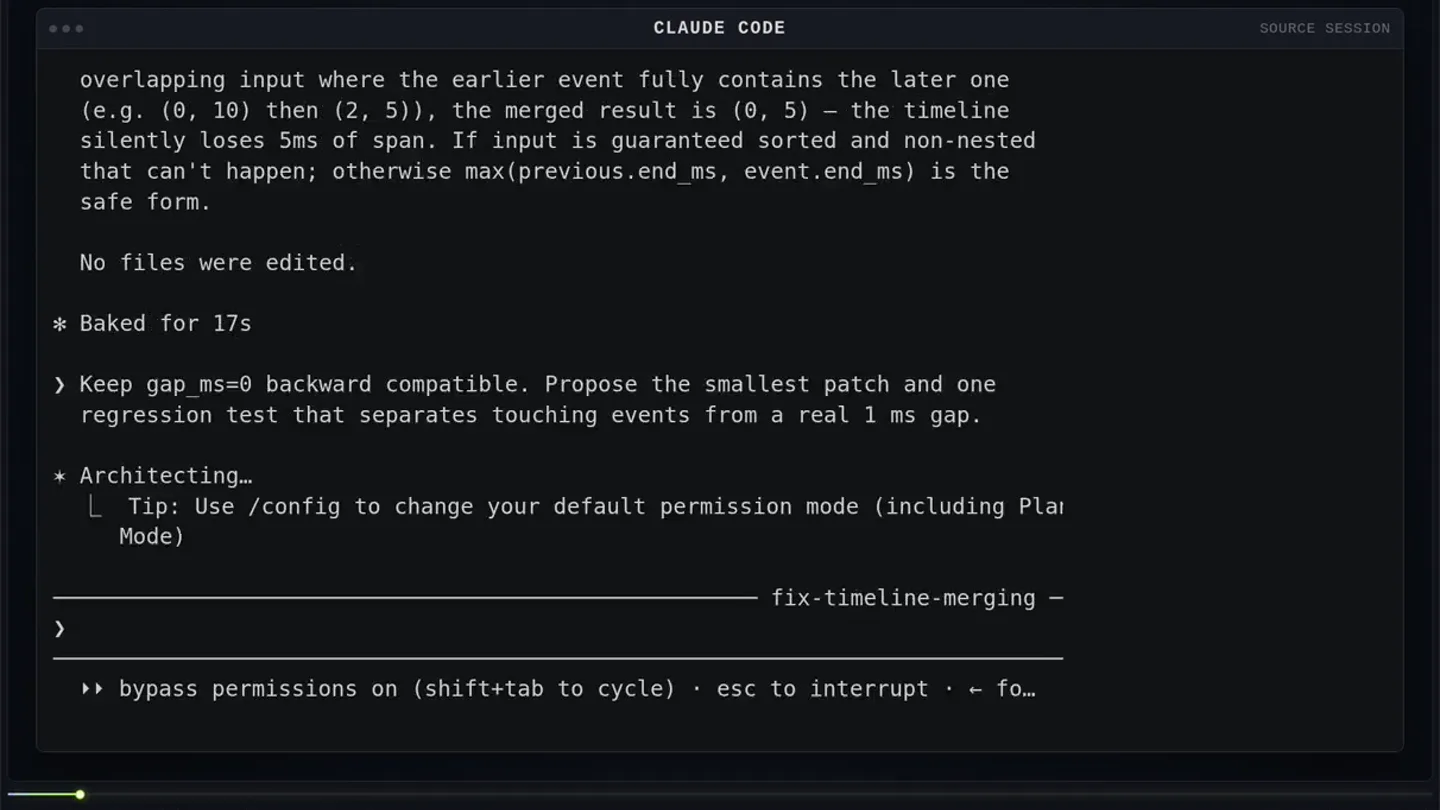
- CLAUDE CODE unreachable-by-design: touching events (end_ms == start_ms, gap 0) require 0 < 0, which is never true, so coalesce(events) with no argument merges nothing at all. Under <=, the default would do the natural thing — merge exactly-adjacent same-state events. One adjacent issue I noticed while reading, separate from the boundary bug: the merge at line 19 takes event.end_ms unconditionally. For overlapping input where the earlier event fully contains the later one (e.g. (0, 10) then (2, 5)), the merged result is (0, 5) — the timeline silently loses 5ms of span. If input is guaranteed sorted and non-nested that can't happen; otherwise max(previous.end_ms, event.end_ms) is the safe form. No files were edited. * Baked for 17s — fix-timeline-merging — > Keep gap_ms=0 backward comp » bypass permissions on (shift+tab to cycle) SOURCE SESSION CLAUDE CODE CONTEXT WINDOW FULL Continue this session in Codex SOURCE • MIGRATE • RESUME • CONTINUE CLAUDE CODE • CODEX
- Camera
- Static, full-screen terminal view, with a subtle zoom out and pan to reveal a 'context window' pop-up.
- Motion
- Text typing animation, subtle UI element reveals, and a soft, slow camera pull-back.
Product Reveal
Introducing Session-Migrate Command
“(No spoken dialogue — silent video with ambient typing sounds implied by visual text progression.)”
- On screen
- CLAUDE CODE SOURCE SESSION distinguish touching from a 1 ms gap: distinguishing them means touching merges. So I read "backward compatible" as "don't change the parameter or its default, don't make callers pass anything new" - satisfied. If you instead meant "gap_ms=0 must continue to merge nothing," say so; that needsra different patch (if gap_ms and gap <= gap_ms), and the regression test would have to move to gap_ms=1 to have two distinguishable cases. Separately, the nested-interval issue from before (line 19 taking event.end_ms unconditionally) is untouched here - it's a differenm bug and not needed for this fix. * Baked for 31s — fix-timeline-merging — » bypass permissions on (shift+tab to cycle) — for agents SESSION-MIGRATE WORKING $ smigrate transf $ smigrate transfer --title fix-timeline- $ smigrate transfer --title fix-timeline-merging --from claude --to $ smigrate transfer --title fix-timeline-merging --from claude --to codex source Claude Code session found target Codex native session written history continued · ready to resume — Continue "fix-timeline-merging" in Codex CLAUDE CODE CONTEXT WINDOW FULL Continue this session in Codex SOURCE • MIGRATE • RESUME • CONTINUE CLAUDE CODE • CODEX
- Camera
- A horizontal split-screen reveal, where the right side slides in to introduce the 'SESSION-MIGRATE' terminal.
- Motion
- Horizontal wipe/slide transition, text typing animation in both terminals, and a 'check mark' confirmation animation.
Feature Teaser
Seamless Session Transfer & Resumption
“(No spoken dialogue — silent video with ambient typing sounds implied by visual text progression.)”
- On screen
- CLAUDE CODE SOURCE SESSION distinguish touching from a 1 ms gap: distinguishing them means touching merges. So I read "backward compatible" as "don't change the parameter or its default, don't make callers pass anything new" - satisfied. If you instead meant "gap_ms=0 must continue to merge nothing," say so; that needsra different patch (if gap_ms and gap <= gap_ms), and the regression test would have to move to gap_ms=1 to have two distinguishable cases. Separately, the nested-interval issue from before (line 19 taking event.end_ms unconditionally) is untouched here - it's a differenm bug and not needed for this fix. * Baked for 31s SHARED HISTORY CODEX RESUMED SESSION Your instruction and the test you asked for point in slightly different directions at gap_ms=0, so I picked the reading the test implies. Today gap_ms=0 merges nothing at all — touching events need 0 < 0, which is never true. Under the patch, touching events at the default do merge. That is a real behavior change, and it's unavoidable if the new test is to distinguish touching from a 1 ms gap: distinguishing them means touching merges. So I read "backward compatible" as "don't change the parameter or its default, don't make callers pass anything new" - satisfied. If you instead meant "gap_ms=0 must continue to merge nothing," say so; that needsra different patch (if gap_ms and gap <= gap_ms), and the regression test would have to move to gap_ms=1 to have two distinguishable cases. Separately, the nested-interval issue from before (line 19 taking event.end_ms unconditionally) is untouched here - it's a different bug and not needed for this fix. SHARED HISTORY > Continue in Codex: implement the patch you proposed, gpt-5.6-sol default /work SOURCE • MIGRATE • RESUME • CONTINUE CLAUDE CODE • CODEX
- Camera
- The left terminal (Claude Code) shrinks slightly and shifts left, while the right terminal (Codex) expands to fill more of the screen, indicating the session transfer.
- Motion
- Dynamic resizing and repositioning of terminal windows, with a 'SHARED HISTORY' overlay appearing, and text typing animation in the new active terminal.
Call to Action
Continued Development in New Environment
“(No spoken dialogue — silent video with ambient typing sounds implied by visual text progression.)”
- On screen
- CODEX RESUMED SESSION different patch (if gap_ms and gap <= gap_ms), and the regression test would have to move to gap_ms=1 to have two distinguishable cases. Separately, the nested-interval issue from before (line 19 taking event.end_ms unconditionally) is untouched here - it's a different bug and not needed for this fix. > Continue in Codex: implement the patch you proposed, add the regression test, and run the focused test suite now. Use the available tools; don't just describe the change. * Working (1s • esc to interrupt) > Write tests for @filename gpt-5.6-sol default /work I'll apply the one-character boundary fix and the gap_ms=0 regression test, then run the focused timeline tests. * Working (3s • esc to interrupt) > Write tests for @filename gpt-5.6-sol default /work Ran rg --files -g 'timeline.py' -g 'test_timeline.py' /work /tmp/ session-migrate-demo/project 2>/dev/null /work/tests/test_timeline.py /work/src/timeline.py Working (5s • esc to interrupt) Ran sed -n '1,120p' src/timeline.py && sed -n '1,160p' tests/ test_timeline.py && git status --short from dataclasses import dataclass +37 lines (ctrl + t to view transcript) Stopping at filesystem boundary (GIT_DISCOVERY_ACROSS_FILESYSTEM not set). Working (7s • esc to interrupt) > Write tests for @filename gpt-5.6-sol default /work SOURCE • MIGRATE • RESUME • CONTINUE CLAUDE CODE • CODEX
- Camera
- The Codex terminal takes over the full screen, with the bottom navigation bar remaining visible. The camera remains static, focusing on the active terminal.
- Motion
- Text typing animation, command execution simulation, and a 'working' indicator with a progress timer, simulating real-time development.
Motion design primitives
Synthesizable in Remotion · key components of the devops-cloud-migrate-cli template.
TerminalTypingEffect
Simulates text being typed character by character into a terminal window, often with a blinking cursor and command line prompts. New lines and command outputs appear sequentially.
+ Code construction recipe
Use `Sequence` and `interpolate` to reveal text content over time. A `spring` animation can be used for the blinking cursor. Implement a `delay` between lines or commands to simulate processing time.
DualTerminalSplitReveal
A full-screen terminal view splits horizontally, revealing a second terminal window sliding in from the side, creating a side-by-side comparison or interaction.
+ Code construction recipe
Utilize `AbsoluteFill` for the background. Animate the `width` and `x` position of two `div` elements (representing terminals) using `spring` or `interpolate` to create the split and slide effect. Ensure responsive scaling for different screen sizes.
ContextWindowOverlay
A smaller, distinct rectangular window appears as an overlay on top of the main terminal, providing additional context or a call to action.
+ Code construction recipe
Create a `div` with `position: absolute` and `z-index` for the overlay. Animate its `opacity` and `scale` using `spring` for a smooth pop-in effect. Use `Text` components for the content within the overlay.
Style DNA & aesthetic system
Visual aesthetic
Typography
Motion
Special effects
Pacing & rhythm
Conceptual story rhythm
- 1
The Problem Setup
Purpose. Establish the context of a developer working within a specific AI coding environment, hinting at potential limitations or the need for a solution.
Execution. Full-screen view of a Claude Code terminal, showing detailed code and architectural notes, with a 'context window' suggesting a need to switch environments.
- 2
The Solution Introduction
Purpose. Introduce 'session-migrate' as the direct answer to the problem of transferring coding sessions.
Execution. A horizontal split-screen reveals the 'SESSION-MIGRATE' terminal, demonstrating the command-line tool in action, migrating a session from Claude Code to Codex.
- 3
The Seamless Transition
Purpose. Showcase the ease and effectiveness of the migration, highlighting the continuity of the development workflow.
Execution. The Codex terminal expands, taking prominence, with 'SHARED HISTORY' indicators, demonstrating the session successfully resumed in the new environment.
- 4
Continued Productivity
Purpose. Reinforce the value proposition by showing the developer immediately continuing their work in the new environment without interruption.
Execution. The Codex terminal fills the screen, displaying further commands, test runs, and code modifications, simulating ongoing development.




