Sf Interface Numbers (by The San Francisco Interface) · Launch Video Breakdown: Hook, Pacing & Motion Design
@sfinterface/numbers is a handcrafted React component with smooth, blurred number transitions. About 13kb zipped, built for real-world UI.
Scene-by-scene timeline & spoken transcript
The Hook
Diverse Number Formats Transition
“(No spoken dialogue — ambient visual with subtle, smooth number transitions)”
- On screen
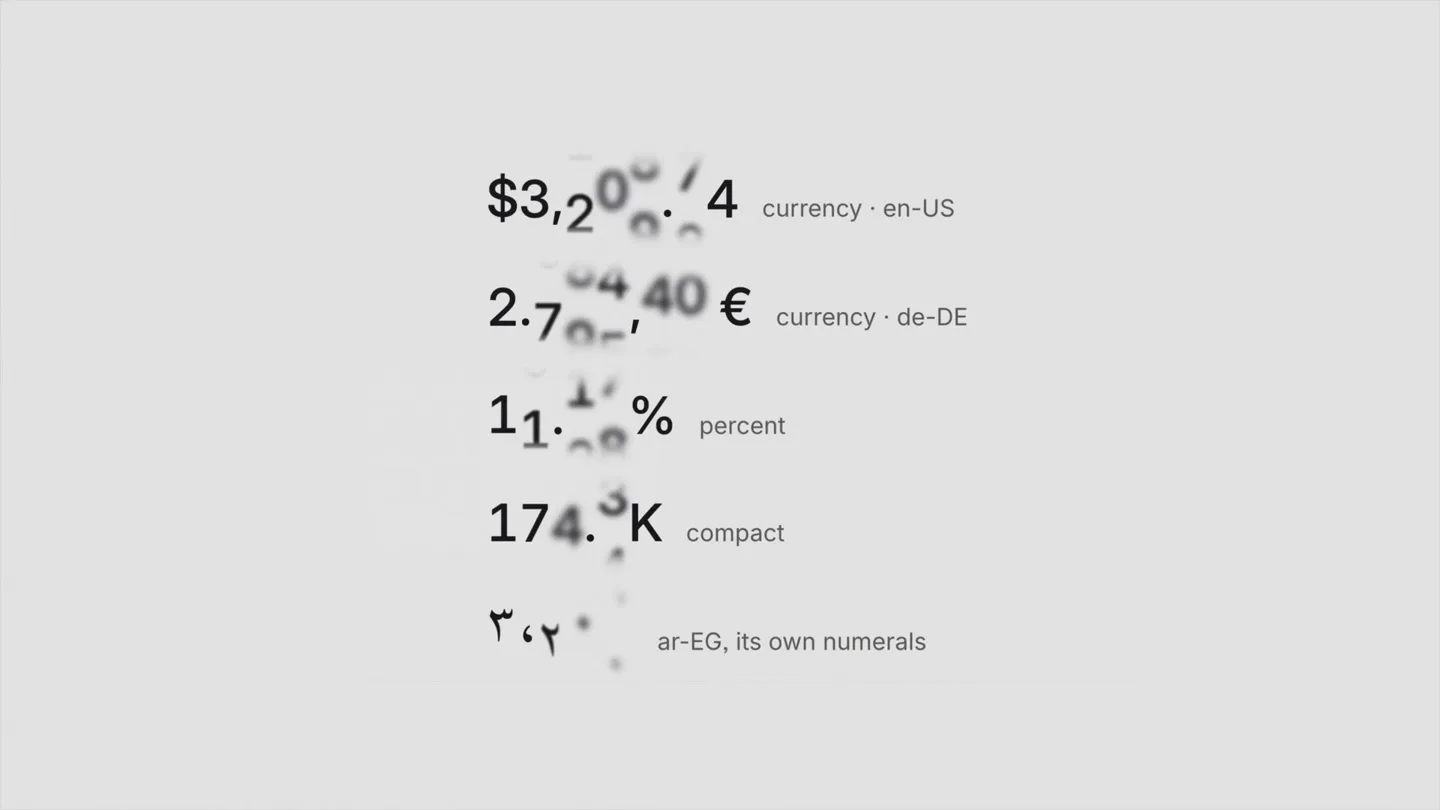
- $2,958.94 currency · en-US 2.485,51 € currency · de-DE 10.18% percent 159.5K compact ٢,٩٥٩ ar-EG, its own numerals
- Camera
- Static, centered view on text elements.
- Motion
- Smooth, blurred number transitions with a subtle 'ghosting' effect on changing digits.
Product Reveal
Real-time Data Update Simulation
“(No spoken dialogue — ambient visual with subtle, smooth number transitions)”
- On screen
- $3,046.24 currency · en-US 2.558,84 € currency · de-DE 10.55% percent 164.8K compact ٣,٠٠٤٦ ar-EG, its own numerals
- Camera
- Static, maintaining focus on the evolving numerical display.
- Motion
- Continuous, fluid number morphing, demonstrating the component's ability to handle live data updates across various formats.
Feature Teaser
Internationalization and Compactness
“(No spoken dialogue — ambient visual with subtle, smooth number transitions)”
- On screen
- $3,308.14 currency · en-US 2.778,84 € currency · de-DE 11.66% percent 180.7K compact ٣,٠٣٨ ar-EG, its own numerals
- Camera
- Static, allowing the dynamic text to be the sole focus.
- Motion
- The blurred transition effect is consistently applied, highlighting the seamless change between different number representations and locales.
Call to Action
Final Value Display and Component Name
“(No spoken dialogue — ambient visual with subtle, smooth number transitions)”
- On screen
- $3,570.04 currency · en-US 2.998,83 € currency · de-DE 12.77% percent 196.6K compact ٣,٠٥٧ ar-EG, its own numerals
- Camera
- Static, concluding with the final state of the animated numbers.
- Motion
- The animation gracefully settles on new values, reinforcing the component's smooth and reliable performance.
Motion design primitives
Synthesizable in Remotion · key components of the blurred-number-transition-showcase template.
BlurredNumberTransition
Individual digits smoothly transition from one value to another with a soft, radial blur effect, creating a 'ghosting' trail of the previous numbers.
+ Code construction recipe
Utilize Remotion's <Text> component with a custom shader or SVG filter for blur. Animate the `text-shadow` property or `filter: blur()` on individual number changes, interpolating between old and new values with a spring animation for a natural feel.
MultiLocaleNumberDisplay
Multiple lines of text display numerical values in different currencies, percentages, compact formats, and international numeral systems, all updating simultaneously.
+ Code construction recipe
Render multiple <Text> components, each with its own data source and formatting logic. Synchronize the animation start times for each number transition using `useCurrentFrame()` and `interpolate()` to ensure all numbers update in unison.
SubtleValueIncrement
Numbers increment or decrement gradually over time, simulating a live data feed, with each digit's change being a smooth, blurred transition rather than an abrupt cut.
+ Code construction recipe
Implement a `useVideoConfig()` and `useCurrentFrame()` to drive the number changes. For each digit, calculate the interpolated value and apply the `BlurredNumberTransition` primitive. Ensure a consistent easing function across all transitions for a unified feel.
Style DNA & aesthetic system
Visual aesthetic
Typography
Motion
Special effects
Pacing & rhythm
Conceptual story rhythm
- 1
Initial State & Variety
Purpose. Introduce the component's capability to handle diverse number formats and locales.
Execution. Display multiple lines of static numbers in different formats, setting the stage for dynamic changes.
- 2
Dynamic Update Demonstration
Purpose. Showcase the core feature: smooth, blurred transitions of numbers as values change.
Execution. All displayed numbers begin to increment/decrement with the signature blurred transition effect.
- 3
Sustained Performance
Purpose. Reinforce the component's reliability and consistent smooth performance over time.
Execution. The numbers continue to transition fluidly, demonstrating sustained, high-quality animation.
- 4
Final State & Impact
Purpose. Conclude with a clear demonstration of the component's polished output.
Execution. The numbers settle on their final values, showcasing the clean and readable result of the smooth transitions.