
Skillsync 2360 (by Nars) · Launch Video Breakdown: Hook, Pacing & Motion Design
Convert your github into a live resume Use this shortcut to turn your work into a resume and get discovered for what you've actually built github[dot]com/username -> skillsgithub[dot]com/username
Scene-by-scene timeline & spoken transcript
The Hook
The Developer's Isolation
“(No spoken dialogue — Pizzicato synths build anticipation with a subtle sub-bass rumble.)”
- On screen
- Skillsync
- Camera
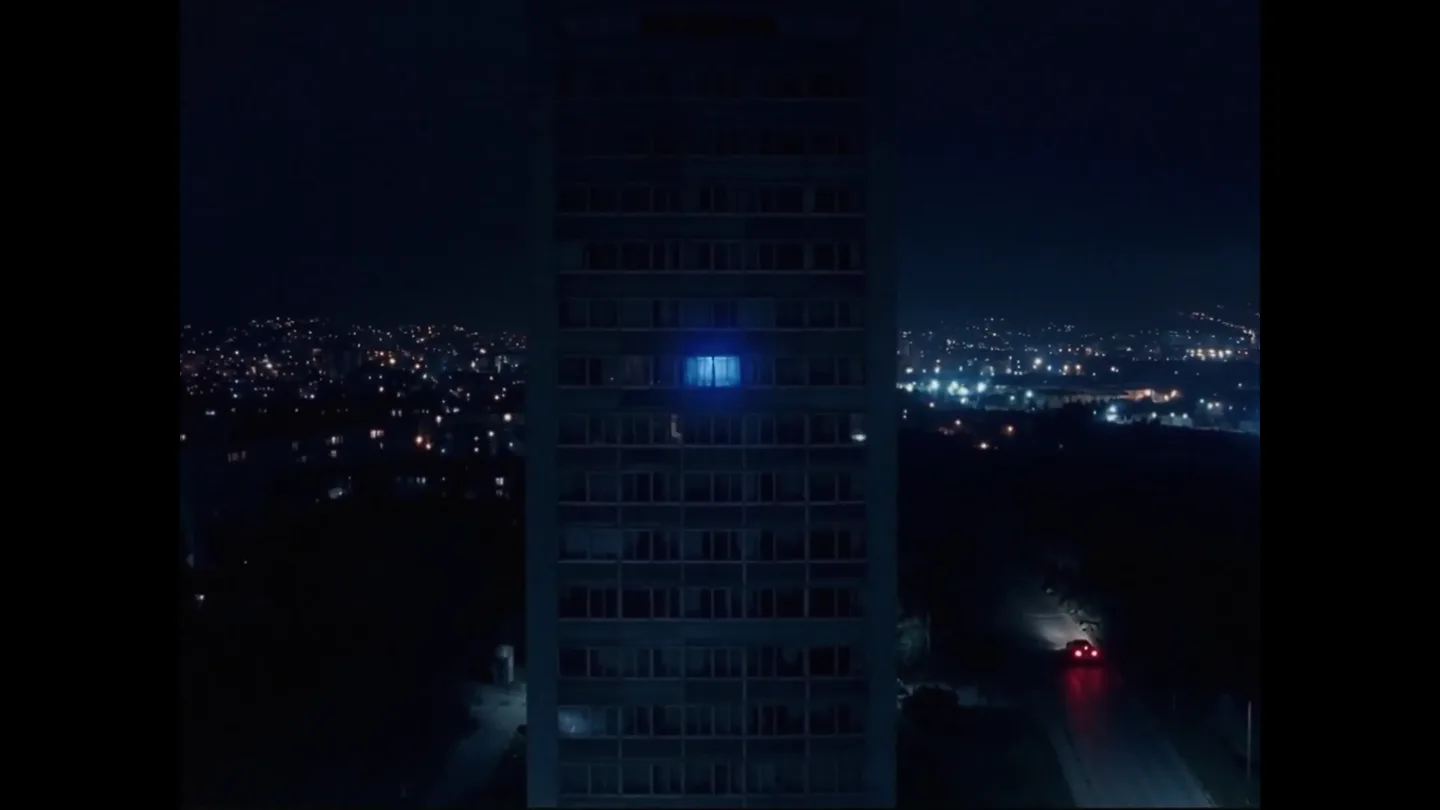
- Establishing shot of a tall building at night with a single glowing blue window, then a quick cut to a close-up of a developer's intense face illuminated by a screen.
- Motion
- Quick cuts, dramatic lighting, and a subtle zoom on the developer's face to create immediate intrigue and establish a mood of focused work.
Problem Agitation
The Resume Dilemma
“(No spoken dialogue — The audio track intensifies with 808-style percussion and high-energy risers, building tension.)”
- On screen
- New chat add an invisible pipeline feature to this parser: support a lightweight implicit threading operator so expressions like x |> f a |v g prase g (f a x) (left-to-right flow), make no mi Auto <’a>, steps: Vec<(_, types::Construct ) | { types::Evaluation::from_tuple((c, acc) t_parser, 1 of 2 Undo ⌘N Keep ⌘Y ch, steps), e(arguments), Rachel Young Please send me your resume!
- Camera
- Wide shot of a developer's room, then close-ups of code on multiple monitors, followed by a dramatic close-up of the developer's face reacting to an incoming message.
- Motion
- Rapid cuts between wide and close-up shots, screen recordings of coding, and a sudden pop-up notification with a 'spring' animation to highlight the problem.
Product Reveal
Skillsync: Your Live Resume
“(No spoken dialogue — The sound design features a sub-bass drop/impact, transitioning to a more confident, driving beat.)”
- On screen
- DeckardK00 Overview Repositories 132 Projects Packages Stars 132 DeckardK00 / README.md Hello, Wor Hey there! I see you've s intriguing or incomplete. Rust Enthusia: Welcome to my digital pla elegant solutions at @ski Tech Stack & Sta Rust aficionado (7 Deckard K ardK00 (Deckard K) x + https://skillsgithub.com/Decka DeckardK00 - Developer Pro https://skillsgithub.com/Decka INTERESTS 100 RUST SYSTEMS & COMPILERS AI ASSISTANTS & TOOLS EMBEDDED & GPU PROGRAMMING DATABASE SYSTEMS DEVELOPER TOO TECHNICAL EXPERTISE (5) Systems Programming and Performance Engineering INDICATORS Builds performance-critical applications using memory Demonstrates expertise in manual memory management an Creates native tooling and utilities requiring direct EVIDENCE NishantJoshi100/dith NishantJoshi100/sidekick NishantJoshi100/ Deckard K VIEW SKILLSYNC PROFILE —
- Camera
- Screen recordings showcasing the Skillsync platform, zooming into specific features like interests and technical expertise, then a stylized digital business card.
- Motion
- Fast-paced screen capture animations with smooth transitions, highlighting key UI elements through zooms and focus shifts. The digital card rotates and scales into view.
Call to Action
Show Your Work
“(No spoken dialogue — The audio track culminates with a final high-energy sweep and impact, followed by a sustained sub-bass.)”
- On screen
- enter Awaiting Reply Message sent Show your work
- Camera
- Close-up of a finger pressing 'enter' on a keyboard, then a message sent confirmation, and finally a return to the establishing shot of the building with multiple glowing windows.
- Motion
- Dramatic close-up, UI animation for 'Message sent', and a visual metaphor of the building's windows lighting up to represent widespread impact, concluding with a bold text reveal.
Motion design primitives
Synthesizable in Remotion · key components of the dark-tech-reveal-montage template.
GlowWindowReveal
Individual windows of a building illuminate sequentially or in patterns, creating a visual representation of activity or impact. This effect is used to introduce the product name and later to signify widespread adoption.
+ Code construction recipe
Use `Sequence` to animate `Opacity` and `Scale` properties of individual window `Rect` components. Apply a `BoxShadow` with a blue hue for the glow effect. Coordinate timing with audio beats using `AbsoluteFill` and `spring` for a subtle bounce.
CodeScreenFocus
Dynamic screen recordings of code being typed, UI elements being clicked, and text appearing, often with a subtle CRT-like distortion or glitch effect.
+ Code construction recipe
Implement `Video` components for screen recordings. Apply `Shader` effects for CRT scanlines, chromatic aberration, and subtle `Noise` filters. Use `interpolate` for smooth zooming and panning within the screen capture, and `spring` for button clicks.
DigitalCardReveal
A stylized digital business card or profile summary animates into view, often with a subtle 3D rotation, scale, and a 'share' icon interaction.
+ Code construction recipe
Create a `Composition` for the card using `AbsoluteFill` and `Layer` components. Animate `transform` properties (rotateY, scale) using `spring` for a natural, bouncy feel. Implement `Path` animations for the 'share' icon's click feedback.
Style DNA & aesthetic system
Visual aesthetic
Typography
Motion
Special effects
Pacing & rhythm
Conceptual story rhythm
- 1
The Developer's World
Purpose. Establish the setting and the protagonist (the developer) in their natural, often solitary, environment.
Execution. Dark, atmospheric shots of a building at night and a developer intensely focused on their screen, bathed in blue light.
- 2
The Pain Point
Purpose. Introduce the core problem the product solves: the inefficiency or difficulty of traditional resume creation for developers.
Execution. Rapid cuts between coding, a 'Keep' button, and a sudden, jarring 'Please send me your resume!' notification.
- 3
The Solution Unveiled
Purpose. Showcase the product (Skillsync) as the elegant, modern solution to the problem.
Execution. Dynamic screen recordings of the Skillsync platform, highlighting its features and ease of use, culminating in a sleek digital profile card.
- 4
The Impact & Call to Action
Purpose. Demonstrate the positive outcome of using the product and encourage viewers to take action.
Execution. A satisfying 'enter' press, 'Message sent' confirmation, and the building's windows lighting up, followed by a clear call to action text.




