
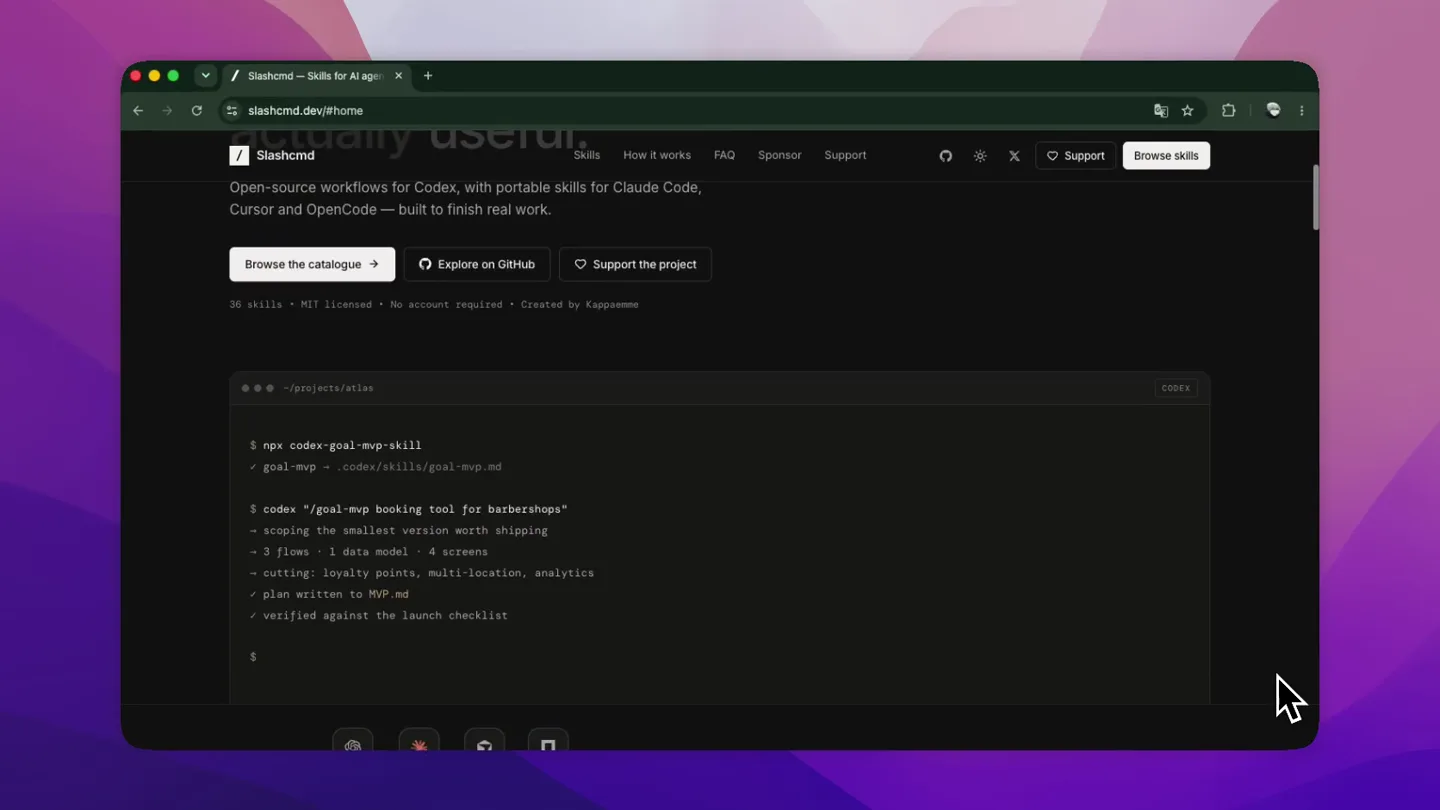
Slashcmd · Launch Video Breakdown: Hook, Pacing & Motion Design
Slashcmd is a public library for open-source Codex skills: discover workflows, see what each skill does, and install with one command.
Scene-by-scene timeline & spoken transcript
The Hook
Introducing Slashcmd: Skills for AI Agents
“(No spoken dialogue — Ambient electronic music with arpeggiated synths and a sub-bass line, consistent drum machine beat.)”
- On screen
- Slashcmd — Skills for AI agents slashcmd.dev SPONSOR One partner per month, presented property → Slashcmd Skills How it works FAQ Sponsor Support Browse skills OPEN-SOURCE SKILLS BY KAPPAEMME Skills that make AI agents actually useful. Open-source workflows for Codex, with portable skills for Claude Code, Cursor and OpenCode — built to finish real work. Browse the catalogue → Explore on GitHub Support the project 36 skills • MIT licensed • No account required • Created by Kappaemme ... /projects/atlas $ npx codex-goal-mvp-skill WORKS WITH Codex Claude Code Cursor OpenCode WHAT A SKILL IS A prompt you never have to write twice. Each skill is a single markdown file with a job, a method and a definition of done. You read it, you install it, your agent follows it. THE CATALOGUE Pick a skill. Ship something better. Search 36 skills CATEGORY All categories WORKS WITH All agents design-audit video-short-maker startup-pressure-test Design Audit Audit a website or frontend for visual hierarchy, UX, responsiveness, accessibility, and polish. Video Short Maker Trim dead air, cut the strongest moments, and optionally add local Whisper subtitles with ffmpeg. Startup Pressure Test Pressure-test a startup idea, expose its core assumptions, and define the smallest useful validation. AGENTS PORTABLE AGENTS PORTABLE AGENTS PORTABLE codex-fm codex-pomodoro-arena simple-flight-search Codex FM Launch a pixel-art lo-fi radio built for long Codex sessions and quiet focus. Pomodoro Arena Launch a Codex-themed Pomodoro arena that makes focused work feel like a game. Cheap Flights Collect current flight options from public search pages and compare prices, dates, stops, and baggage hints. CODEX ONLY 4 AGENTS PORTABLE 4 AGENTS PORTABLE Show all 36 skills 36 MORE SKILLS ON THE CATALOGUE New releases announced on X
- Camera
- Static, wide shot of a desktop browser window. The mouse cursor moves and clicks, simulating user interaction.
- Motion
- Screen recording with animated mouse cursor, subtle UI element highlighting on hover/click, smooth scrolling, and tab switching.
Product Reveal
Deep Dive: Video Short Maker Skill
“(No spoken dialogue — Ambient electronic music continues with arpeggiated synths and a sub-bass line, consistent drum machine beat.)”
- On screen
- Slashcmd — Skills for AI agents slashcmd.dev/skill/video-short-maker Slashcmd Skills How it works FAQ Sponsor Support Browse skills MEDIA Turn a long video into a sharp short. Trim dead air, cut the strongest moments, and optionally add local Whisper subtitles with ffmpeg. Created by Kappaemme • MIT • Released May 1, 2026 Codex Claude Code Cursor Portable workflow INSTALLATION Install in one command. Run this in your terminal. If your agent is already open, start a new session when the installation finishes. TERMINAL $ npx --yes codex-video-short-maker-skill@latest Copy command #1 Run the command #2 Open a new agent session #3 Try the prompt below INSIDE THE SKILL What it actually does. Turn a local source video into a platform-ready short without an external editing service. The workflow can remove dead air, tighten pauses, create a vertical export, generate local Whisper captions, burn them into the MP4, and produce an edit report. WHAT YOU CAN DO 01 Create vertical shorts from local demos, interviews, or talking-head footage. 02 Choose target duration, language, quality, and light or aggressive cuts. 03 Generate and burn local captions without an OpenAI API key. TRY IT YOURSELF Start with this prompt. Paste it into your agent after installing the skill, then replace the example details with yours. Use $video-short-maker to create a 30s vertical high quality short with English captions from /Users/me/Desktop/demo.mp4 using aggressive cut style. Copy prompt Kappaemme Creator • release on X ORIGINAL WORKFLOW Prompt → real output Watch the original demo on X Source code codex-video-short-maker-skill This skill could be supported by Your brand Kappaemme on X: 'CODEX' x.com/kappaemme1926/status/205092151481348165809 Post Kappaemme @kappaemme1926 CODEX SKILL TO MAKE SHORTS FROM ANY VIDEO! Just give Codex a local video and it creates a short for you -> Removes dead air -> Cuts pauses -> Exports 1080x1920 vertical MP4 -> Adds local Whisper captions -> Gives an edit report No OpenAI API key required. Install: npx --yes codex-video-short-maker-skill@latest --with-captions Result shown in the video. 100% open source. What should we work on? 0:31 23.9K views Relevant people Kappaemme @kappaemme1926 21 Cs Student with a great desire to learn What's happening Politics • Trending Alessandro Di Battista Trending with Forza Alessandro Trending Touching Trending in Italy Rimetititi Video game genres • Trending Crime Empire Show more
- Camera
- Static, wide shot of a desktop browser window. The mouse cursor navigates through a specific skill page, highlighting features and installation commands.
- Motion
- Screen recording with animated mouse cursor, smooth scrolling, text selection, and tab switching to a social media post demonstrating the skill.
Feature Teaser
How It Works: Installation & Execution
“(No spoken dialogue — Ambient electronic music continues with arpeggiated synths and a sub-bass line, consistent drum machine beat.)”
- On screen
- Slashcmd — Skills for AI agents slashcmd.dev/itcatalog SPONSOR One partner per month, presented property → Slashcmd Skills How it works FAQ Sponsor Support Browse skills HOW IT WORKS Install once. The workflow comes with it. 01 Install One command drops the skill into your project's skills directory. Nothing global, nothing hidden. 02 Invoke Call it by name in your agent. The skill takes over the workflow instead of you re-explaining it. 03 Scope It asks the few questions that actually change the output. Then commits to a plan. 04 Execute The work happens in your repo, in your environment, with your own tools and permissions. 05 Verify Each skill ends with a check on the real behaviour — not a summary of what it intended to do. 06 Fork Every skill is a file. Edit it, tighten it, make it yours, open a PR if it helps everyone. ON THE TIMELINE Five Kappaemme skills shared by OpenAI co-founder Greg Brockman. I build every skill in public and share the demo on X. Then something rare happened. Greg Brockman, cofounder of OpenAI, picked up five of those 5 ~2M 10K+ POSTS BY GREG COMBINED X VIEWS LIKES, SHARES, MENTIONS Greg Brockman @gdb codex for customer feedback + roadmap Kappaemme @kappaemme1926 CODEX SKILL THAT TURNS CUSTOMER FEEDBACK INTO A ROADMAP! 735 187.8K views Greg Brockman @gdb codex for finding customers for your startup: Kappaemme @kappaemme1926 CODEX SKILL THAT FINDS YOUR STARTUP'S FIRST CUSTOMERS! 1.7K 491.6K views Greg Brockman @gdb codex for improving computational complexity Kappaemme @kappaemme1926 CODEX SKILL THAT FINDS COMPLEXITY HOTSPOTS IN YOUR CODEBASE! 1.7K 330.9K views Greg Brockman @gdb codex for finding local businesses who may need help building a website: Kappaemme @kappaemme1926 CODEX SKILL THAT TURNS LOCAL SEARCH INTO CLIENT LEADS! 1.6K 293.1K views Greg Brockman @gdb codex for startup ideas Kappaemme @kappaemme1926 CODEX SKILL TO BRUTALLY TEST ANY STARTUP IDEA! STARTUP PRESSURE TEST 2.3K 395.7K views Every used links to the original public post on X.
- Camera
- Static, wide shot of a desktop browser window. The mouse cursor scrolls through the 'How it works' section and then showcases social proof from Greg Brockman.
- Motion
- Screen recording with animated mouse cursor, smooth scrolling, and highlighting of key text elements.
Call to Action
Sponsor & FAQ: Get Involved
“(No spoken dialogue — Ambient electronic music continues with arpeggiated synths and a sub-bass line, consistent drum machine beat.)”
- On screen
- Slashcmd — Skills for AI agents slashcmd.dev/itcatalog Slashcmd Skills How it works FAQ Sponsor Support Browse skills QUESTIONS The things people ask first. What exactly is a skill? Does it only work with Codex? Do I need an account? Where does my code go? Who creates these skills? FOR SPONSORS Put your tool inside the workflow. Own the homepage, a single skill launch, or the whole catalogue for a month. One relevant partner at a time — no ad network, no tracking. See sponsor options → Slashcmd Open-source skills for people who ship with coding agents. CATALOGUE All skills How it works FAQ PROJECT GitHub X Sponsor LEGAL License Privacy
- Camera
- Static, wide shot of a desktop browser window. The mouse cursor navigates to the FAQ and Sponsor sections, then scrolls to the footer.
- Motion
- Screen recording with animated mouse cursor, smooth scrolling, and subtle UI element highlighting.
Motion design primitives
Synthesizable in Remotion · key components of the developer-tool-ui-walkthrough template.
BrowserWindowScroll
A realistic browser window with a moving mouse cursor that navigates and scrolls through web content. UI elements like tabs and buttons are interactable.
+ Code construction recipe
Use <AbsoluteFill> with a <BrowserWindow> component. Implement `useCurrentFrame()` and `interpolate()` for smooth vertical scrolling of content. Animate the mouse cursor's `x` and `y` positions using `spring()` for natural movement and `Sequence` for click events.
TerminalTypewriter
Text appears character by character in a terminal-like interface, simulating typing, followed by a command execution and output.
+ Code construction recipe
Utilize `Sequence` and `spring()` for character-by-character text reveal. Use `delay` and `duration` props to control typing speed. A blinking cursor can be achieved with an `Opacity` animation toggling between 0 and 1.
SocialProofCarousel
A section of a webpage displaying multiple social media posts (e.g., X/Twitter) that scroll horizontally or vertically, showcasing endorsements or mentions.
+ Code construction recipe
Render multiple `TweetCard` components within a horizontally or vertically scrolling container. Use `interpolate()` on the `transform.translateX` or `transform.translateY` property to create a smooth scrolling effect, revealing new cards as the user scrolls.
Style DNA & aesthetic system
Visual aesthetic
Typography
Motion
Special effects
Pacing & rhythm
Conceptual story rhythm
- 1
Product Overview & Value Proposition
Purpose. Introduce Slashcmd and its core benefit: making AI agents useful with open-source skills.
Execution. Initial browser view of the Slashcmd homepage, highlighting the main headline and a brief description, followed by a scroll through the skill catalog.
- 2
Feature Deep Dive & Demonstration
Purpose. Showcase a specific skill ('Video Short Maker') in detail, demonstrating its installation and functionality.
Execution. Navigation to a specific skill page, scrolling through its features, installation command, and a brief switch to a social media post demonstrating its output.
- 3
Mechanism & Social Proof
Purpose. Explain how the skills work (install, invoke, scope, execute) and build credibility through endorsements.
Execution. Scrolling through the 'How it works' section, followed by a display of social media posts from a prominent figure (Greg Brockman) endorsing the skills.
- 4
Engagement & Call to Action
Purpose. Address common questions and invite users to engage further, either by using the product or sponsoring.
Execution. Navigation to the FAQ section, then the 'Sponsor' section, concluding with a view of the website footer with links.




