
Sodium (by Result) · Launch Video Breakdown: Hook, Pacing & Motion Design
Sodium turns your website's existing features into tools AI agents can call directly, without a browser. Connect a repo, review the tools, and go live with one line of code.
Scene-by-scene timeline & spoken transcript
The Hook
Problem Agitation: The Slow Manual Process
“(No spoken dialogue — The audio begins with a sustained, low-frequency drone, gradually building in intensity. A subtle, high-frequency sweep introduces the track. A prominent sub-bass impact occurs, followed by rhythmic, percussive synth stabs and swells. A distinct high-energy riser culminates in a powerful sub-bass drop.)”
- On screen
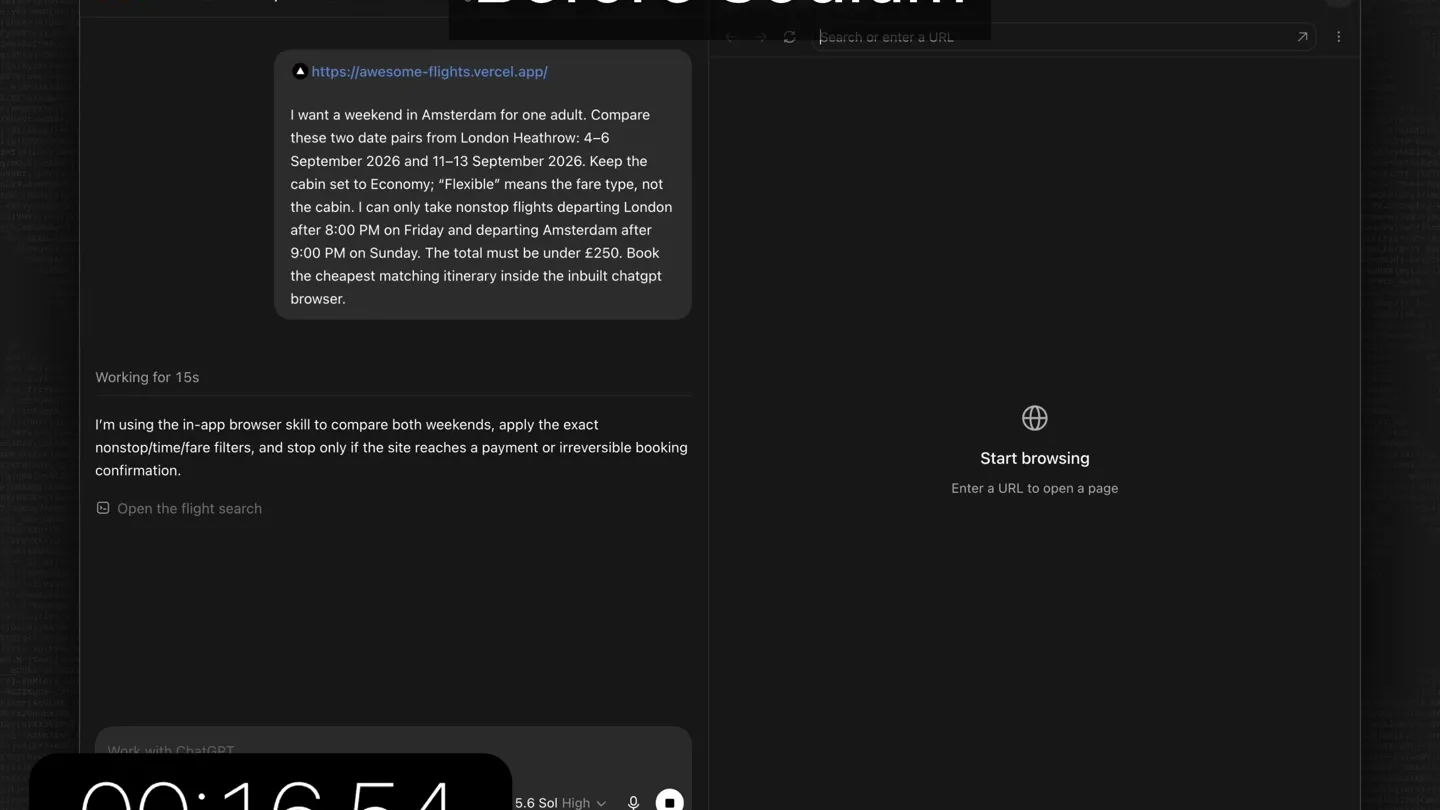
- Before Sodium
- Camera
- Static, wide shot of a split-screen UI, focusing on a browser window and a chat interface.
- Motion
- Split-screen comparison, subtle UI element highlighting.
Problem Agitation
Manual Browser Interaction
“(No spoken dialogue — The pattern repeats with variations: another riser leading to a sub-bass impact, and a further riser with a sub-bass drop. The soundscape then transitions to a more sustained, atmospheric drone with subtle electronic textures.)”
- On screen
- Before Sodium
- Camera
- Static, wide shot of a split-screen UI, with a mouse cursor interacting with the browser elements.
- Motion
- Simulated user interaction, cursor movement, form filling, and navigation within a web application.
Product Reveal
Sodium's Automated Efficiency
“(No spoken dialogue — The soundscape continues with a sustained, atmospheric drone with subtle electronic textures and occasional metallic-sounding impacts.)”
- On screen
- After Sodium
- Camera
- Static, wide shot of a split-screen UI, showing the same task being completed automatically.
- Motion
- Split-screen comparison, rapid automated UI interaction, progress indicators.
Feature Teaser
Speed and Efficiency Metrics
“(No spoken dialogue — The soundscape continues with a sustained, atmospheric drone with subtle electronic textures and occasional metallic-sounding impacts.)”
- On screen
- Before Sodium After Sodium 2.8x faster 91x more token efficient
- Camera
- Static, full-screen shot of text revealing key performance metrics.
- Motion
- Text reveal, numerical animation, color emphasis on key metrics.
Call to Action
Call to Action
“(No spoken dialogue — The soundscape continues with a sustained, atmospheric drone with subtle electronic textures and occasional metallic-sounding impacts.)”
- On screen
- (No on-screen text)
- Camera
- Fade to black.
- Motion
- Simple fade out.
Motion design primitives
Synthesizable in Remotion · key components of the developer-tool-efficiency-showcase template.
SplitScreenComparison
Two distinct UI interfaces are displayed side-by-side, allowing for direct visual comparison of processes or outcomes. One side typically shows a 'before' state, and the other an 'after' state.
+ Code construction recipe
Utilize Remotion's <AbsoluteFill> and <Sequence> components. Create two child components, each rendering a distinct UI simulation. Position them using flexbox or absolute positioning to occupy 50% width each. Animate content within each panel independently.
AutomatedCursorInteraction
A mouse cursor moves and clicks through a web interface at an accelerated pace, simulating automated user input without human intervention. This highlights efficiency gains.
+ Code construction recipe
Implement a custom SVG cursor component. Animate its 'x' and 'y' position properties using <interpolate> or <spring> to follow a predefined path of UI elements. Simulate clicks by briefly scaling down the cursor or adding a subtle ripple effect on interaction points.
MetricRevealText
Key performance metrics (e.g., '2.8x faster', '91x more token efficient') appear on screen with a subtle fade-in and a distinct color highlight.
+ Code construction recipe
Use <Text> components with <spring> or <interpolate> for opacity and scale. Apply a specific color (e.g., green) to emphasize the positive metrics. Coordinate timing with audio cues for impact.
Style DNA & aesthetic system
Visual aesthetic
Typography
Motion
Special effects
Pacing & rhythm
Conceptual story rhythm
- 1
The Manual Struggle
Purpose. Establish the pain point of slow, manual processes using existing tools.
Execution. Extended, accelerated screen recording of a user manually interacting with a complex web application.
- 2
The Sodium Solution
Purpose. Introduce Sodium as the efficient, automated alternative.
Execution. Split-screen comparison showing Sodium automating the same task in a fraction of the time.
- 3
Quantified Impact
Purpose. Provide concrete, data-driven evidence of Sodium's superiority.
Execution. Full-screen text reveal of 'X times faster' and 'Y times more efficient' metrics.
- 4
Empowerment & Call
Purpose. Inspire developers to adopt Sodium for enhanced productivity.
Execution. Fade to black, implying a seamless transition to a more efficient future.




