
Stripe · Launch Video Breakdown: Hook, Pacing & Motion Design
Connect agents to Stripe MCP to build custom reports on MRR, churn, and retention for businesses using Stripe Sigma.
Scene-by-scene timeline & spoken transcript
The Hook
Problem Identification via Conversational AI
“(No spoken dialogue — Typing sound effects and subtle UI clicks would enhance the experience.)”
- On screen
- > why did my mrr drop this month? () Calling Stripe ↳ Called Stripe Your MRR is down $12,840 this month. The largest driver was 6 customer downgrades, which reduced MRR by $7,200.
- Camera
- Static, centered view of a terminal-like window, simulating a desktop application.
- Motion
- Text typing animation, sequential reveal of response text, subtle cursor blink.
Problem Agitation
Deep Dive into MRR Drivers
“(No spoken dialogue — The rhythmic typing and response reveal create a sense of interactive data exploration.)”
- On screen
- > create a report of the 6 customers that downgraded, with their old plan,new plan,and mrr impact. () Calling Stripe ↳ Called Stripe
- Camera
- Slight vertical pan to accommodate new input and output, maintaining the terminal perspective.
- Motion
- Typing animation, rapid text reveal, and a 'calling' indicator with a subtle loading animation.
Product Reveal
Instant Report Generation
“(No spoken dialogue — The visual presentation of data is the primary communication method.)”
- On screen
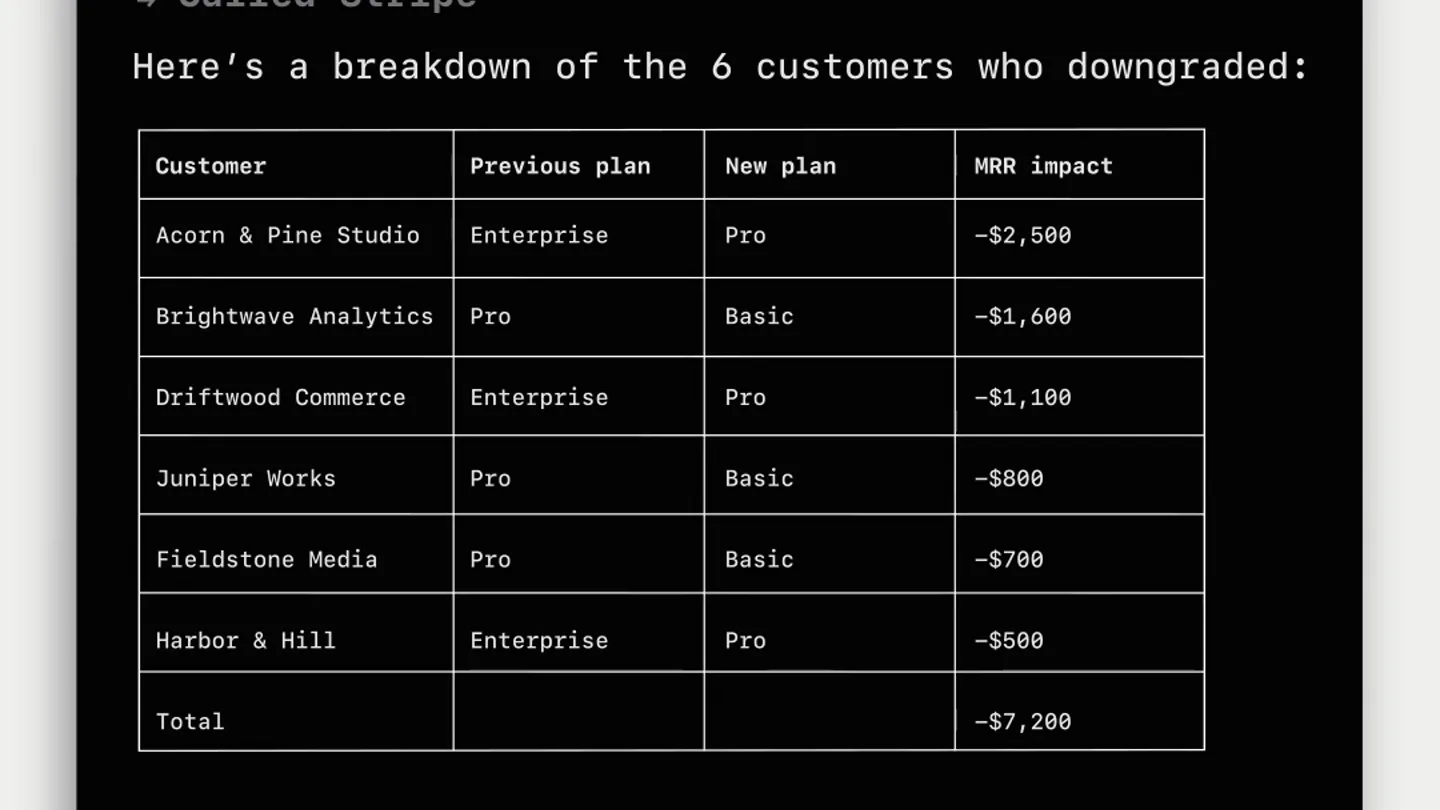
- Here's a breakdown of the 6 customers who downgraded: Customer | Previous plan | New plan | MRR impact Acorn & Pine Studio | Enterprise | Pro | -$2,500 Brightwave Analytics | Pro | Basic | -$1,600 Driftwood Commerce | Enterprise | Pro | -$1,100 Juniper Works | Pro | Basic | -$800 Fieldstone Media | Pro | Basic | -$700 Harbor & Hill | Enterprise | Pro | -$500 Total | | | -$7,200 > can you give me a csv file?
- Camera
- Zoom out slightly to reveal the full table, then a subtle vertical pan as new input is typed.
- Motion
- Table data pop-in animation, row by row or column by column, followed by typing animation.
Call to Action
Actionable Data Export
“(No spoken dialogue — The visual cue of a downloadable link serves as the call to action.)”
- On screen
- ↳ Called Stripe Here's a CSV file of the 6 customers who downgraded this month. Download MRR Downgrades (CSV)
- Camera
- Static view, focusing on the final output and the call to action link.
- Motion
- Text reveal, highlighting of the downloadable link, subtle hover state simulation.
Motion design primitives
Synthesizable in Remotion · key components of the terminal-analytics-breakdown template.
TerminalTypewriterEffect
Text appears character by character, simulating real-time typing in a command-line interface, accompanied by a blinking cursor.
+ Code construction recipe
Use Remotion's 'interpolate' function with 'spring' for cursor blink. Animate 'text.length' over time to reveal characters sequentially. Implement a 'delay' for each line.
DynamicResponseReveal
Blocks of response text and data tables appear smoothly after a 'calling' state, mimicking a server response.
+ Code construction recipe
Utilize 'spring' for opacity and translateY transitions for incoming text blocks. For tables, animate individual rows or cells with staggered delays using 'delay' and 'sequence'.
InteractivePromptHighlight
User input prompts are visually distinct and can be highlighted or animated to draw attention to the interactive nature.
+ Code construction recipe
Apply a subtle background color change or a border animation using 'interpolate' and 'spring' on user input fields. Ensure consistent styling for the '>' prompt character.
Style DNA & aesthetic system
Visual aesthetic
Typography
Motion
Special effects
Pacing & rhythm
Conceptual story rhythm
- 1
The Question
Purpose. Establish a common business problem and introduce the interactive solution.
Execution. User types a direct question about MRR drop, immediately engaging the audience with a relatable challenge.
- 2
The Insight
Purpose. Demonstrate the product's ability to quickly diagnose the root cause.
Execution. The system responds with a concise explanation of the MRR drop, highlighting specific drivers.
- 3
The Deep Dive
Purpose. Showcase the product's capability for detailed, custom reporting.
Execution. User requests a detailed report, and the system instantly generates a structured table with relevant data.
- 4
The Action
Purpose. Illustrate how the product facilitates actionable next steps.
Execution. User requests a CSV export, and the system provides a downloadable link, emphasizing ease of data utilization.




