
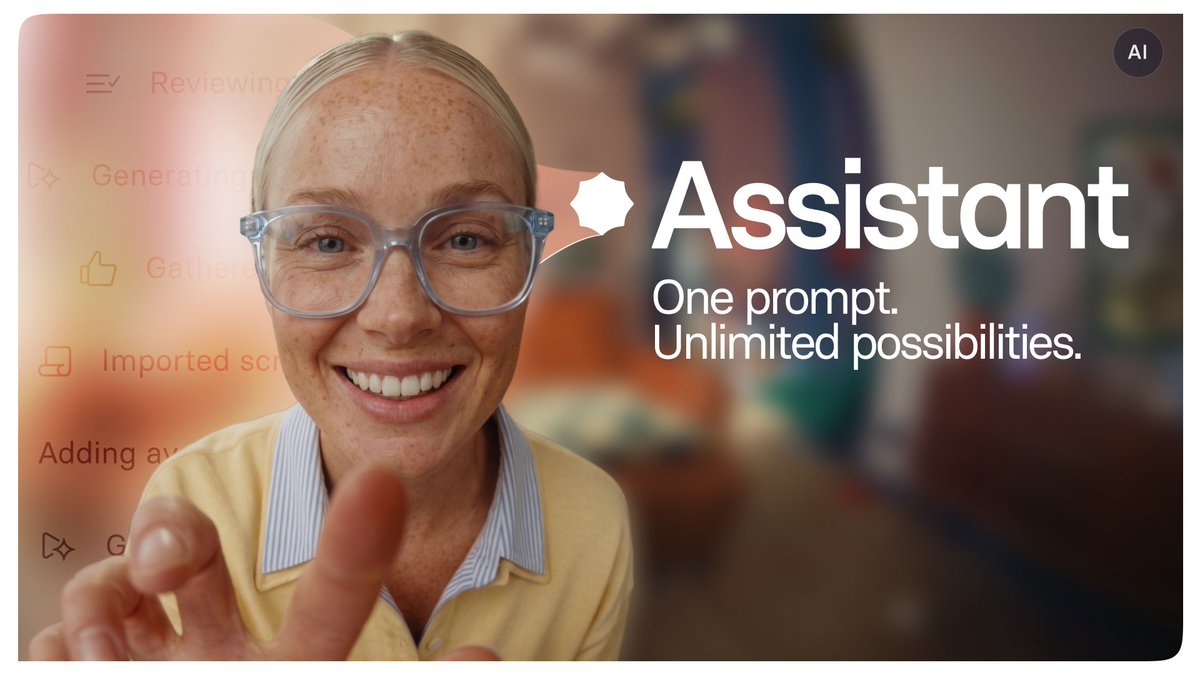
Synthesia · Launch Video Breakdown: Hook, Pacing & Motion Design
All-in-one AI Video platform for business
Scene-by-scene timeline & spoken transcript
The Hook
Introducing Synthesia Assistant
“(No spoken dialogue — opening with crisp staccato synth plucks and ascending high-frequency percussive sweeps before dropping into a resonant sub-bass 808 impact at 0:06)”
- On screen
- AI GENERATED Introducing Assistant
- Camera
- Frontal medium shot of a woman on a couch opening a laptop, accelerating into a rapid zoom-in directly into the camera lens with wide-angle barrel distortion.
- Motion
- Photorealistic AI avatar footage integrated with smooth kinetic title reveals and a continuous optical zoom transition into the digital UI.
Problem Agitation
The Multiverse of Enterprise Video
“(No spoken dialogue — driving trap hi-hats and rhythmic electronic percussion build momentum underneath low-pass filter modulations)”
- On screen
- a Skydiving 101: Ground School
- Camera
- Continuous backward 3D dolly pulling out from the laptop screen across an expansive infinite white canvas populated by video cards.
- Motion
- Parallax canvas flight with floating UI media cards receding in Z-space at staggered velocities.
Product Reveal
Document-to-Video Multimodal Prompting
“(No spoken dialogue — heavy 808 kick drops on beat with sharp snare claps synchronizing with interface clicks and keystrokes)”
- On screen
- 2026-Onboarding-guide PDF Office Onboarding PPTX I want to make an onboarding video to welcome new hires Short Add to prompt: File Template Examples
- Camera
- Macro camera punch into the search prompt field, followed by an elegant track-out showing file attachments populating above the prompt.
- Motion
- Typewriter text emulation with glowing caret, SVG file pill docking animations, and tactile cursor physics.
Feature Teaser
Autonomous Agent Reasoning in Action
“(No spoken dialogue — rhythmic synth pulse accelerates as reasoning tasks complete sequentially with crisp UI trigger swooshes)”
- On screen
- Reviewed prompt Reading attached documents Define layouts Search online Defined layouts Searching online 6 sites Interactive Halide Onboarding Roleplay Conversational Practice Joanna
- Camera
- Split-panel tracking movement drifting smoothly left to right as documents flutter in Z-space alongside execution check-items.
- Motion
- Multi-tier state progression list with prismatic spinning agent orb icon and floating 3D layered card stacks.
Feature Teaser
Prompt-Driven Motion Graphic Generation
“(No spoken dialogue — ascending melodic arpeggios layered over syncopated claps accompanying real-time asset synthesis)”
- On screen
- Create a motion graphic of our scale and growth, using this reference Scene created > Done! I've created the motion graphic asset for your video The scale 298 The customers 56% 52% The growth $500 $490 $480 $470 $460 $450 Two hundred and ninety-eight million parts last year...
- Camera
- Smooth diagonal pan across the full video editor, tracking from the side chat prompt directly into the multi-element canvas stage.
- Motion
- Choreographed timeline population with simultaneous data visualization draw-in (donut charts, bar charts, line graphs) triggered by AI conversational responses.
Call to Action
One Prompt. Unlimited Possibilities.
“(No spoken dialogue — crescendo synth sweep peaks at 0:42 before striking a definitive final sub-bass boom at 0:44 that slowly decays into silence)”
- On screen
- One prompt. Unlimited possibilities. Assistant synthesia
- Camera
- Static centered lockup framing with subtle forward drift on warm cream background, cutting to pure minimalist white canvas.
- Motion
- High-contrast typographic entrance with spring physics, transitioning through the Assistant badge to the primary Synthesia wordmark fade.
Motion design primitives
Synthesizable in Remotion · key components of the synthesia-infinite-canvas-agent-launch template.
InfiniteCanvasFlythrough
Simulates a virtual 3D camera dollying backward across an infinite white 2D plane populated with floating video cards that scale, rotate subtly, and blur in the periphery.
+ Code construction recipe
Use Remotion interpolate to map frame count to camera Z translation (e.g. z: interpolate(frame, [0, 150], [0, -2000])). Position child cards using absolute CSS 3D transforms with perspective: 1200px and translate3d(x, y, z). Add depth blur using CSS filter blur based on Z-distance.
AgentReasoningChecklist
A vertical stack of task items where completed items fade into low-opacity grey, the active item highlights with bold text and a rotating chromatic badge, and upcoming items remain muted.
+ Code construction recipe
Manage activeIndex with Math.floor(frame / stepDuration). Animate each row using spring({ frame: frame - itemStartFrame, fps, config: { damping: 15, mass: 0.8 } }) to interpolate translateY from 12px to 0px and opacity from 0.2 to 1. Rotate an SVG chromatic gemstone using continuous linear interpolation.PromptBarFileDrop
A floating card container that expands dynamically when file attachments (PDF, PPTX) snap into the upper slot, accompanied by soft drop shadows and an active text input cursor.
+ Code construction recipe
Wrap the prompt box in an auto-layout flex container. Use spring for height and scale animations when files enter. Animate cursor opacity with Math.floor((frame / 15) % 2) for a realistic 500ms blink rate. Render file pills with spring-loaded scale up from 0.8 to 1.0.
StudioSplitViewPan
A high-fidelity software studio interface showing an AI sidebar chat and a primary canvas stage that seamlessly shifts focus and framing via coordinates-based canvas transforms.
+ Code construction recipe
Structure the workspace using CSS Grid or Flexbox. Drive camera focus with a shared Remotion spring driving transform: translate(panX, panY) scale(zoom). Stagger child elements like timeline tracks, canvas artboards, and chat bubbles using Sequence wrappers.
Style DNA & aesthetic system
Visual aesthetic
Typography
Motion
Special effects
Pacing & rhythm
Conceptual story rhythm
- 1
Physical Reality to Digital Portal
Purpose. Establish immediate emotional connection through a human creator in a cozy room, then pull directly into the digital creation space.
Execution. Warm cinematic shot of a blonde creator opening a laptop, zooming into the webcam lens to break into the white digital universe.
- 2
The Endless Multi-Format Problem
Purpose. Demonstrate the overwhelming scope of modern enterprise video demands (training, onboarding, localization, technical roles).
Execution. Infinite canvas flight showcasing diverse video styles, avatars, languages, and contexts floating harmoniously in 3D perspective.
- 3
Frictionless Multimodal Input
Purpose. Showcase that complex video creation now starts from simple existing company knowledge (PDFs, presentations, natural language).
Execution. Clean UI interaction: dragging enterprise onboarding documents into an AI assistant bar alongside an everyday prompt.
- 4
Agentic Reasoning & Production
Purpose. Demystify AI by making its chain-of-thought visible, structured, and auditable.
Execution. Dynamic status checklist ticking through document analysis, external web research, and layout synthesis with synchronized floating previews.
- 5
Direct In-Editor Co-Creation
Purpose. Prove that the AI assistant lives directly inside the studio timeline, generating bespoke interactive assets and motion graphics instantly.
Execution. Split-screen studio view where typing a request generates multi-part animated growth charts directly into the video canvas.
- 6
The Thesis Affirmation
Purpose. Deliver an unforgettable brand punchline that summarizes the exponential leverage offered by the tool.
Execution. Stark typography statement 'One prompt. Unlimited possibilities.' fading smoothly into the clean Synthesia brand lockup.





