Tesseract Design (by Mirage) · Launch Video Breakdown: Hook, Pacing & Motion Design
Your agent can create editable designs and bring them into motion, with no Figma or Canva required. Tesseract is free.
Scene-by-scene timeline & spoken transcript
The Hook
Dreamlike Desert Reveal
“(No spoken dialogue — A suspenseful riser builds to a sub-bass drop, setting an ethereal tone.)”
- On screen
- REW ◄◄ Made with Tesseract
- Camera
- A slow, sweeping camera motion reveals a vast desert landscape under a starry, gradient sky, with a reflective cube hovering above a dune. The camera pans slightly to the right, revealing more of the landscape.
- Motion
- 3D camera animation, object reveal, subtle environmental particle effects (stars), reflective material rendering.
Problem Agitation
Layered Complexity Breakdown
“(No spoken dialogue — A rhythmic electronic pulse with a sub-bass hit accompanies the visual breakdown.)”
- On screen
- Texture 14-16 Highlights 11-13 Shadows 07-10 Flat colors 04-06 Skeleton 01-03 Made with Tesseract
- Camera
- Static, slightly angled isometric view of a stack of undulating layers. The camera remains fixed as layers animate.
- Motion
- Exploded view animation, procedural texture generation, text overlays with connecting lines, synchronized layer expansion and contraction.
Product Reveal
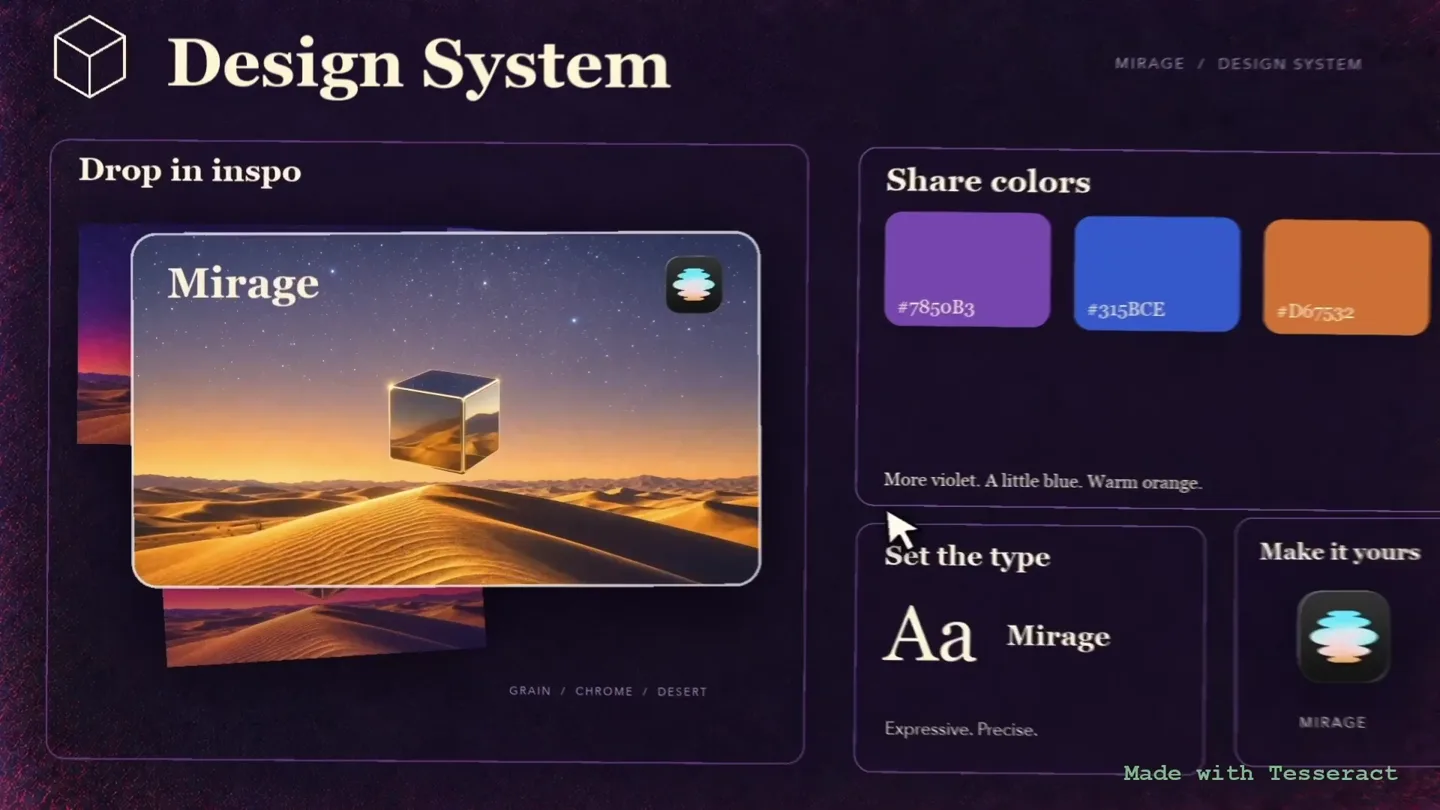
Modular Design System Showcase
“(No spoken dialogue — A driving electronic beat with risers and sub-bass drops punctuates scene transitions.)”
- On screen
- SCENE COMPONENTS 01 CUBE / EIGHT ANGLES 45° STEPS - FIXED SCALE 01 / FRONT 02 / FRONT + RIGHT 03 / RIGHT 04 / RIGHT + BACK 05 / BACK 06 / BACK + LEFT 07 / LEFT 08 / LEFT + FRONT 02 MATERIAL RELIEF 01 CHROME GRID 02 WIRE LATTICE 03 STEPPED RIBS 04 VIOLET ENAMEL 05 COBALT GLASS 06 CORAL CERAMIC 07 WIND SAND 08 SANDSTONE 09 FOLDED FOIL 10 LUNAR CRATERS 11 HAMMERED 12 LIQUID METAL 13 MIRROR MOSAIC 14 IRIDESCENT 15 PEARL CLOUD 16 AMBER DUNES 03 DESERT / LIGHT STATES DAY / MATCHED CAMERA NIGHT / MATCHED CAMERA ONE SCENE. EVERY INGREDIENT. 04 SCENE ELEMENTS CLOUD BANK MOUNTAIN RANGE CLOUDS AIRBORNE SAND SKY SHADOW PASS Made with Tesseract #7850B3 #315BCE More violet. A little blue. Warm orange. Set the type Prompt a vibe Grain Expressive. Pre GRAIN / CHROME / DESERT Share colors #7850B3 #315BCE #D67532 Set the type Make it yours Mirage Expressive. Precise. MIRAGE Drop in inspo Mirage Design System MIRAGE / DESIGN SYSTEM Share colors #7850B3 #315BCE #D67532 Set the type Aa Mirage Expressive. Precise. Make it yours MIRAGE Made with Tesseract
- Camera
- Dynamic camera movements, including zooms, pans, and rotations, to highlight different UI elements and their interactions. The camera often follows a cursor-like interaction.
- Motion
- UI animation, text input simulation, drag-and-drop interactions, card-based transitions, color palette selection, and dynamic content updates.
Call to Action
Tesseract: The Design Engine
“(No spoken dialogue — A final riser leads to a powerful sub-bass drop, concluding with a sustained electronic pulse.)”
- On screen
- FF ►► SP 00:00:24 Every great video starts with great design. Made with Tesseract FF ►► SP 00:00:26 Every great video starts with great design. Made with Tesseract FF ►► SP 00:00:28 Radiance Every great video starts with great design. Made with Tesseract Radiance TESSERACT By Mirage Made with Tesseract
- Camera
- A slow zoom out from the desert scene, revealing it playing on a retro CRT monitor. The camera then holds a static wide shot of the monitor.
- Motion
- CRT screen simulation (scanlines, dither, chromatic aberration), text reveal, product logo animation, and a subtle camera pull-back.
Motion design primitives
Synthesizable in Remotion · key components of the mirage-creative-tools-launch template.
ReflectiveCubeHover
A polished, reflective cube gently hovers and rotates above a textured surface, mirroring its environment. The cube exhibits subtle up-and-down motion and slow rotation.
+ Code construction recipe
Implement using Remotion's `ThreeCanvas` for 3D rendering. Use `useCurrentFrame` and `interpolate` for subtle vertical translation and rotation. Apply a `MeshStandardMaterial` with high `metalness` and `roughness` for reflections, potentially using an `EnvironmentMap` for realistic reflections.
ExplodedLayerStack
Multiple undulating, semi-transparent layers are stacked and then dynamically separate and expand, revealing labels and details for each layer. The layers have a soft, organic wave-like motion.
+ Code construction recipe
Utilize `Sequence` and `spring` animations for the individual layer movements. Each layer can be a `Path` or `Shape` component with `filter` properties for blur/transparency. Text labels can `fadeIn` and `slideIn` using `interpolate` synchronized with layer expansion.
RetroCRTOverlay
A clean digital scene is overlaid with visual artifacts mimicking an old CRT monitor, including scanlines, subtle dither, and chromatic aberration, often within a physical monitor frame.
+ Code construction recipe
Wrap the main scene component with a `Composition` that applies `CSS filters` for chromatic aberration and `SVG filters` for scanlines and dither. A `noise` or `grain` shader can be applied. The physical monitor can be a static image or a 3D model rendered with `ThreeCanvas`.
Style DNA & aesthetic system
Visual aesthetic
Typography
Motion
Special effects
Pacing & rhythm
Conceptual story rhythm
- 1
Ethereal Introduction
Purpose. To immediately captivate the viewer with a visually stunning, abstract representation of the product's creative potential.
Execution. A serene, dreamlike desert scene with a hovering, reflective cube, establishing a sense of wonder and advanced technology.
- 2
Deconstructing Complexity
Purpose. To illustrate the underlying modularity and power of the design system by breaking down complex visuals into manageable layers.
Execution. An animated exploded view of a layered composition, revealing individual components and their functions with clear labels.
- 3
Interactive Control
Purpose. To demonstrate the intuitive and comprehensive control users have over design elements within the product's interface.
Execution. Rapid-fire UI interactions showcasing color selection, text input, material application, and scene element manipulation, all driven by a cursor.
- 4
The Creative Catalyst
Purpose. To position the product as the essential tool for bringing creative visions to life, culminating in a strong brand reveal.
Execution. The initial desert scene reappears, now framed within a retro CRT monitor, with a powerful tagline and the product's final branding.