
Threejs Super Terrain (by vibe-stack) · Launch Video Breakdown: Hook, Pacing & Motion Design
A Three.js mesh terrain implementation inspired by Unreal Engine 5.8: dig holes, push and pull in 3D, non-destructive CSG.
Scene-by-scene timeline & spoken transcript
The Hook
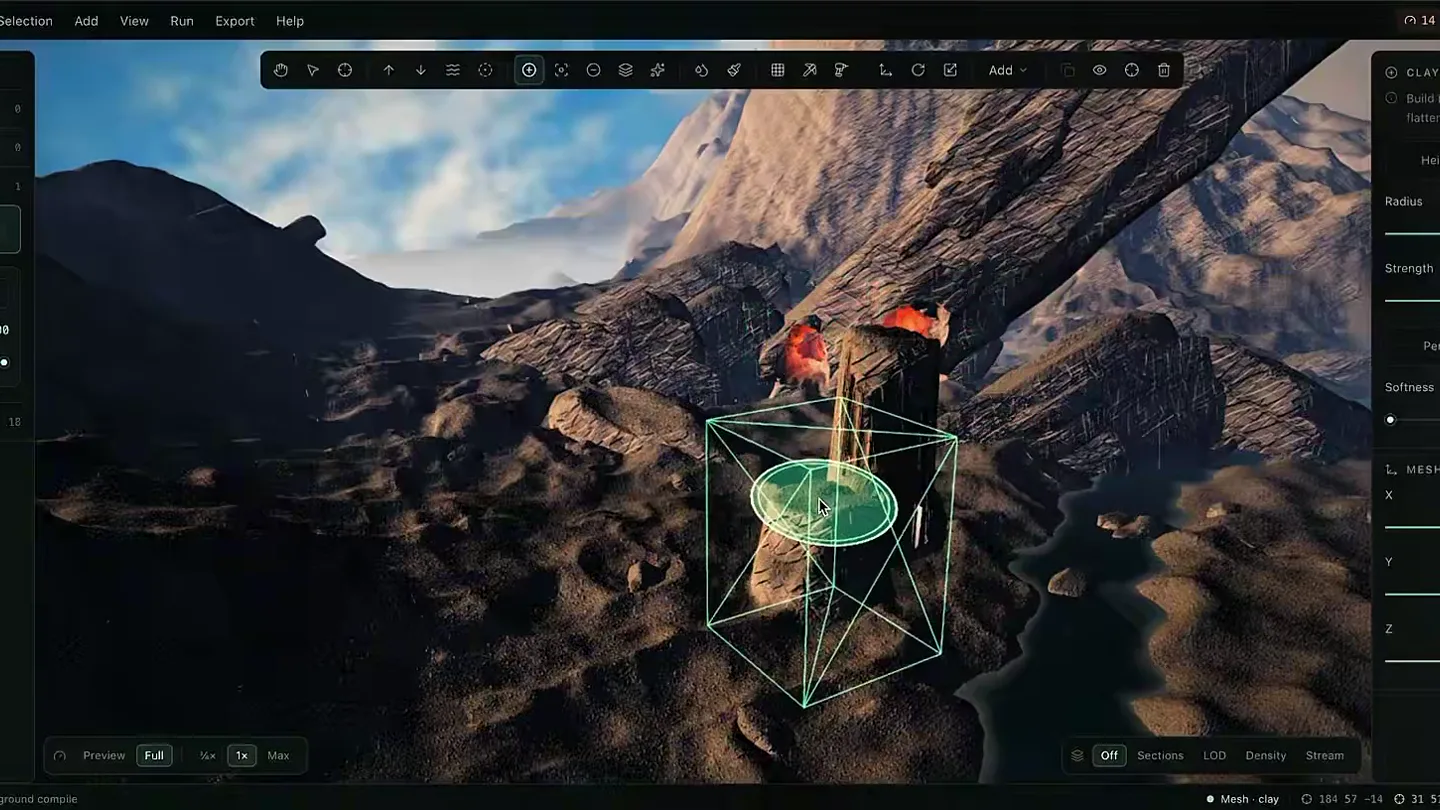
Interactive Terrain Sculpting
“Woke up at 3:16, I was feeling free”
- On screen
- Mesh Terrain, SCENE, LIGHTS, ROCKS, LAYERS, Base sculpt, Opacity, MODIFIERS, Clay, Build broad clay-like mass with a naturally flattened crest., Heightfield, Mesh, Radius, Strength, Per stroke, Continuous, Softness, MESH, CLAY, X, Y, Z, Preview, Full, 1x, 2x, Max, Off, Sections, LOD, Density, Stream, Clay, Edit queued for background compile
- Camera
- Medium shot, slightly elevated, panning slowly right while rotating around a central 3D object. The camera maintains a consistent distance from the interactive mesh.
- Motion
- Smooth 3D camera orbit with interactive mesh manipulation (clay sculpting) and UI elements fading in/out.
Product Reveal
Non-Destructive CSG Tunneling
“Then you brought me back to the situation”
- On screen
- Mesh Terrain, SCENE, LIGHTS, ROCKS, LAYERS, Mesh - tunnel subtract, Mesh - volume add, Mesh - volume add, MODIFIERS, ROCK RECIPE, World scale, Relief, Wetness, Lichen, Moss, Snow, Draft, Studio, Standard, Coarse, Fine, Micro, Preview, Full, 1x, 2x, Max, Off, Sections, LOD, Density, Stream, Camera, Fly camera active - WASD move - Shift boost - Esc release, TUNNEL, Portal radius, Burial depth, Surface noise, Noise scale, MESH - TUNNEL SUBTRACT, Portal radius, Burial depth, Surface noise, Noise scale, X, Y, Z, Tunnel, Edit queued for background compile
- Camera
- Dynamic fly-through camera, moving through a procedurally generated tunnel, then pulling back to reveal the terrain. The camera transitions from inside to outside the mesh.
- Motion
- Fast-paced 3D camera fly-through, showcasing real-time boolean operations (tunnel subtraction) with wireframe overlays and dynamic terrain generation.
Feature Teaser
Panoramic Terrain Generation
“(No spoken dialogue — The music continues with a laid-back R&B/Hip-Hop groove, deep sub-bass, and a simple synth melody.)”
- On screen
- (No on-screen text)
- Camera
- Wide, sweeping aerial shot, rotating and panning across a vast, detailed 3D terrain, emphasizing scale and complexity.
- Motion
- Cinematic 3D camera pan and rotation, highlighting the generated terrain's visual fidelity and expansive scope without UI.
Feature Teaser
Push & Pull Terrain Manipulation
“I was feeling free, then you brought me back to the situation”
- On screen
- Mesh Terrain, SCENE, LIGHTS, ROCKS, LAYERS, Base sculpt, Opacity, MODIFIERS, Lower, Push the surface inward along its normal or dig down using an inverted heightfield mode., Heightfield, Mesh, Radius, Strength, Per stroke, Continuous, Softness, MESH, LOWER, X, Y, Z, Preview, Full, 1x, 2x, Max, Off, Sections, LOD, Density, Stream, Lower, Edit queued for background compile, Clay, Edit queued for background compile, RAISE, Push the surface outward along its normal or up using an inverted heightfield mode., MESH, RAISE
- Camera
- Top-down, slightly angled view, zooming in and out while the user interacts with the terrain, demonstrating 'lower' and 'raise' functions.
- Motion
- Interactive 3D camera zoom and pan, showcasing real-time terrain deformation (push/pull) with UI feedback and wireframe overlays.
Product Reveal
Advanced Rock Recipe & Modifiers
“I was feeling free, then you brought me back to the situation, I was feeling free, then you brought me back to the situation”
- On screen
- Mesh Terrain, SCENE, LIGHTS, ROCKS, LAYERS, MODIFIERS, Mesh - volume add, Mesh - volume add, Mesh - volume add, ROCK RECIPE, World scale, Relief, Wetness, Lichen, Moss, Snow, Draft, Studio, Standard, Coarse, Fine, Micro, Preview, Full, 1x, 2x, Max, Off, Sections, LOD, Density, Stream, Select, Selection island
- Camera
- Medium shot, slowly orbiting around a complex rock formation, highlighting the detailed textures and procedural generation. The camera maintains a consistent, smooth rotation.
- Motion
- Smooth 3D camera orbit, emphasizing the visual complexity and customization options of the 'Rock Recipe' with UI elements visible.
Motion design primitives
Synthesizable in Remotion · key components of the vibe-stack-terrain-builder template.
InteractiveMeshSculpt
A 3D camera smoothly orbits around a terrain mesh while a circular cursor interacts with it, causing real-time deformation. UI panels with sliders and toggles are visible on the sides.
+ Code construction recipe
Use Remotion's `ThreeCanvas` component for the 3D scene. Implement camera orbit using `interpolate` for rotation angles. Mesh deformation can be simulated by updating vertex positions based on cursor interaction, driven by `useCurrentFrame` and `spring` for smooth transitions. UI elements (sliders, text) should be rendered as `AbsoluteFill` React components, with their opacity and position animated using `interpolate`.
DynamicTerrainFlythrough
A fast-paced 3D camera moves through a procedurally generated environment, showcasing complex boolean operations like tunneling, with wireframe overlays temporarily appearing.
+ Code construction recipe
Utilize `ThreeCanvas` for the 3D environment. Animate camera position and rotation along a predefined path using `interpolate` with `easeOutCubic` for speed. Wireframe overlays can be toggled on/off using `spring` for opacity, applied to a duplicate mesh material. Procedural generation can be pre-rendered or simulated with shaders if performance allows.
CinematicTerrainReveal
A wide, sweeping aerial shot pans and rotates across a vast, detailed 3D landscape, emphasizing its scale and visual fidelity without any UI elements.
+ Code construction recipe
Employ `ThreeCanvas` with a high-detail 3D terrain model. Animate the camera's `position` and `lookAt` properties using `interpolate` over a longer duration with `easeInOutSine` for a smooth, grand movement. Ensure no UI elements are rendered in this scene to maintain a cinematic feel.
Style DNA & aesthetic system
Visual aesthetic
Typography
Motion
Special effects
Pacing & rhythm
Conceptual story rhythm
- 1
The Interactive Introduction
Purpose. Immediately showcases the core interactive sculpting capability, hooking the viewer with direct product engagement.
Execution. Close-up camera orbit around a mesh being sculpted, with UI elements visible, demonstrating 'clay' tool.
- 2
The Procedural Reveal
Purpose. Highlights the advanced non-destructive CSG features and the dynamic nature of the terrain generation.
Execution. Fast fly-through of a generated tunnel, then pulling back to reveal the full terrain, showing 'tunnel subtract' and 'volume add'.
- 3
The Grand Scale Showcase
Purpose. Emphasizes the vastness and visual quality of the generated environments, appealing to creative aspirations.
Execution. Cinematic, wide aerial pan across a large, detailed terrain without UI, focusing purely on the visual output.
- 4
The Feature Deep Dive
Purpose. Demonstrates specific, powerful manipulation tools like 'push' and 'pull' in detail, reinforcing product utility.
Execution. Top-down interactive view of terrain being modified with 'lower' and 'raise' tools, showing real-time changes.




