
Zerion · Launch Video Breakdown: Hook, Pacing & Motion Design
We built a wallet for humans, now - for agents 🦞 npx -y zerion-cli init
Scene-by-scene timeline & spoken transcript
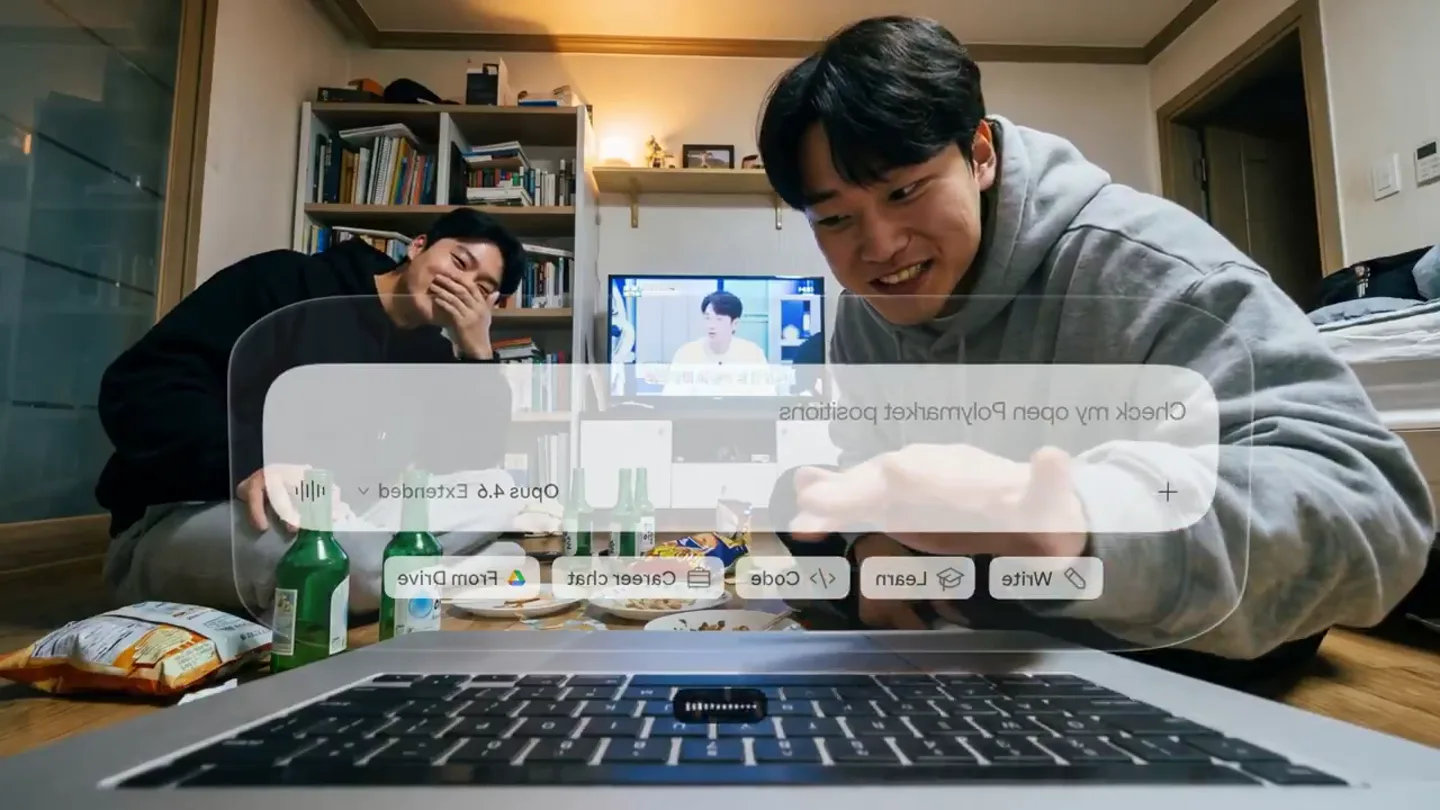
The Hook
Everyday People, Powerful Commands
“Check my open positions. Tell me my exposure.”
- On screen
- (No on-screen text)
- Camera
- Low-angle, slightly wide shot of a person interacting with a laptop, with a transparent UI overlay.
- Motion
- Seamless UI overlay with real-world footage, subtle camera push-in, and text input animation.
Problem Agitation
Diverse Scenarios, Universal Access
“Find me the cheapest route to move five hundred dollars. Analyze my wallet. Show me my thirty day.”
- On screen
- (No on-screen text)
- Camera
- Repeated low-angle, slightly wide shots of different individuals in varied environments (car, rooftop) interacting with a laptop, featuring the same UI overlay.
- Motion
- Rapid scene cuts between diverse user contexts, maintaining the consistent UI overlay and text input animation.
Product Reveal
Mobile & Desktop Integration
“Find me the best yield for two hundred USDC. Swap two hundred USDC to TUSD via Monom. Swap two hundred USDC to TUSD via Uniswap.”
- On screen
- (No on-screen text)
- Camera
- Alternating between a first-person perspective of a person holding a phone in a club and a low-angle shot of a person using a laptop in a cafe, both with UI overlays.
- Motion
- Transition from mobile UI to desktop UI, demonstrating cross-platform functionality with consistent visual language. Text input animation continues.
Feature Teaser
CLI Command Reveal
“(No spoken dialogue — A high-energy audio riser builds anticipation, leading to a sub-bass impact.)”
- On screen
- /zerion-anal, /zerion
- Camera
- Extreme close-up on the transparent UI overlay, focusing on the text input field.
- Motion
- Zoom-in on the UI, revealing a command-line interface (CLI) input, with text typing animation. The background blurs into a gradient.
Call to Action
Zerion CLI: Wallet for Agents
“(No spoken dialogue — A driving electronic beat with sub-bass impacts and percussive synths. A significant sub-bass impact occurs at 0:25 and 0:33.)”
- On screen
- {s}, zerion CLI
- Camera
- Static, centered shot on a blue gradient background.
- Motion
- Icon animation (from '{s}' to Zerion logo) followed by text reveal ('zerion CLI'). Clean, direct visual communication.
Motion design primitives
Synthesizable in Remotion · key components of the glassmorphic-cli-launch template.
GlassmorphicOverlay
A semi-transparent, frosted glass-like UI element floats above real-world footage, displaying text input and interactive buttons. It subtly blurs the background behind it.
+ Code construction recipe
Use a `View` component with `backdropFilter: 'blur(10px)'` and a semi-transparent background color (e.g., `rgba(255, 255, 255, 0.3)`). Apply `borderRadius` for rounded corners and a subtle `boxShadow` for depth. Animate `opacity` and `scale` for entrance/exit.
DynamicTextInput
Text appears character by character within an input field, simulating live typing, often accompanied by a blinking cursor. Spoken dialogue is synchronized with the text reveal.
+ Code construction recipe
Utilize `interpolate` to reveal text characters over time. Calculate the `frame` at which each character should appear based on the total duration and number of characters. A blinking cursor can be achieved with `opacity` animation on a pipe character, toggling between 0 and 1.
IconToLogoReveal
A simple, abstract icon transforms or expands into a more detailed product logo and accompanying text, often with a quick, impactful animation.
+ Code construction recipe
Implement using SVG path morphing or `scale` and `opacity` animations. Start with the abstract icon SVG, then animate its `d` attribute to the logo's path, or fade out the icon while fading in and scaling up the logo and text. Synchronize with a sound effect for impact.
Style DNA & aesthetic system
Visual aesthetic
Typography
Motion
Special effects
Pacing & rhythm
Conceptual story rhythm
- 1
The Human Touch
Purpose. Establish relatable user scenarios, showing diverse individuals interacting with the product in everyday settings.
Execution. Quick cuts of people in various real-world locations (home, car, cafe) using a laptop or phone with the transparent UI overlay.
- 2
The Command Power
Purpose. Demonstrate the product's intuitive, voice-activated command capabilities for complex financial tasks.
Execution. On-screen text typing in the UI overlay, synchronized with clear, concise spoken commands, highlighting ease of use.
- 3
The Tech Reveal
Purpose. Shift focus from user experience to the underlying technology, revealing the CLI aspect.
Execution. Zoom-in on the UI, transitioning from a general input field to a specific command-line interface, with a background gradient replacing real-world footage.
- 4
The Agent's Tool
Purpose. Solidify the product's identity as a powerful, developer-centric tool for advanced users.
Execution. Abstract icon morphing into the Zerion CLI logo and text, set against a clean, modern gradient background, emphasizing the brand and its core offering.




